TL;DR:
- SaaS tools are cloud-based applications accessed via subscription that eliminate local installation and heavy IT support. Teams should adopt them with discipline by defining problems, ensuring integrations, and regularly auditing subscriptions. Successful use requires a focused stack, strategic ownership, and a disciplined approach to connecting best-fit tools.
SaaS tools are defined as cloud-hosted software applications that teams access through a web browser or app, paying a recurring subscription fee instead of buying a permanent license. The provider hosts the software, manages the servers, and handles all updates. You never install anything locally, and you never own the software outright. This model sits at the center of the modern subscription economy, built on cloud computing and multi-tenant architecture that lets thousands of businesses share the same infrastructure without ever touching each other's data. The industry term for this delivery model is Software as a Service, or SaaS, and understanding its meaning is the first step to using it well.
What is the SaaS tools meaning, and how does it differ from traditional software?
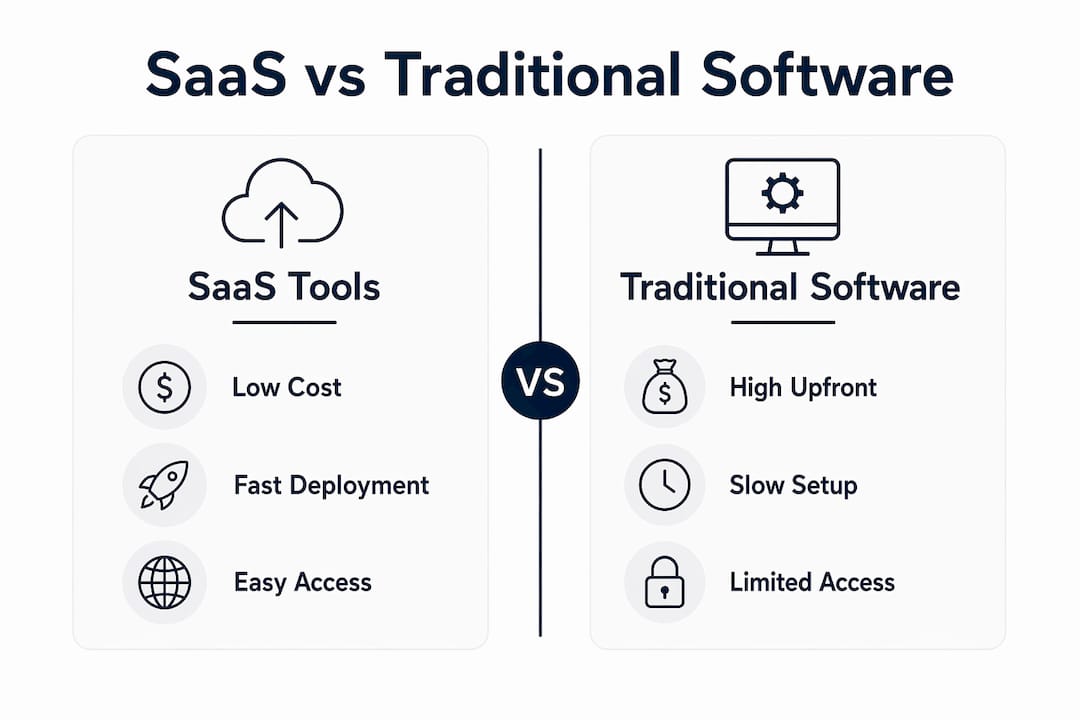
SaaS tools are the practical application layer of the Software as a Service model. Traditional software required a one-time purchase, a physical disc or download, installation on every machine, and an internal IT team to manage patches and security. SaaS flips that model entirely. You pay monthly or annually, log in from any device, and the provider handles everything behind the scenes.

The cost structure is the most immediate difference. Traditional enterprise software often demanded five-figure upfront license fees before a single employee could log in. SaaS shifts that to a predictable monthly line item, which makes budgeting far easier for small teams and solo founders. SaaS platforms maintain gross margins between 70–90% because cloud-native delivery removes most of the physical distribution cost. That efficiency gets passed to customers through lower entry prices.
Speed is the second major difference. Organizations deploy new capabilities in hours or days instead of weeks or months. A team that needs a new project management tool can sign up, invite members, and start working the same afternoon. With traditional software, that same process could take weeks of procurement, installation, and configuration.
What are common types and examples of SaaS tools for businesses?
Over 80 distinct SaaS tool categories serve varied business functions, from communication to compliance. That number reflects how deeply SaaS has penetrated every part of business operations. Each category targets a specific workflow, which means teams can build a precise stack rather than relying on one bloated system.
The major categories include:
- Communication and collaboration: Video conferencing, team messaging, and shared document editing tools that replace in-person meetings and email chains.
- Project management: Tools for tracking tasks, deadlines, and team workloads across departments or client projects.
- Customer relationship management (CRM): Platforms that centralize sales pipelines, customer data, and follow-up sequences.
- Design and creative: Browser-based tools for graphic design, video editing, and prototyping that require no local software installation.
- Finance and accounting: Cloud-based invoicing, expense tracking, and financial reporting platforms.
- Customer support: Helpdesk and live chat tools that manage tickets, automate responses, and track resolution times.
- Human resources: Platforms for payroll, onboarding, performance reviews, and benefits administration.
- Marketing automation: Tools that schedule campaigns, track conversions, and segment audiences without manual intervention.
Each category solves a specific bottleneck. A five-person startup and a 5,000-person enterprise can both access the same category of tool, scaled to their size and budget.
Pro Tip: Before adding any new tool to your stack, write down the exact workflow problem it solves. If you cannot name the bottleneck in one sentence, you do not need the tool yet.
How do SaaS tools benefit businesses compared to traditional software?
The benefits of SaaS tools fall into four clear areas: cost, speed, access, and maintenance. Each one represents a direct improvement over the traditional software model.
| Benefit | SaaS tools | Traditional software |
|---|---|---|
| Upfront cost | Low or zero; subscription-based | High license fees before use |
| Deployment time | Hours to days | Weeks to months |
| IT maintenance | Provider-managed | Internal IT team required |
| Device access | Any device, any location | Licensed machines only |
| Scaling | Add seats instantly | Requires new licenses or hardware |
SaaS eliminates IT overhead by shifting infrastructure management, security patching, and software updates entirely to the provider. That shift frees internal teams to focus on their actual work rather than maintaining software. For small businesses without a dedicated IT department, this difference is significant.
Accessibility is another concrete advantage. A sales rep in Chicago and a developer in Austin can work in the same platform simultaneously, seeing the same data in real time. Traditional software tied access to specific machines on a specific network.
Scaling works differently too. Adding ten new team members to a SaaS platform takes minutes. Adding ten new users to a traditional licensed system could require purchasing new license blocks, waiting for procurement approval, and scheduling installation time.
Pro Tip: When calculating total cost of ownership for any SaaS tool, include the cost of integrations, training time, and the hours your team will spend on data migration. The subscription price is rarely the full cost.
What technical architecture and subscription models define SaaS tools?
Multi-tenant architecture is the technical foundation of most SaaS products. Multiple clients share the same infrastructure cost-effectively while the platform maintains strict data isolation for security. Think of it like a modern apartment building: residents share the structure, plumbing, and electricity, but each unit is private and locked. This model drives affordability because the provider spreads infrastructure costs across thousands of customers.
Data isolation within multi-tenant systems relies on logical separation at the database level. Each customer's data is tagged and partitioned so that no tenant can access another's records, even though they share physical servers. This approach meets most compliance requirements, though highly regulated industries sometimes require dedicated single-tenant environments.
SaaS pricing models vary to match different team sizes and usage patterns:
- Subscription (monthly or annual): A fixed fee per user or per account, billed on a recurring schedule. Annual plans typically offer a discount of 15–20% compared to monthly billing.
- Freemium: A free base tier with limited features, designed to let teams try the product before committing. Conversion from free to paid depends on hitting a usage threshold that makes the upgrade feel necessary.
- Usage-based fees: Billing tied to actual consumption, such as the number of API calls, emails sent, or gigabytes stored. This model suits teams with variable or unpredictable workloads.
SaaS sits at the top of the cloud service stack. Infrastructure as a Service (IaaS) provides raw computing resources. Platform as a Service (PaaS) adds development tools and runtime environments. SaaS delivers the finished application. Most business teams interact only with SaaS and never need to think about the layers below it.
Businesses remain responsible for data sovereignty even when a provider manages the infrastructure. SLA uptime guarantees typically run at 99.9% or higher, but teams should verify where their data is physically stored, especially when operating under regulations like GDPR or HIPAA.
What should businesses consider before adopting SaaS tools?
Adoption strategy matters as much as tool selection. Teams that treat SaaS as a plug-and-play solution often end up with a fragmented stack, redundant subscriptions, and data scattered across a dozen platforms with no way to connect them.
Follow these steps before committing to any new SaaS tool:
- Define the specific problem. Write down the exact workflow that is broken or slow. A vague goal like "improve communication" leads to poor tool choices. A specific goal like "reduce email back-and-forth on project approvals" leads to the right category.
- Check integration compatibility. Integrating SaaS tools via APIs or connectors prevents data silos and improves workflow automation. Before signing up, confirm that the tool connects to the platforms your team already uses.
- Audit your current stack. Periodic audits of SaaS subscriptions reduce redundant spending and security exposure, typically saving companies 10–20% of software budgets. Run an audit every six months and cancel anything with low usage.
- Review the SLA. Confirm the uptime guarantee, the provider's incident response process, and what compensation you receive if they miss the target. A 99.9% uptime guarantee still allows roughly 8.7 hours of downtime per year.
- Verify data storage location. Ask the provider where your data lives physically. If your business operates in the European Union or handles health data in the United States, storage location directly affects your compliance obligations.
Successful SaaS adoption relies on selecting tools that solve specific business bottlenecks rather than accumulating broad feature sets. The "all-in-one" fallacy causes feature bloat and wasted spend. A focused stack of five well-integrated tools outperforms a sprawling collection of twenty loosely connected ones.
A user experience audit of your current tools can reveal which platforms your team actually uses versus which ones they avoid. Adoption rates inside your organization are a better measure of tool value than feature lists.
Key Takeaways
SaaS tools deliver software via cloud subscription, giving teams fast deployment, predictable costs, and provider-managed maintenance without local installation or heavy IT overhead.
| Point | Details |
|---|---|
| Core definition | SaaS tools are cloud-hosted apps accessed by subscription, with no local installation required. |
| Deployment speed | Teams can deploy new SaaS capabilities in hours or days, not weeks. |
| Cost structure | Subscription pricing replaces high upfront license fees, making costs predictable and scalable. |
| Architecture | Multi-tenant infrastructure shares resources across customers while keeping each tenant's data isolated. |
| Adoption discipline | Audit subscriptions every six months and prioritize tools with strong API integration to avoid sprawl. |
What I've learned about SaaS tools after watching teams get it wrong
The most common mistake I see is treating SaaS adoption as a shopping problem. Teams browse product pages, get excited about features, and sign up for five tools in a week. Three months later, half those tools are abandoned, the subscriptions are still running, and nobody can remember which platform holds the client data from last quarter.
Tiered pricing democratizes SaaS access for solo founders through large enterprises. That accessibility is genuinely good. But it also removes the friction that used to force teams to think carefully before committing. When a tool costs $12 a month, it feels low-stakes. Multiply that by 30 tools across a 20-person team and you are looking at a real budget problem.
The teams I have seen succeed with SaaS share one habit: they treat their stack like a product. They assign ownership to specific tools, review usage quarterly, and retire anything that does not pull its weight. They also prioritize integration from day one. A tool that does not connect to your existing workflow creates more work, not less.
The SaaS market will keep producing new categories and new entrants. The teams that win are not the ones with the most tools. They are the ones with the most disciplined approach to choosing and connecting the right ones. That discipline is worth more than any individual feature set.
— Gregory Cornelius
How SaaS LaunchPad helps you build and evaluate SaaS products
Building a SaaS product means making dozens of decisions that compound over time. A weak architecture choice in month one becomes a costly rebuild in month twelve.

SaaS LaunchPad by Stratevia analyzes your application across twenty-one product engineering disciplines, then delivers a Product Excellence Blueprint and a copy-paste-ready Master Transformation Prompt tailored to your platform. Teams use it to catch blind spots before they become expensive problems. Whether you are evaluating your current SaaS product or building from a new idea, the product engineering framework gives you a structured path from concept to enterprise-grade execution. The methodology covers everything from technical architecture to user experience, so no discipline gets skipped.
FAQ
What does SaaS tools mean?
SaaS tools are software applications delivered over the internet via a subscription model, requiring no local installation. The provider manages all infrastructure, updates, and security on the customer's behalf.
How do SaaS tools work technically?
Most SaaS tools run on multi-tenant cloud architecture, where multiple customers share the same servers while their data remains logically isolated. Users access the software through a web browser or mobile app using an internet connection.
What are the main benefits of SaaS tools for small teams?
SaaS tools give small teams access to professional software without large upfront costs or internal IT support. Subscription pricing, fast deployment, and automatic updates make them practical for teams of any size.
How many categories of SaaS tools exist?
Over 80 distinct SaaS tool categories serve business functions including communication, project management, CRM, design, finance, and customer support.
What is the biggest risk when adopting SaaS tools?
SaaS sprawl is the most common risk: teams accumulate redundant subscriptions that create data silos, security gaps, and wasted budget. Regular subscription audits and a clear integration strategy reduce this risk significantly.