AI for SaaS means embedding machine learning, generative models, and autonomous agents directly into your product to deliver measurable customer value — not as a side feature, but as a core driver of activation, retention, and ARR expansion. The single most important priority right now is picking one bounded surface, shipping a measurable pilot, and governing it from day one.
TL;DR — three things to do this week:
- Pick one high-friction workflow in your product and prototype an AI assist for it using the OpenAI GPT family or Anthropic Claude.
- Instrument baseline metrics before you ship anything so you can measure actual lift.
- Run an AI readiness audit (SaaS LaunchPad's comprehensive Product Excellence Blueprint covering multiple disciplines is built for exactly this) to identify gaps before they become production incidents.
Table of Contents
- Why does AI matter for SaaS right now?
- Which AI feature categories should you build first?
- How do you wire AI into your product stack?
- How do you measure whether your AI features are working?
- How do you choose between building and buying AI capabilities?
- SaaS LaunchPad's AI readiness audit: what it covers and how to use it
- What does a realistic AI implementation roadmap look like?
- Key Takeaways
- What to do in the next 30, 90, and 180 days
- The part most guides skip
- What SaaS LaunchPad delivers for your AI roadmap
- Useful sources
- FAQ
Why does AI matter for SaaS right now?
The enterprise adoption curve is no longer gradual. Gartner projects that a large majority of enterprises will have used generative AI APIs or deployed generative AI-enabled applications by 2026, which means your enterprise buyers are already running pilots internally. If your product does not offer AI-native features, procurement teams will ask why — and some will find a competitor that does.
The business outcomes that actually move the needle fall into three buckets: faster time-to-value for new users (activation), stickier workflows that reduce churn (retention), and new expansion revenue from AI-gated tiers (ARR). Efficiency gains — support deflection, automated QA, faster onboarding — are real but secondary to those three.
The overpromise problem is worth naming directly. Most AI pilots that fail do so because teams treat them as demos rather than product features. A prototype that impresses in a sales call but has no instrumentation, no error handling, and no fallback path will erode trust faster than having no AI at all. The realistic horizon from pilot to scaled feature is several months depending on data readiness, not 3–4 weeks.
AlixPartners frames this shift bluntly: model-first architectures are beginning to replace parts of the traditional SaaS stack, not just augment them. That is a strategic signal, not a vendor pitch. Product teams that treat AI as a bolt-on will find themselves defending their roadmap to boards that have read the same report.
Gartner predicts a significant portion of generative AI solutions will be multimodal by 2027 — combining text, image, audio, and structured data. If your product roadmap only accounts for text-based AI features, you are already planning one generation behind.
Which AI feature categories should you build first?
Not every AI capability delivers equal value at equal cost. The categories below are ordered roughly by time-to-measurable-impact, not by novelty.
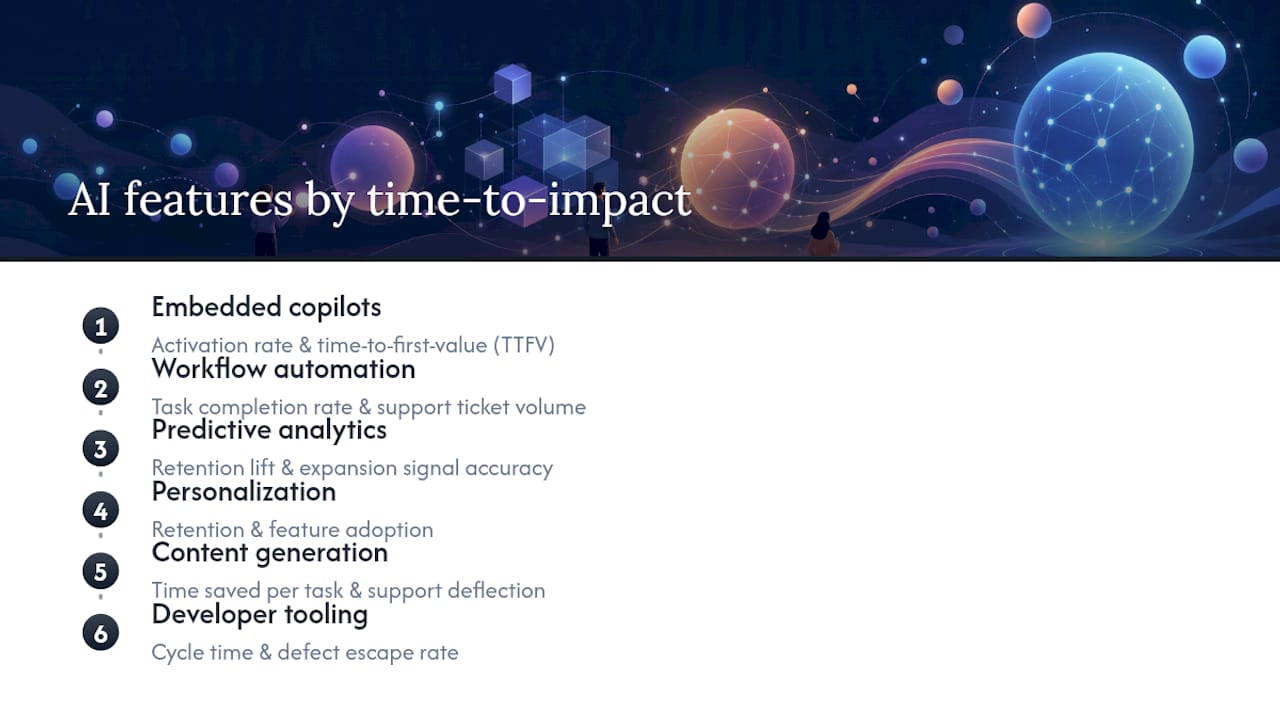
Embedded copilots and contextual assistants cut time-to-value for new users by surfacing the right action at the right moment. The primary metric they move is activation rate and time-to-first-value (TTFV). OpenAI's GPT-4o and Anthropic's Claude 3.5 Sonnet are the two most commonly embedded models for this pattern because of their instruction-following reliability and context window size.

Workflow automation and agentic features go further: instead of suggesting an action, the agent executes it. Bain's analysis of agentic AI makes clear this is where the real disruption sits — autonomous agents can replace UI-driven logic entirely for repetitive workflows, which is both an opportunity and a competitive threat. The metric to watch is task completion rate and support ticket volume.

Predictive analytics and forecasting are where machine learning for SaaS has the longest track record. IBM's research on AI-enhanced SaaS analytics shows that models integrated into analytics pipelines can predict user behavior and automate data sorting in ways that increase the actionable value of dashboards. Churn prediction, usage forecasting, and anomaly detection all fall here. The primary metric is retention lift and expansion signal accuracy.
Personalization and recommendations drive engagement by adapting the product experience to individual usage patterns. Think smart defaults, reordered navigation, and proactive nudges. Retention and feature adoption are the KPIs.
Content generation and augmentation — drafting emails, summarizing records, generating reports — reduce manual effort for end users. Support deflection and time-saved-per-task are the clearest metrics here.
Developer platform tooling and automated QA speed up your own engineering cycles. Code generation via GitHub Copilot or similar, automated test generation, and AI-assisted code review all reduce cycle time and defect escape rate.
Which models and tools belong in every vendor conversation? At minimum: the OpenAI GPT family for general-purpose generation, Anthropic Claude for instruction-following and long-context tasks, Google Gemini for multimodal and Google Workspace integrations, LangChain for orchestration and agent pipelines, Pinecone or Weaviate as vector databases for retrieval-augmented generation (RAG), and the Hugging Face model catalog for open-weight alternatives and fine-tuning.
Pro Tip: Don't evaluate models in isolation. Run the same five representative prompts from your actual product use case through GPT-4o, Claude 3.5 Sonnet, and Gemini 1.5 Pro before committing. Output quality varies more by task type than by benchmark score.
Innovecs' 2026 SaaS AI guide confirms what most practitioners already suspect: the tools that produce measurable outcomes are the ones paired with clear success metrics from the start, not the ones with the most impressive feature lists.
How do you wire AI into your product stack?
Architecture decisions made in the pilot phase tend to calcify. Getting them roughly right early saves significant rework.
Three patterns to choose from
Embed third-party APIs (OpenAI, Anthropic, Google Gemini via their REST APIs): fastest path to a working prototype, lowest upfront cost, but you are dependent on vendor uptime, pricing changes, and their data handling terms. Right for most pilots and many production features.
Self-host open-weight models (Llama 3, Mistral, or models from Hugging Face): more control over data residency and cost at scale, but requires MLOps infrastructure, GPU provisioning, and ongoing model maintenance. Right for regulated industries or high-volume inference where per-token costs become material.
Hybrid: use a third-party API for low-sensitivity, high-variability tasks (drafting, summarization) and a self-hosted model for sensitive data processing. More complex to operate but often the right answer for enterprise SaaS with mixed data classifications.
Data plumbing: the part teams underestimate
RAG (retrieval-augmented generation) is the dominant pattern for grounding AI outputs in your product's actual data. The flow is: chunk and embed your documents or records into a vector database (Pinecone and Weaviate are the two most production-tested options), retrieve the top-k relevant chunks at query time, and inject them into the model's context window. Latency is the main operational concern — a retrieval step that adds 800ms to a user-facing response will hurt adoption regardless of output quality.
Unified connector platforms reduce the integration surface area significantly. Instead of building bespoke connectors to every data source your agents need to read from or write to, a typed-schema connector layer handles auth, rate limiting, and schema normalization. This matters especially for multi-tenant SaaS where each customer's data lives in a different system.
Agent orchestration via LangChain (or comparable frameworks) sits above the model layer and manages tool calls, memory, and multi-step reasoning chains. Embeddable agent platforms built for SaaS multi-tenancy let product teams add agents without building the full infrastructure from scratch — a legitimate buy option when time-to-market matters more than full ownership.
The most common architecture mistake is skipping tenant isolation at the data layer. In a multi-tenant SaaS product, a vector database that does not enforce per-tenant namespace separation can leak context between customers. Build the isolation boundary before you build the feature, not after.
| Pattern | Speed to pilot | Data control | Ongoing cost | Best for |
|---|---|---|---|---|
| Third-party API (OpenAI, Anthropic) | Fast (days) | Low | Per-token, variable | Most pilots and production features |
| Self-hosted (Hugging Face, Llama) | Slow (weeks) | High | Fixed infra + MLOps | Regulated data, high-volume inference |
| Hybrid | Medium | Medium | Mixed | Enterprise SaaS with mixed data sensitivity |
| Embeddable agent platform | Fast (days) | Medium | Platform fee + usage | Teams without ML infra capacity |
Pro Tip: Start with a single, bounded product surface — one workflow, one user role, one data type. A copilot that does one thing well is easier to instrument, easier to govern, and easier to explain to customers than a general-purpose assistant that does ten things inconsistently.
How do you measure whether your AI features are working?
Measurement is where most teams get sloppy. "Users are engaging with it" is not a KPI. Before you ship any AI feature, define the hypothesis, the primary metric, the guardrail metric, and the minimum detectable effect.
| KPI | Measurement method | Minimum sample / window |
|---|---|---|
| Activation rate | % of new users completing a defined activation event | 14-day window |
| Time-to-first-value (TTFV) | Median time from signup to first meaningful action | 14-day window |
| Feature adoption | % of active users triggering the AI feature weekly | 30-day rolling window |
| Retention lift | Cohort retention delta (AI users vs. control) | 60–90 day cohort |
| Support deflection | Ticket volume change in AI-assisted categories | 30-day pre/post or A/B |
| ARR expansion | Upgrade rate from base to AI tier | 90-day cohort |
| Cost-per-outcome | Inference cost / number of successful task completions | Ongoing, per feature |
Experiment design basics:
- State the hypothesis before you build: "Adding an AI-generated summary to the weekly report will reduce time-to-insight by X% for users who currently spend more than 10 minutes reviewing it."
- Use feature flags to run a clean A/B test. Avoid rolling out to everyone and then trying to reconstruct a control group.
- Set a guardrail metric alongside your primary metric. If support tickets go down but NPS drops, the feature is not working.
- Define the measurement window before launch. Retention effects take 60–90 days to show up; activation effects are visible in 14 days.
ROI modeling needs to account for inference cost, not just revenue lift. A feature that increases retention by 2 percentage points but costs $0.08 per active user per day in API calls may be margin-negative at your current pricing. Run the unit economics before you scale.
How do you choose between building and buying AI capabilities?
The build-vs.-buy decision is not binary, and the right answer changes as your product matures.
Build when: you have a proprietary data advantage that a fine-tuned or RAG-grounded model would exploit, your use case requires data residency that third-party APIs cannot guarantee, or the AI capability is a core differentiator that you cannot afford to commoditize.
Buy (or embed) when: time-to-market matters more than ownership, your engineering team lacks ML expertise, or the capability is table-stakes rather than differentiating. Embeddable copilot SDKs and agent platforms let teams add contextual assistants with minimal backend changes — a legitimate path for a first pilot.
Vendor evaluation checklist:
- Does the vendor have a current SOC 2 Type II report? Ask for it, not just a summary.
- How is tenant data isolated? Can they demonstrate namespace separation in their vector store?
- What is the data retention and deletion policy? Can you trigger deletion on customer offboarding?
- Is there per-tenant usage and billing visibility? Opaque aggregate billing is a red flag for multi-tenant products.
- What is the model provenance? Do you know which model version is serving production traffic?
- What are the SLA terms for the AI endpoints specifically? Many vendors exclude AI API uptime from their standard SLA.
- What is the exit strategy? Can you export your embeddings, fine-tuned weights, and audit logs?
Red flags to walk away from:
- No audit logs or opaque logging ("we handle that internally")
- No clear answer on model versioning or update notifications
- Pricing that bundles AI usage into a flat platform fee with no per-tenant breakdown
- BAA offered only at the highest enterprise tier when your product handles health data
Pro Tip: Ask every AI vendor for their incident response runbook for a model-related data exposure. If they do not have one, that tells you more about their security posture than any SOC 2 summary will.
SaaS LaunchPad's AI readiness audit: what it covers and how to use it
Before you commit engineering cycles to an AI feature, you need to know where your product actually stands across the dimensions that determine whether AI will work in production. SaaS LaunchPad's comprehensive Product Excellence Blueprint covering multiple disciplines covers exactly this — from product discovery and UX audit through AI enhancement readiness, security posture, scalability, and enterprise readiness scoring.
AI readiness audit checklist (aligned with the 21-discipline framework):
- Product discovery: is the problem the AI feature solves clearly defined and validated with user data?
- Platform audit: does the current architecture support the latency and throughput requirements of AI inference?
- UX/UI audit: does the interface make AI outputs interpretable and correctable by users?
- Workflow optimization: which workflows have the highest friction and the clearest automation potential?
- AI enhancement assessment: which feature categories (copilot, analytics, automation) fit the product's data maturity?
- Security review: are tenant isolation, secrets management, and audit logging in place?
- Enterprise readiness: does the product meet the compliance and observability standards enterprise buyers require?
Sample Master Transformation Prompt structure:
The Master Transformation Prompt SaaS LaunchPad delivers is a copy-paste-ready prompt you can run against your preferred AI model (GPT-4o, Claude, Gemini) to generate a prioritized transformation plan for your specific product. Its structure follows this pattern:
- Context block: your product category, current tech stack, user persona, and primary business metric.
- Constraint block: data residency requirements, compliance scope (SOC 2, HIPAA, CCPA), and engineering capacity.
- Objective block: the specific outcome you want the AI to optimize for (activation, retention, support deflection).
- Output schema: the format you want back (prioritized feature list, phased roadmap, risk register).
The most operationally useful prompts include a constraint block. A prompt that tells the model your compliance scope, your stack, and your team's capacity produces a roadmap you can actually execute — not a generic list of AI features that sounds impressive but ignores your real constraints.
Interpreting audit scores: A product that scores well on data readiness and security but poorly on UX/UI audit typically means the AI feature will work technically but fail in adoption. Prioritize the UX gap before the model selection. A product that scores poorly on data readiness should not be running a production AI pilot at all — fix the data foundation first.
What does a realistic AI implementation roadmap look like?
Teams consistently underestimate the data readiness phase and overestimate how fast a pilot converts to a scaled feature.
Phase 1: Discovery and data readiness (a few weeks) Audit your data sources, define the target use case, instrument baseline metrics, and confirm compliance scope. This phase often reveals that the data needed for the AI feature does not exist in a usable form — better to find that out in week two than week ten.
Phase 2: Prototype (several weeks) Build the smallest possible version of the feature using a third-party API. The goal is a working demo with real data, not a polished product. Cost at this phase is typically low — mostly engineering time and API usage fees that run well under $1,000 for most text-based features.
Phase 3: Pilot (a few months) Ship to a defined cohort (5–15% of users or a specific customer segment) with full instrumentation. This is where you run your A/B test, collect the retention and activation data, and make the go/no-go decision. Inference costs become real here; budget for them explicitly.
Phase 4: Scale (several months or more) Expand to the full user base, optimize the model and retrieval pipeline for cost and latency, integrate into product OKRs, and run an enterprise readiness audit before pitching the feature to enterprise buyers.
Staffing reality: a production AI feature in a SaaS product needs at minimum a product manager who owns the KPIs, an ML engineer or a senior engineer comfortable with API integration and prompt engineering, an infrastructure engineer for the data pipeline, and a security reviewer for the compliance controls. You can compress this with the right tooling, but you cannot eliminate it.
Gartner's projection that 80%+ of enterprises will have used generative AI APIs by 2026 means your enterprise customers are already benchmarking your AI features against what they are building internally. The pilot phase is not just a product experiment — it is a competitive signal.
Key Takeaways
AI for SaaS delivers measurable value when teams pick one bounded use case, instrument it before launch, and govern it from the first line of code.
| Point | Details |
|---|---|
| Start with one bounded surface | Pick a single high-friction workflow and prototype with GPT-4o or Claude before expanding scope. |
| Instrument before you ship | Define your primary KPI, guardrail metric, and measurement window before the feature goes live. |
| Governance from day one | Tenant isolation, data minimization, and SOC 2 scope must be in place before production, not after. |
| Realistic timeline | Expect a few weeks for data readiness, several weeks for a prototype, and a few months for a measurable pilot. |
| SaaS LaunchPad audit | SaaS LaunchPad's a comprehensive Product Excellence Blueprint covering multiple disciplines identifies AI readiness gaps and delivers a copy-paste Master Transformation Prompt to accelerate safe rollouts. |
What to do in the next 30, 90, and 180 days
30 days:
- Run an AI readiness quick-audit across your product's data maturity, security posture, and UX instrumentation.
- Pick one bounded workflow with clear friction and a measurable outcome.
- Instrument the baseline metric for that workflow before touching any code.
- Evaluate OpenAI GPT-4o, Anthropic Claude, and Google Gemini on five representative prompts from your actual use case.
- Confirm your compliance scope: CCPA, SOC 2, HIPAA if applicable.
90 days:
- Complete a pilot with a defined user cohort and a live A/B test or feature flag.
- Collect 30–60 days of KPI data before making a go/no-go decision.
- Put basic governance controls in place: tenant isolation, audit logs, secrets rotation.
- Finalize vendor decisions if you are buying rather than building.
- Review inference costs against your unit economics.
180 days:
- Scale proven features to the full user base with optimized retrieval and inference pipelines.
- Bake AI feature performance into product OKRs for the next planning cycle.
- Run a full enterprise readiness audit before pitching AI capabilities to enterprise buyers.
- Evaluate whether any features warrant moving from third-party API to a self-hosted or fine-tuned model based on volume and cost data.
The part most guides skip
The teams that ship AI features successfully in 2026 are not the ones with the most sophisticated models. They are the ones that treated instrumentation as a first-class requirement from day one.
The pattern that fails consistently: a PM sees a demo of GPT-4o doing something impressive, gets excited, ships a feature in three weeks with no baseline metrics, and then cannot answer the board's question about whether it moved retention. The feature gets deprioritized, the team loses confidence in AI investment, and the cycle repeats.
The pattern that works: start with the customer problem, not the model. Define what "working" looks like in a number before writing a single line of prompt. Then build the smallest possible version that could produce that number.
On the build-vs.-buy question: most teams buy too late and build too early. The right time to build a custom model or fine-tune is when you have clear evidence that a general-purpose API cannot solve your specific problem at your specific cost point. That evidence usually takes 6–12 months of production data to accumulate. Until then, embed and iterate.
The 21-discipline audit framework SaaS LaunchPad uses consistently changes how product teams prioritize their roadmaps — not because it reveals problems they did not know existed, but because it forces a structured conversation about which problems are actually blocking AI value delivery versus which ones are just uncomfortable to look at. That distinction is what separates a roadmap that gets funded from one that stalls in committee.
What SaaS LaunchPad delivers for your AI roadmap
If you have read this far, you already know the two things that slow most AI implementations down: unclear priorities and unresolved compliance gaps. SaaS LaunchPad addresses both in a single engagement.

The Product Excellence Blueprint covers all 21 disciplines — product discovery, platform audit, AI enhancement readiness, security, scalability, and enterprise readiness scoring — and delivers a prioritized improvement roadmap with a phased execution plan. Alongside it, you receive a copy-paste-ready Master Transformation Prompt customized for your platform and your stack, so your team can run it against GPT-4o, Claude, or Gemini and get an operationally grounded output rather than a generic feature list.
There is no subscription and no retainer. You purchase credits, run the analysis, and receive your Blueprint. Credits never expire, and volume packs are available for teams running multiple audits across product lines. Start your audit at SaaS LaunchPad and get a clear picture of where your product stands before your next sprint planning session.
Useful sources
- gartner.com
- The Smart Guide to SaaS AI Tools in 2026
- Will Agentic AI Disrupt SaaS?
- Farewell, SaaS: AI is the future of enterprise software
- Maximizing SaaS application analytics value with AI
- https://www.truto.one/
- AI Agents for SaaS Companies | OrchStack | OrchStack
FAQ
What is AI for SaaS in practical terms?
AI for SaaS means embedding machine learning models, generative APIs, or autonomous agents into a software product to automate tasks, personalize experiences, or surface predictive insights for end users. The most common starting points are copilots, workflow automation, and predictive analytics.
Which AI models work best for SaaS product features?
OpenAI's GPT-4o and Anthropic's Claude 3.5 Sonnet are the most widely used for instruction-following and generation tasks; Google Gemini 1.5 Pro is the strongest option for multimodal and Google Workspace integrations. The right choice depends on your specific task type, latency requirements, and data handling terms.
How long does it take to ship an AI feature in a SaaS product?
A working prototype using a third-party API typically takes several weeks to a few months; a measurable pilot with a defined user cohort takes a few months. Scaling a proven feature to the full user base adds another several months depending on data readiness and compliance requirements.
What compliance requirements apply to AI features in US SaaS products?
CCPA governs personal data handling for California residents, which covers most US user bases. SOC 2 Type II is the baseline enterprise trust standard. HIPAA applies when any AI feature processes protected health information, and requires a Business Associate Agreement with any third-party AI API provider.
How does SaaS LaunchPad help with AI implementation?
SaaS LaunchPad's Product Excellence Blueprint runs a 21-discipline analysis of your product covering AI readiness, security, scalability, and enterprise requirements, then delivers a prioritized roadmap and a copy-paste Master Transformation Prompt tailored to your stack. It is a pay-per-analysis model with no subscription required.