Enterprise software is custom-built or installed on company infrastructure to handle complex, large-scale business needs. SaaS delivers the same capabilities through a vendor-hosted cloud subscription, prioritizing speed and accessibility. Choosing between them is not a matter of which is better overall. It depends entirely on your organization's compliance requirements, IT capacity, customization needs, and budget structure.
Here are the core distinctions at a glance:
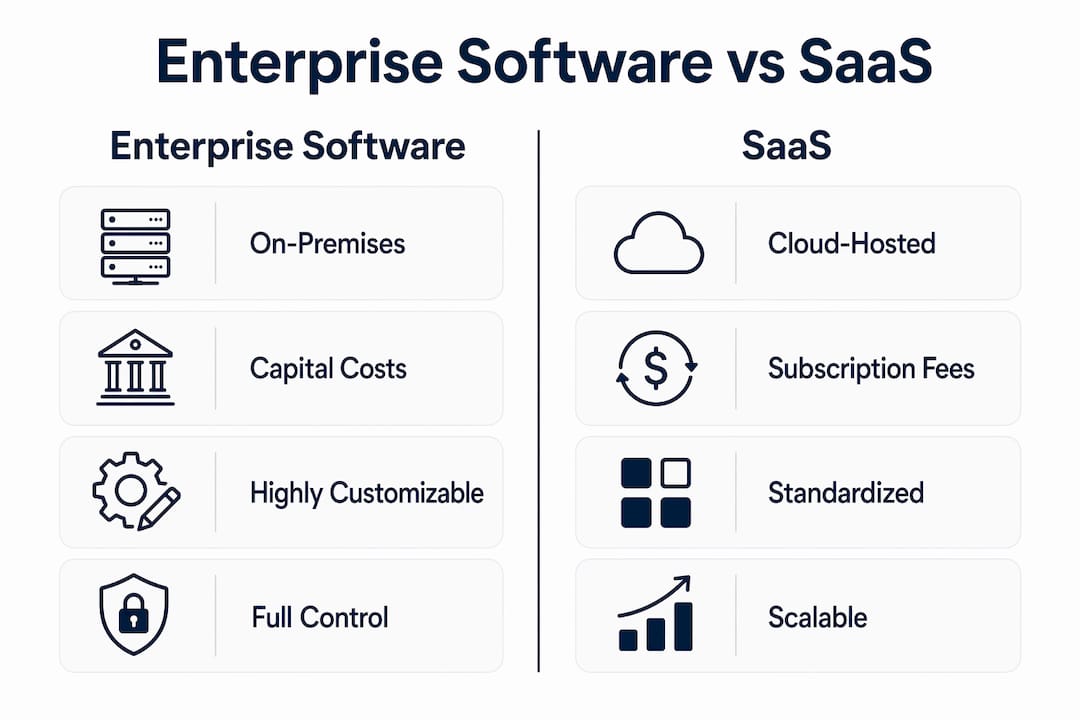
- Deployment: Enterprise software runs on-premises or in a private cloud you control. SaaS runs on the vendor's infrastructure, accessed through a browser.
- Ownership: Enterprise software involves a perpetual license you own. SaaS grants access as long as you pay the subscription.
- Cost model: Enterprise software requires large upfront capital expenditure. SaaS converts that to recurring operational expense.
- Customization: Enterprise software can be deeply tailored to your workflows. SaaS customization stays within the vendor's predefined parameters.
- Maintenance: Your IT team owns updates and patches for enterprise software. The SaaS vendor handles all of that automatically.
- Scalability: SaaS scales by adding users or modules in minutes. Scaling enterprise software often means buying more servers or upgrading infrastructure.
What enterprise software and SaaS actually are
Enterprise software is purpose-built for large organizations with complex operational needs. It typically runs on-premises or in a private cloud, and the organization owns the license outright. The software is deeply integrated into business systems, covering everything from finance and supply chain to HR and manufacturing. Oracle's suite of ERP and database products is one of the most widely deployed examples in large US enterprises, with Oracle Fusion Cloud ERP offering AI-driven automation across finance and operations. Adobe Workfront is another example, built specifically for enterprise-scale project and work management, connecting creative teams, marketing operations, and IT workflows inside a single governed platform.
SaaS is vendor-hosted software accessed over the internet on a subscription basis. The vendor manages infrastructure, security patches, and updates. Users log in through a browser or lightweight app, and the software works the same whether the team is in Chicago or remote. GetStream.io illustrates what modern SaaS architecture looks like at the API layer: it delivers real-time chat, activity feeds, and video calling as cloud-native services that development teams integrate directly into their own products, without managing any backend infrastructure.
Key characteristics of each model:
- Enterprise software: on-premises or private cloud, perpetual license, deep customization, dedicated support, high IT involvement
- SaaS: vendor-hosted, subscription billing, automatic updates, shared infrastructure, minimal IT setup required
- Enterprise software examples: Oracle ERP, Adobe Workfront, SAP S/4HANA Cloud, Microsoft Dynamics 365
- SaaS examples: GetStream.io, Google Workspace, Salesforce CRM, Dropbox
Global SaaS spending rose 73% over the five years leading up to 2023, which reflects how decisively the market has shifted toward cloud-based delivery. That said, enterprise software still dominates in sectors where data control and deep integration are non-negotiable.
How enterprise software and SaaS differ across five critical dimensions
The differences between these two models go well beyond where the software lives. They affect your budget, your IT team's workload, your compliance posture, and how fast you can respond to change.
Deployment and control
Enterprise software is designed for large organizations with complex needs, typically installed on-premises or in private clouds. SaaS is vendor-hosted and internet-accessed, serving organizations that prioritize agility. With enterprise software, your team controls the environment completely, including network access, data residency, and system configuration. With SaaS, you trade that control for speed and simplicity.

Cost structure
Enterprise procurement teams often prefer perpetual license models as capital expenditures, viewing them more favorably than recurring subscription costs on the operating budget. SaaS flips that equation: lower upfront cost, predictable monthly or annual fees, but cumulative spend that grows over time. According to Gartner, it takes about seven years of SaaS subscription fees for total cost of ownership to match the cumulative cost of traditional enterprise software licenses. For organizations planning to use the same system for a decade or more, that math favors the perpetual model.
Customization and flexibility
Enterprise software wins on depth of customization. Because the organization owns the license and controls the environment, developers can modify workflows, build custom modules, and integrate with legacy systems at a code level. SaaS customization is real but bounded: you can configure roles, workflows, and integrations within the vendor's framework, but you cannot alter the underlying application. For organizations with genuinely unique processes, that ceiling matters.
Security and compliance
SaaS's one-size-fits-all model can fail complex data visualization or integration requirements at the enterprise level. Regulated industries in the US, including healthcare (HIPAA), financial services, and defense contracting, often require data to stay on controlled infrastructure. Enterprise software gives you that control directly. Reputable SaaS vendors do maintain strong security, including encryption, regular audits, and compliance certifications, but the data still lives on their servers, which creates a trust dependency that some compliance frameworks do not allow.
Scalability
SaaS scales by design: add users, expand to new locations, or activate new modules without touching a server. Enterprise software scaling typically requires hardware procurement, infrastructure upgrades, and IT coordination. For fast-growing organizations or those with distributed teams, SaaS has a clear operational advantage here.
Weighing the advantages and challenges of each model
Neither model is universally superior. The right choice depends on what your organization actually needs to run.
SaaS advantages:
- Rapid deployment, often activated instantly with minimal IT involvement
- Automatic updates keep every user on the latest version without internal effort
- Lower upfront cost makes budgeting predictable and accessible
- Accessible from anywhere with an internet connection, which supports distributed teams
- Vendor handles infrastructure, security patching, and disaster recovery.
Enterprise software advantages:
- Deep customization to match complex, proprietary business processes
- Full data ownership and control, critical for regulated industries
- More personalized and dedicated customer support compared to SaaS models, reflecting client scale
- Perpetual license can be more cost-effective over a long time horizon
- Operates independently of internet connectivity, which matters in restricted environments
SaaS challenges:
- Limited customization beyond vendor-defined parameters
- Data residency and compliance constraints in regulated US industries
- Vendor lock-in: switching platforms means migrating data and retraining users
- Cumulative subscription costs can exceed enterprise licensing over a long period
Enterprise software challenges:
- High upfront license and infrastructure costs
- Complex, resource-intensive installation and ongoing maintenance
- Updates and security patches require internal IT effort
- Slower to deploy, which delays time-to-value for new capabilities
SaaS solutions are better for rapid deployment but cannot fully replace traditional software when strict compliance, offline operations, or deep customization are required. That is not a knock on SaaS. It is just an accurate description of where each model fits.
Implementation and operational considerations for large organizations
Getting enterprise software live is a project in itself. Installation requires server provisioning, network configuration, workstation setup, and IT coordination across departments. Successful enterprise software implementations require targeted focus on a few key business areas for early results rather than comprehensive rollouts, which improves adoption and ROI. Trying to deploy everything at once is one of the most common reasons large ERP projects stall.
SaaS implementation looks nothing like that. SaaS offers ease of implementation with instant activation and minimal IT involvement, whereas enterprise software installation can be resource-intensive and time-consuming. A team can be using a SaaS platform the same day procurement approves it.

Integration with existing IT infrastructure is where SaaS often hits friction at the enterprise level. Most SaaS platforms offer public APIs and prebuilt connectors, but connecting them to legacy on-premises systems, proprietary databases, or industry-specific platforms requires custom development work. Enterprise software, by contrast, is typically built to integrate deeply with the organization's existing stack, though that integration still takes time and expertise to configure.
Long-term support also differs significantly. Enterprise software vendors tend to assign dedicated account managers and support teams to large clients, given the complexity and revenue involved. SaaS support models vary widely: higher-tier plans often include phone support and dedicated contacts, while lower tiers rely on documentation, community forums, and ticketing systems. For mission-critical deployments, that distinction shapes your operational risk profile.
Key operational considerations:
- Enterprise software requires ongoing internal IT resources for patching, upgrades, and system monitoring
- SaaS creates vendor dependency: if the provider has an outage, your team is affected
- Integration complexity with legacy systems applies to both models, but hits SaaS harder in highly customized environments
- For compliance-sensitive deployments, understanding where data is stored and who can access it is a prerequisite, not an afterthought
How to choose between enterprise software and SaaS for your organization
The decision comes down to five factors: customization depth, compliance requirements, budget structure, IT capacity, and scalability needs. There is no universal answer, but there are clear signals pointing in each direction.
Choose enterprise software when:
- Your workflows are proprietary and cannot be mapped to a standard SaaS configuration
- Regulatory requirements (HIPAA, FedRAMP, ITAR) mandate on-premises data control
- Your organization has an established IT team capable of managing infrastructure
- You plan to use the same core system for a decade or more, making the TCO math work in your favor
- Offline operation is required in your environment
Choose SaaS when:
- Speed of deployment matters more than deep customization
- Your team is distributed or remote, and browser-based access is a practical necessity
- You want to avoid capital expenditure and prefer predictable monthly costs
- Your compliance requirements are met by standard certifications like SOC 2 or ISO 27001
- You need to scale user count or functionality quickly without infrastructure investment
Ask these questions before committing:
- Where does our data need to reside, and does the vendor's infrastructure satisfy that requirement?
- What is the realistic total cost of ownership over five and ten years, not just year one?
- Does our IT team have the capacity to manage installation, updates, and security for on-premises software?
- What happens to our data if we need to switch vendors?
Choosing between SaaS and enterprise software depends on organizational constraints such as compliance, customization needs, and operational preferences, not on inherent superiority of either model.
Hybrid deployment is increasingly the practical answer for large US enterprises. Large enterprises often adopt hybrid approaches, retaining core proprietary on-premises systems while using SaaS for cloud-native tools to balance control and agility. A common pattern: run your ERP and financial systems on-premises for compliance and control, while using SaaS for collaboration, CRM, and project management where speed and accessibility matter more than data sovereignty. The SaaS tools landscape has matured enough that this kind of selective adoption is operationally straightforward for most large organizations.
What SaaS LaunchPad and industry analysts say about enterprise SaaS evaluation
Evaluating a SaaS platform for enterprise use requires more than checking a feature list. The gap between "works for a 50-person team" and "enterprise-ready" is wide, and most SaaS products are not built to bridge it without deliberate engineering.
SaaS LaunchPad addresses this directly. Its 21-discipline product analysis covers enterprise readiness scoring, security assessment, scalability analysis, compliance verification, workflow optimization, and a prioritized improvement roadmap, among other dimensions. The output is a Product Excellence Blueprint and a copy-paste-ready Master Transformation Prompt tailored to the specific platform. For organizations evaluating whether a SaaS product is genuinely ready for enterprise deployment, that kind of structured analysis replaces weeks of internal discovery work.
Industry analysts at Gartner consistently flag that the hybrid model is gaining ground precisely because neither pure SaaS nor pure on-premises satisfies all enterprise requirements. The practical recommendation from analysts: do not start with the deployment model. Start with the business requirement, then work backward to the architecture that supports it.
Best practices for enterprise SaaS evaluation:
- Score the platform against enterprise readiness criteria before procurement, not after
- Verify compliance certifications against your specific regulatory obligations (SOC 2 Type II, HIPAA BAA, FedRAMP where applicable)
- Test integration with your existing IT stack in a sandbox environment before committing
- Evaluate the vendor's financial stability and support model for long-term dependency
- Assess scalability under realistic load conditions, not vendor-provided benchmarks
Pro Tip: Run a structured audit of any SaaS platform against your enterprise requirements before signing a multi-year contract. SaaS LaunchPad's enterprise readiness scoring covers security, scalability, compliance, and workflow fit in a single analysis, giving you a defensible evaluation rather than a gut check.
The AI business builder tools emerging in 2026 are also shifting how enterprises think about SaaS evaluation, particularly for platforms that incorporate AI-driven automation. Assessing AI readiness alongside traditional enterprise criteria is becoming a standard part of procurement due diligence.
Key Takeaways
Neither enterprise software nor SaaS is the default right answer for large organizations. The correct choice depends on compliance requirements, IT capacity, customization depth, and how long you plan to use the system.
| Point | Details |
|---|---|
| TCO crossover time varies | It generally takes about seven years of SaaS subscription fees for total cost of ownership to match the cumulative cost of traditional enterprise software licenses. |
| Hybrid is the enterprise norm | Large enterprises increasingly retain on-premises core systems while adopting SaaS for non-critical functions. |
| Compliance drives deployment choice | US regulated industries (healthcare, defense, finance) often require on-premises data control that SaaS cannot provide. |
| SaaS wins on speed | SaaS deploys instantly with minimal IT involvement; enterprise software installation is resource-intensive and time-consuming. |
| Enterprise software wins on customization | Perpetual license ownership allows code-level modification that SaaS vendor frameworks do not permit. |
FAQ
Is SaaS the same as enterprise software?
No. SaaS is a delivery model where software is hosted by a vendor and accessed via subscription. Enterprise software refers to software designed for large organizations with complex needs, which can be delivered either on-premises or, increasingly, through a SaaS model.
Is Netflix a SaaS or PaaS?
Netflix is a SaaS product: it delivers software (a streaming application) over the internet on a subscription basis, hosted entirely on its own infrastructure, with no installation required from the user.
What is replacing SaaS?
Nothing is replacing SaaS outright. The trend in 2026 is toward hybrid models, where enterprises combine SaaS for agile, non-critical functions with on-premises or private cloud systems for compliance-sensitive operations. AI-native platforms are also emerging as a new layer on top of existing SaaS architectures.
Is ChatGPT considered SaaS?
Yes. ChatGPT is a SaaS product: it is hosted by OpenAI, accessed through a browser or API, and offered on a subscription or pay-per-use basis, with OpenAI managing all infrastructure and updates.