Optimizing SaaS workflows means running a focused product audit, usually 3 to 7 days, that maps every activation, branching, and error path against enterprise-readiness controls, then converts the findings into a phased roadmap. The immediate next step is not a redesign sprint. It's a structured audit, like the 21-discipline review SaaS LaunchPad runs, that tells you what to fix first and what to leave alone.
TL;DR:
- Running a focused SaaS workflow audit can identify three to four critical transition issues that drive most customer churn and security risks.
- Prioritizing security controls like tenant isolation, audit logs, and SSO early in the roadmap prevents costly retrofits after enterprise deals are underway.
- Segmentation of user journeys, especially role-based paths, helps uncover hidden handoff failures and permission mismatches that impact activation and retention.
- Sequencing fixes from architectural controls to operational improvements ensures efficient rework and delivers measurable activation gains within the first month.
- Automated instrumentation, deterministic rules, and phased feature deployment behind flags are essential strategies for measurable, low-risk workflow optimization.
Table of Contents
- Why Workflow Optimization Matters for Retention and Sales Cycles
- Quick Audit Checklist: A 3 to 7 Day Product Audit
- How to Sequence Fixes Without Expensive Rework
- Execution Playbook: Turning the Roadmap Into Sprints
- Which Enterprise Security Controls Should You Prioritize?
- Common SaaS Workflow Bottlenecks and Their Root Causes
- Integrating SaaS Workflows With Other Enterprise Systems
- Change Management: Getting Teams to Actually Adopt the New Workflow
- Where Automation and AI Actually Improve Workflow Efficiency
- What Successful Workflow Optimization Looks Like in Practice
- How SaaS LaunchPad Turns an Audit Into a Roadmap You Can Actually Ship
- A Closing Note on What Actually Moves the Needle
- Sources
- FAQ
Why Workflow Optimization Matters for Retention and Sales Cycles
Workflow quality is not a UX nicety. It's the reason a trial converts, a customer renews, or a deal stalls in procurement for three extra weeks. When onboarding buries the first meaningful action under five clicks, activation drops, and everything downstream (retention, expansion, referrals) drops with it.
The fix starts with picking the right metrics, not more metrics. Activation should be defined behaviorally, not as "completed onboarding." A behavior correlated with retention, validated with cohort data, tells you far more than a checklist of tutorial steps.
Track these four numbers before and after any workflow change:
- Behavioral activation rate: the percentage hitting the specific action tied to Day-30 retention.
- Time-to-first-value: minutes or days from signup to that first meaningful outcome.
- Day-30 retention: cohort-based, not aggregate.
- Support ticket volume tied to the workflow you changed.
Founders who run a focused audit before touching code typically find that three or four broken transitions, not the whole product, are driving most of the churn.
Quick Audit Checklist: A 3 to 7 Day Product Audit
You don't need a quarter to find your worst workflow problems. A focused audit reviewing code, architecture, and process can surface a prioritized backlog in under a week for most SaaS apps, longer only if your system spans multiple services or legacy code.
Run these checks in sequence:
- Define activation and test it against real cohorts. Pull six months of usage data and run survival analysis to find which early behaviors actually predict Day-30 retention, rather than guessing.
- Map role-based journeys. An admin, an end user, and a billing contact experience three different apps. Chart each path separately; broken handoffs between roles hide in aggregate flow charts.
- Inspect where business logic lives. If pricing rules, permission checks, or approval logic are scattered across the frontend, backend, and a spreadsheet somewhere, that's a workflow risk, not just tech debt.
- Check idempotence and determinism. Does resubmitting a form, retrying a webhook, or double-clicking "save" create duplicate records? This single class of bug generates a disproportionate share of support tickets.
- Audit your event taxonomy. List every funnel you can't currently measure. Missing instrumentation is often the real reason a workflow "problem" can't be diagnosed.
- Verify SSO/SCIM readiness, audit log visibility, and session revocation. These are the controls enterprise security reviewers ask about first.
- Confirm tenant isolation. Can one customer's data leak into another's query, cache, or export under any edge case?
For each item, capture the evidence (a screen recording, a query result, a log excerpt) and score severity from 1 (cosmetic) to 5 (blocks enterprise deals or causes data leakage). That scoring is what turns a checklist into a roadmap.
Pro Tip: Run the activation and cohort analysis before the security checks. Knowing which behaviors actually drive retention tells you which workflows are worth hardening first, so the security work doesn't get spent on a feature nobody uses.
How to Sequence Fixes Without Expensive Rework
The order you fix things in matters as much as the fixes themselves. Rework a workflow's UI before you fix the business logic underneath it, and you'll redo the UI a second time once the logic changes shape.
The rule of thumb: architectural controls first, operational controls later, guided by a business scaling outsourcing checklist for SMB owners to decide what to keep in-house versus outsource. Tenant isolation, audit logging, and a governed business logic layer are expensive to retrofit once customer data and integrations depend on the current structure, so sequencing them early saves months down the line. Documentation, monitoring dashboards, and policy write-ups can wait.
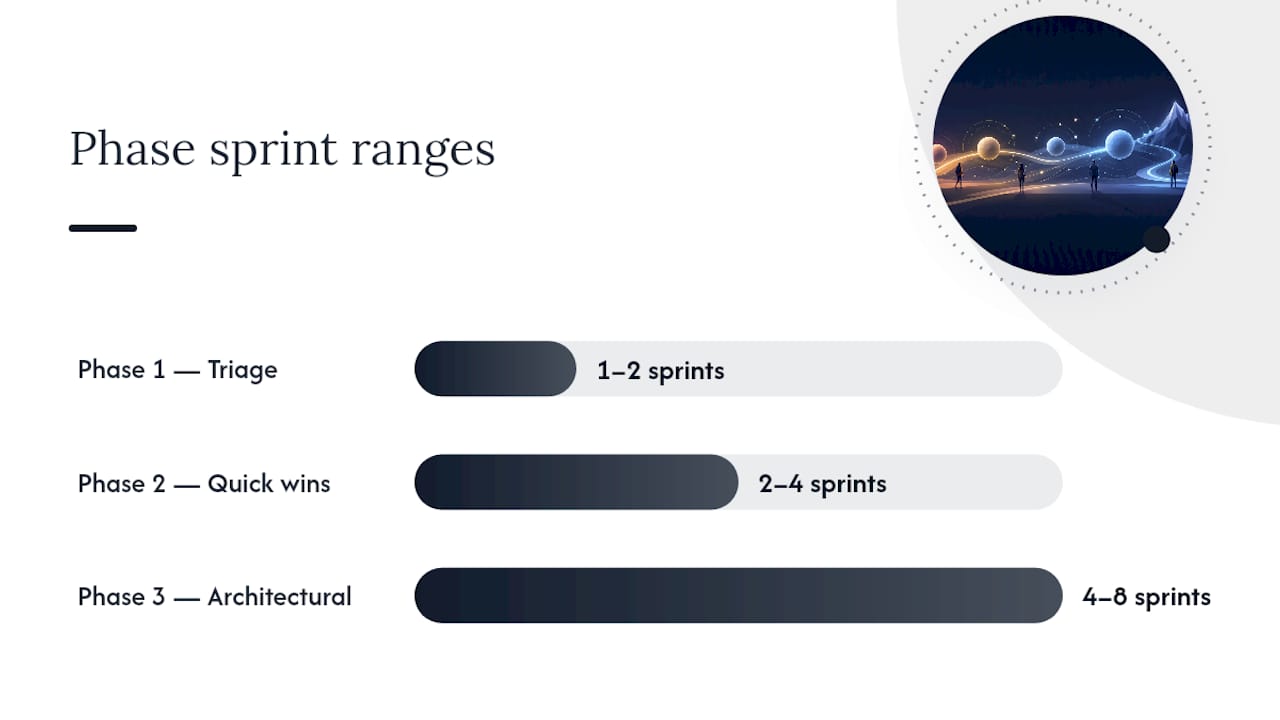
A practical three-phase template:
- Phase 1, Triage (1 to 2 sprints): Fix data-loss bugs, duplicate-record issues, and any workflow blocking enterprise deals outright. Instrument the events you're currently missing.
- Phase 2, Quick wins (2 to 4 sprints): Ship feature-flagged fixes to the top three activation drop-off points, add role-based branching where journeys currently diverge without support, and centralize scattered business rules into one governed layer.
- Phase 3, Architectural work (4 to 8 sprints): Rebuild orchestration boundaries, implement SSO/SCIM, and formalize tenant isolation testing.
Score each backlog item on impact times effort, then flag anything an enterprise prospect has already asked about. A prioritized, evidence-backed roadmap beats an unranked list of forty tickets every time. Teams that sequence this way tend to ship visible activation gains inside the first month, while the deeper architectural fixes run quietly in parallel.
Execution Playbook: Turning the Roadmap Into Sprints
A roadmap item is not a task until it has an owner, an acceptance criterion, and a rollback plan. Translate each backlog line into something an engineer can actually pick up on Monday.
- Roll out behind a feature flag. Ship the new onboarding branch or role-based flow to 5% of new signups first. Compare activation and time-to-first-value against the control group before expanding.
- Build contextual onboarding rails, not tours. A tooltip that fires the moment a user hits a real decision point outperforms a five-step product tour almost every time, because it teaches in context instead of in advance.
- Assign one rollout owner per workflow change. Cross-functional pods (one PM, one engineer, one designer) move faster than committees, and a single owner means someone actually watches the dashboards after launch.
- Instrument before you ship, not after. Add the event taxonomy changes in the same pull request as the workflow fix, so you have before/after data automatically.
- Write QA acceptance criteria per workflow, not per feature. "User can recover from a failed payment without contacting support" is testable. "Payment flow works" is not.
Pro Tip: Treat every role-based branch as its own mini product. If your app serves an admin and a viewer, write a separate RACI for each journey; combined journey maps almost always hide the viewer's dead ends.
For deeper analytics-specific tactics, teams building data-heavy products can lean on dedicated workflow guidance for analytics SaaS rather than reinventing instrumentation patterns from scratch.
Which Enterprise Security Controls Should You Prioritize?
Enterprise buyers don't ask if your product is secure. They ask for proof, in a specific, repeated format. A checklist enterprise clients actually audit runs to roughly twenty items, and the buyers expect documented, auditable evidence rather than a verbal assurance.
The table-stakes list:
- SSO and SCIM provisioning, so IT can manage access centrally instead of per-user invites.
- Tenant-visible audit logs, letting a customer's admin see who did what, when.
- Session revocation, so a terminated employee's access dies immediately, not at next login.
- Backup and disaster recovery with a documented recovery time objective.
- Penetration testing on a regular cadence, with a summary report available on request.
- Basic ISMS documentation: access policies, data retention rules, incident response steps.
Tenant isolation and audit logging belong in Phase 1 or 2 of your roadmap because retrofitting them after customers are live is far costlier than building them in from the start. SOC 2 or ISO 27001 certification can wait until your sales pipeline justifies the cost. In the meantime, minimum-viable fixes like a subprocessors list or a tenant-visible log viewer unblock deals without a full audit cycle.
Common SaaS Workflow Bottlenecks and Their Root Causes
Most workflow complaints trace back to a small set of repeat offenders. The names change, the pattern doesn't.
Orphaned state transitions top the list. A user starts a multi-step process, abandons it at step three, and the app has no path back except starting over. The root cause is usually a workflow designed as a straight line when real usage is full of interruptions.
Permission mismatches come next. A user sees a button they can't actually use, clicks it, and hits a cryptic error. This almost always traces back to permission checks living in one layer of the app while the UI was built assuming a different set of rules.
Silent failures are the quiet killer. A webhook fails, a background job times out, nothing surfaces to the user, and support finds out three days later from a confused email. The fix is rarely more error handling on the frontend. It's usually a missing retry policy or dead-letter queue on the backend.
Duplicate submissions stem from missing idempotency keys on write operations, particularly around payments and record creation. Configuration drift, where a workflow behaves differently in staging than production, usually points to business rules hardcoded in multiple places instead of one governed layer.
Each of these has a fix that's smaller than it sounds once you know exactly where the logic lives.
Integrating SaaS Workflows With Other Enterprise Systems
Once a workflow works inside your app, the next test is whether it survives contact with a customer's existing stack. Enterprise buyers rarely adopt a tool in isolation. It has to talk to their identity provider, their CRM, and often a data warehouse.
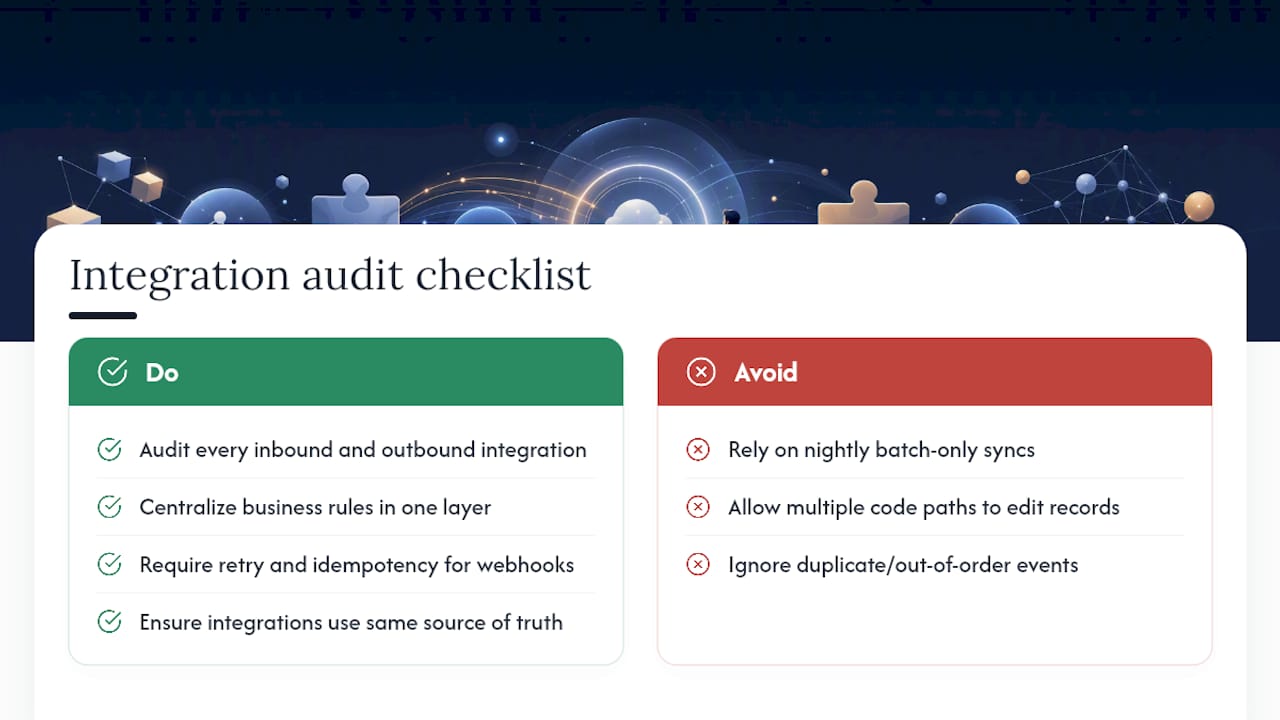
APIs are the obvious connective tissue, but the failure mode that trips up most SaaS teams is data sync, not data access. A CRM sync that runs on a nightly batch job looks fine until a sales rep updates a deal and the workflow inside your app acts on stale data for eighteen hours. Real-time webhooks solve part of this, but only if your app has a retry and idempotency strategy strong enough to handle duplicate or out-of-order events, which loops directly back to the business logic checks from the audit.
Centralizing business rules in one governed layer pays off doubly here. When pricing logic, entitlement checks, or approval rules live in a single place, every system that integrates with your workflow (a billing sync, an identity provider, a reporting pipeline) consumes the same deterministic rules instead of each integration point interpreting logic slightly differently.
Practically, this means auditing every outbound and inbound integration for one question: does this integration point read from or write to the same source of truth as the rest of your app? If a Zapier connection, a native API integration, and your own UI can each modify the same record through three different code paths, you have three chances for the record to end up in an inconsistent state, and enterprise customers will find that inconsistency during their own testing before you do.
Change Management: Getting Teams to Actually Adopt the New Workflow
A workflow fix that ships but doesn't get used is a wasted sprint. Internal teams and customers both resist change, for the same underlying reason: the old broken path is at least familiar.
Rolling changes out behind a feature flag solves more than a technical risk. It solves an adoption risk too. Instead of forcing every user into a new flow on launch day, you can run the new version alongside the old one, watch which cohort adapts faster, and gather real objections before a full cutover.
Internally, change management fails most often when a workflow change ships without a clear owner watching adoption metrics afterward. Assign that owner explicitly, and give them a specific number to watch (activation rate, ticket volume, drop-off point) for the first two weeks post-launch, not just a general "keep an eye on it."
For customer-facing changes, over-communicate the "why," not just the "what." A support team migrating to role-based permissions needs to understand that the new model prevents the exact data-leak scenario they filed three tickets about last quarter. That context turns a change request into something the team actively wants, rather than a mandate to tolerate.
Documentation matters here too, but sequence it last. Write the internal runbook and customer-facing changelog once the workflow has stabilized behind a flag, not before, so you're documenting the version that actually shipped.
Where Automation and AI Actually Improve Workflow Efficiency
Automation earns its place in a workflow when it removes a repetitive decision, not when it's bolted on because the technology is available. The distinction matters more than most roadmaps admit.
The clearest wins show up in three places. First, automated data validation at the point of entry, catching malformed records before they enter a workflow instead of failing silently three steps downstream. Second, automated routing, where a support ticket, an approval request, or an onboarding task gets assigned based on rules instead of a person manually triaging a queue. Third, AI-assisted anomaly detection on usage patterns, flagging a customer whose activation behavior deviates sharply from a healthy cohort so a customer success team can intervene before churn, not after.
Where automation backfires is workflow steps that require judgment calls tied to context an algorithm doesn't have, like a nuanced billing dispute or an edge-case permission request. Automating those tends to create the exact silent-failure pattern covered earlier in this piece, just with an AI system in place of a broken webhook.
The practical test before automating any step: can you write a deterministic rule for it, or does it genuinely need human judgment? If it's deterministic, it belongs in your governed business logic layer, automated. If it needs judgment, automate the routing to the right human, not the decision itself.
What Successful Workflow Optimization Looks Like in Practice
The pattern across successful workflow overhauls looks remarkably consistent regardless of product category. A team runs a focused audit, finds three or four disproportionately costly bottlenecks, fixes those first behind feature flags, and measures the result before touching anything else.
Enterprise SaaS onboarding redesigns that anchor activation to a specific, retention-correlated behavior rather than a generic "setup complete" checkbox tend to see faster time-to-first-value and stronger Day-90 retention, because the team is optimizing for the behavior that actually predicts long-term use instead of a vanity milestone. Phased milestones built around genuine early wins, the kind of approach reflected in onboarding patterns at companies like Slack and Asana, consistently outperform linear, one-size-fits-all tours.
On the enterprise-readiness side, teams that tackle tenant isolation and audit logging early, before a big enterprise deal is on the table, close those deals faster because security review becomes a formality instead of a six-week discovery process. Teams that wait until a prospect asks tend to scramble, retrofit under deadline pressure, and often lose the deal to a slower internal review cycle they could have avoided.
The throughline in every case: the roadmap came from evidence gathered in a short, structured audit, not from a backlog of assumptions about what users probably want.
How SaaS LaunchPad Turns an Audit Into a Roadmap You Can Actually Ship
You've seen what the checklist and sequencing rules above demand: a structured look across activation, business logic, instrumentation, and security, followed by a backlog ranked by impact and enterprise risk. Running that audit yourself, across twenty-plus disciplines, easily eats a month you don't have.

SaaS LaunchPad compresses that work into a single on-demand analysis. The 21-discipline audit covers everything from workflow optimization and business logic verification to security and enterprise-readiness scoring, and it returns a Product Excellence Blueprint plus a phased, prioritized roadmap mapped almost exactly to the triage, quick-wins, and architectural phases described earlier in this piece. You also get a copy-paste-ready Master Transformation Prompt, customized to your platform, so your team or your no-code builder can start executing the same day the report lands.
There's no subscription to manage. You purchase analysis credits, they never expire, and volume packs come at a discount if you're running audits across multiple products or a portfolio. If your app already serves analytics-heavy customers, the workflow optimization service for analytics SaaS applies the same 21-discipline lens with sharper focus on data pipelines and reporting flows.
The next step is straightforward: run your product through the audit and get a roadmap ranked by what actually blocks activation and enterprise deals, instead of guessing at your own backlog for another quarter.
A Closing Note on What Actually Moves the Needle
Most teams overinvest in polish and underinvest in sequencing. They'll spend a sprint perfecting a modal's animation while a duplicate-submission bug quietly generates a third of their support tickets. The audit-first approach exists precisely to correct that imbalance, by forcing evidence to rank the backlog instead of whoever argued loudest in the roadmap meeting.
The uncomfortable truth is that enterprise readiness and good UX are the same project, not two competing ones. A workflow that confuses a free-trial user with a broken permission check is the same underlying defect a security reviewer will flag six months later during a SOC 2 conversation. Fix the root cause once, and it pays off in both activation numbers and procurement speed.
If there's one habit worth adopting from this entire framework, it's treating every workflow complaint, whether it comes from a churned trial user or an enterprise security questionnaire, as a symptom pointing at the same handful of structural issues. Chase the structure, not the symptom.
. Next: run a focused audit, rank the backlog by impact and enterprise risk, and ship the top three fixes behind a flag... Request a tailored Master Transformation Prompt when you're ready to execute.
— Gregory Cornelius
Sources
- The B2B SaaS Security Checklist Enterprise Clients Actually Audit
- Software Product Audit Guide For Security And Compliance - GainHQ
- How to Design a High-Converting Enterprise SaaS Onboarding Flow | Johnny Mai
- How to Standardize and Orchestrate Enterprise Business Logic
FAQ
What Is SaaS Workflow Optimization?
It's the process of auditing and improving how users move through a SaaS product, its activation paths, branching logic, error handling, and enterprise controls, so the app converts, retains, and scales without costly rework.
How Long Does a Product Audit Take?
A focused audit covering workflow, business logic, and enterprise-readiness typically runs 3 to 7 days for most SaaS apps, though larger, multi-service systems need longer.
Which Metric Should I Track First After a Workflow Fix?
Start with behavioral activation, a specific action correlated with retention, rather than a generic onboarding-completion rate.
Which Enterprise Controls Should Come First?
Tenant isolation, audit logging, and SSO/SCIM are the most expensive to retrofit later, so prioritize them early even before pursuing formal certifications like SOC 2.
How Does SaaS LaunchPad Fit Into This Process?
SaaS LaunchPad runs the 21-discipline audit described throughout this piece and delivers a prioritized roadmap and a customized Master Transformation Prompt, instead of a team building that checklist from scratch.