A SaaS feature audit is a structured review of which features customers actually use, how often, and whether that usage justifies the engineering cost of keeping them. The person running it is usually a product manager, sometimes paired with a data analyst. If you're starting one today, your first move is small: pull the adoption rate for one feature you suspect is underused and check it against last quarter's number.
The output of a full audit typically includes:
- A feature inventory mapped by product area and pricing tier
- A popularity × frequency quadrant chart
- A short list of invest, improve, experiment, or retire decisions with named owners
Key Takeaways
A SaaS feature audit turns raw usage data into forced invest, improve, experiment, or retire decisions that make roadmap prioritization defensible instead of political.
| Point | Details |
|---|---|
| Definition and output | A feature audit plots usage popularity against frequency to produce a quadrant chart and explicit decisions. |
| Run it on triggers, not just a calendar | Churn spikes, pricing changes, and major UX overhauls should all prompt an audit outside the normal cadence. |
| Data beats demos | Pull real adoption, frequency, and support-ticket data instead of relying on internal claims about feature performance. |
| Enforce the decision | A retire or refactor label that sits unactioned for months defeats the purpose of running the audit at all. |
| Get expert help when needed | SaaS LaunchPad's 21-stage audit delivers a feature evaluation plus a full Product Excellence Blueprint for teams short on time or tooling. |
Table of Contents
- What Is a SaaS Feature Audit, Really?
- Why Run a Feature Evaluation at All?
- When Should You Run a Feature Audit?
- How to Conduct a SaaS Feature Audit Step by Step
- Which Metrics and Tools Actually Matter?
- How Do You Read Each Quadrant?
- What Mistakes Make an Audit Unreliable?
- What Happens After the Audit Ends?
- What Do Real SaaS Feature Audits Look Like?
- What Separates a Mature Audit Program From a One-Off Exercise
- Get an Expert-Run Audit Without Building the Dashboard Yourself
- Sources
- FAQ
What Is a SaaS Feature Audit, Really?
A feature audit plots every feature on two axes: how many customers use it (popularity) and how often they come back to it (frequency). The result is a quadrant graph that turns a spreadsheet of usage logs into a decision map.
Each quadrant tells a different story:
- Top right (high popularity, high frequency): core features carrying the product
- Top left (low popularity, high frequency): niche tools a small group depends on daily
- Bottom right (high popularity, low frequency): broadly adopted but rarely revisited, often a sign of a one-time setup task
- Bottom left (low popularity, low frequency): candidates for retirement
A CSV export button is a classic bottom right example. Almost everyone tries it once. Almost nobody opens it weekly.
Why Run a Feature Evaluation at All?
Feature audits solve a specific problem: roadmaps built on opinion instead of usage data. When a product team can see exactly which features earn their engineering cost, prioritization stops being a debate about whose feature request is loudest.
The practical payoffs show up fast:
- Roadmap decisions get backed by usage evidence instead of the loudest sales objection
- Technical debt shrinks because dead code tied to unused features gets flagged for removal
- Retention improves once you find and fix the features power users depend on but rarely praise
- Pricing and tiering decisions get sharper once you know which features actually drive plan upgrades
Statistic callout: SaaS now accounts for a meaningful and growing share of enterprise application spending; this is exactly why IDC's cloud software research frames product health as a strategic issue, not just a product team concern. One audit at a mid-size SaaS company can surface a feature draining a notable share of support tickets while driving very low active usage. That single finding often justifies retiring it outright.
When Should You Run a Feature Audit?
Quarterly audits work well for teams shipping fast; they catch drift before it compounds. Pre-roadmap audits (once or twice a year) work better for slower-moving enterprise products.
Run one immediately after:
- A churn spike that doesn't match your usual seasonal pattern
- A pricing or packaging change
- A merger, acquisition, or major platform migration
- A significant UX overhaul that could be masking real usage shifts
Between full audits, keep a lightweight dashboard running so nothing goes stale for six months straight.
How to Conduct a SaaS Feature Audit Step by Step
1. Define scope and objectives. Decide which product area, customer segment, and decision you're trying to make before you touch any data. Scoping first prevents the audit from sprawling into a review of the entire product.
2. Build a feature inventory. List every feature with a consistent naming convention, then hunt for shadow features (internal tools, undocumented flags, or legacy add-ons nobody remembers approving). Map each one to its pricing tier.
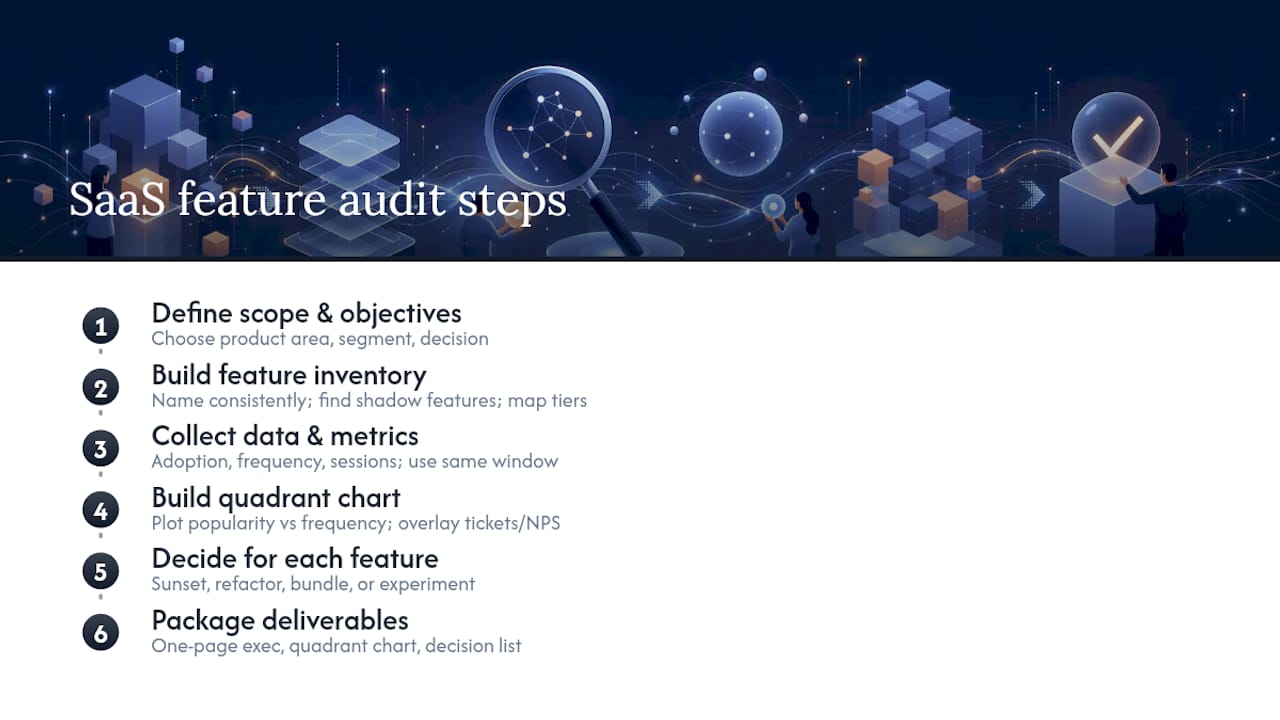
3. Collect the data. Pull adoption rate, frequency of use, and session data segmented by cohort and plan. Don't mix time windows; a feature measured over 30 days looks different from one measured over 90.
4. Build the quadrant chart. Plot popularity against frequency, then layer in support ticket volume or NPS-by-feature where you have it. This overlay often reveals features that look healthy on usage alone but are quietly generating complaints.

5. Force a decision on every feature. Low-impact features get one of four labels: sunset, refactor, bundle into another feature, or run a small experiment before deciding.
6. Package deliverables for stakeholders. A one-page executive summary, the quadrant chart itself, and a decision list with owners and target dates. Engineering leads want the decision list. Executives want the one-pager.
Pro Tip: Run the inventory step before you touch analytics tools. Teams that jump straight to pulling metrics almost always discover, halfway through, a feature nobody scoped, which forces a restart.
Which Metrics and Tools Actually Matter?
Collect adoption rate, frequency of use, DAU/MAU ratio, support ticket volume per feature, average session time, and conversion funnel impact. NPS or satisfaction scores broken out by feature, when you can get them, catch problems raw usage numbers miss entirely.
Tool fit depends on what you're measuring:
- Google Analytics (GA4) for top-of-funnel traffic and page-level engagement
- Amplitude or Mixpanel for event-based cohort analysis, especially when you need to trace a user's path through a specific feature
- Pendo for in-app guidance, feature tagging, and lightweight in-product surveys
- Heap when you need retroactive event capture because nobody instrumented the feature in advance
- FullStory for session replay, which shows you exactly where users hesitate or abandon a flow
- ProductPlan for turning audit findings into a roadmap artifact stakeholders can actually read
Segment everything by new users versus power users, by plan tier, and by onboarding stage; a feature that looks abandoned overall can be thriving among your highest-paying accounts.
Pro Tip: Instrument empty states and first-run screens separately from the rest of the feature. A high abandonment rate at the empty state usually means a discovery problem, not a value problem, and the fix is completely different.
How Do You Read Each Quadrant?
Every quadrant maps to a specific action, not a general vibe:
- Top right (high popularity, high frequency): double down. Consider raising the price or bundling adjacent features around it.
- Top left (low popularity, high frequency): improve discoverability. A small, devoted user base often signals a feature buried too deep in navigation.
- Bottom right (high popularity, low frequency): run a usability test and check time-to-value. One-time-use features often need a faster onboarding path, not a redesign.
- Bottom left (low popularity, low frequency): experiment with a minor tweak first, then retire if nothing moves within a defined window.
Before finalizing any decision, weigh three secondary signals: how much revenue the feature touches, how much support volume it generates, and how expensive it is to maintain technically. A low-frequency feature tied to your top three enterprise accounts stays, even if the quadrant chart says otherwise.
Pro Tip: Never retire a bottom-left feature the same week you find it. Check whether it's a dependency for a smaller but high-value account first.
What Mistakes Make an Audit Unreliable?
The most common failure is scope creep: trying to audit the whole product instead of one area tied to one decision. Close behind it is relying on sales demos or roadmap claims instead of actual shipping data, which independent verification exists specifically to catch.
Watch for these red flags:
- Sample sizes too small to trust (a feature with 40 total users tells you almost nothing)
- Inconsistent event definitions between teams or tools
- Metrics pulled across mismatched time windows
- Shadow features left out of the inventory entirely
Pro Tip: If a number looks too clean, cross-check it against support tickets or a handful of session replays before you act on it.
What Happens After the Audit Ends?
Score every "improve" or "experiment" decision with a method like RICE, then hand off to engineering and design with clear acceptance criteria and a rollback plan.
- Prioritize using RICE or a similar impact-versus-effort matrix
- Attach success metrics and an owner to every handoff item
- Schedule a 60 or 90-day follow-up to confirm the change actually worked
What Do Real SaaS Feature Audits Look Like?
A mid-market project management SaaS company runs a useful blueprint. The product team scoped an audit to their reporting module after noticing support tickets climbing without a matching bump in usage. The inventory step turned up eleven distinct reporting features, three of which nobody on the current team had built or knew still existed.
Pulling adoption data by cohort showed the pattern: enterprise accounts used four of the eleven features weekly, while self-serve accounts touched maybe two, and rarely more than once. Plotting all eleven on a quadrant chart put six of them squarely in the bottom left. Support ticket volume told a different story for two of those six: low usage, but every ticket came from a top-20 account. Those two got a refactor label instead of a sunset label.
The other four went through a staged retirement, communicated to the small number of affected accounts three weeks ahead.
A second pattern shows up often in B2B SaaS audits: a feature-gap analysis run alongside the internal audit, turning competitor differences into explicit build, accept, or disqualify decisions instead of letting a competitor's marketing page dictate the roadmap. Teams that skip this step tend to build reactive features that mirror a rival's announcement rather than their own usage data.
What Separates a Mature Audit Program From a One-Off Exercise
The teams that get real value from feature audits don't treat them as a quarterly fire drill. They wire usage signals into the same pipeline that ships code, so a feature's adoption curve is visible the same week it ships, not six months later. They also enforce decisions; a "retire" label that sits unactioned for two quarters is worse than never running the audit at all.
Expect your first three audits to be messy. Data will be inconsistent, half your shadow features will surprise you, and at least one stakeholder will push back on a retirement decision with a story instead of a number. That's normal. Set the goal for audit one as building the inventory cleanly, not making perfect decisions.
I've watched this exact pattern play out across the twenty-one disciplines SaaS LaunchPad reviews in a single product audit: feature usage rarely lies, but the org chart around it usually does.
Get an Expert-Run Audit Without Building the Dashboard Yourself
Everything above works if you have the analytics stack, the time, and a team willing to sit through six weeks of data wrangling. SaaS LaunchPad exists for the teams that don't have all three at once.

The on-demand 21-stage product audit covers feature evaluation alongside twenty other disciplines, from business logic verification to competitive intelligence, and hands you a Product Excellence Blueprint plus a copy-paste-ready Master Transformation Prompt built for your specific platform. It's built for teams who need the quadrant analysis, the decision framework, and the stakeholder-ready deliverables without spending a quarter assembling them internally.
Engage SaaS LaunchPad when you need a full audit fast, when you lack a dedicated analyst, or when you want an outside set of eyes to validate what your internal data is already suggesting. Purchase a credit, submit your platform, and get back a prioritized roadmap with before/after impact projections. Start your product analysis and see where your feature set actually stands.
Sources
For deeper definitions and quadrant templates, the ProductPlan glossary is a solid starting point, alongside their reference documentation on interpreting results. For competitive context, Semrush's guide to competitive analysis covers AI visibility gaps worth checking alongside usage data.
FAQ
What Are Audit Features?
Audit features are the specific capabilities a feature audit evaluates: usage data like adoption rate and frequency, along with qualitative signals like support ticket volume and satisfaction scores tied to that feature.
What Are the 5 C's of an Audit?
There's no single standardized "5 C's" framework specific to SaaS feature audits; audit methodology varies by source, so treat any five-word acronym you see elsewhere with caution and focus instead on scope, inventory, data, analysis, and action.
What Are the Four Types of Audits in a SaaS Context?
For SaaS products, the four practical types are typically feature audits (usage and adoption), security audits, competitive audits, and financial or license audits covering spend and seat utilization.
How Often Should a SaaS Team Run a Feature Audit?
Quarterly works for fast-shipping teams, while a pre-roadmap cadence of one or two audits a year suits slower-moving enterprise products; either way, run one immediately after a churn spike or major pricing change.
Can SaaS LaunchPad Run My Feature Audit for Me?
Yes. SaaS LaunchPad's on-demand 21-stage product audit includes feature evaluation as one discipline within a full Product Excellence Blueprint, delivered with a prioritized roadmap and a Master Transformation Prompt.