TL;DR:
- A SaaS product is software hosted by a provider, accessed online through a subscription, and automatically updated. It relies on multi-tenancy and continuous delivery to offer scalable, cost-effective solutions for businesses of all sizes.
A SaaS product is defined as software hosted by a provider and delivered to users over the internet through a subscription model, removing the need for local installation or manual updates. The industry term is Software as a Service, and it represents the dominant software deployment model worldwide as of 2023. Three pillars define every SaaS product: multi-tenancy, continuous delivery, and subscription-based recurring billing. Understanding these pillars tells you exactly what you are buying, what you are not buying, and why the model works so well for businesses of every size.
What is a SaaS product, and how does it differ from traditional software?
A SaaS product separates software ownership from software use. With traditional software, you buy a license, install it on a machine, and manage every update yourself. With a SaaS product, the provider owns the application, hosts it on cloud infrastructure, and handles every upgrade automatically.

SaaS development differs fundamentally from custom software in one critical way: the product belongs to the provider, not the buyer. You pay for access, not ownership. That distinction changes your cost structure, your IT workload, and your ability to scale.
The practical result is significant. A small business using a SaaS accounting platform never needs an IT team to push updates or patch security vulnerabilities. The vendor does it overnight, and you log in the next morning to a better product. That is a structural advantage traditional software cannot match.
Pro Tip: Before evaluating any SaaS product, confirm whether the vendor uses a true multi-tenant architecture. Single-tenant setups often cost more and scale poorly, which matters when your business grows.
How does SaaS architecture actually work?
SaaS runs on cloud infrastructure built on layers of technology, typically Infrastructure as a Service (IaaS) and Platform as a Service (PaaS), sitting beneath the application layer. The provider manages all three layers. You interact only with the application through a web browser.
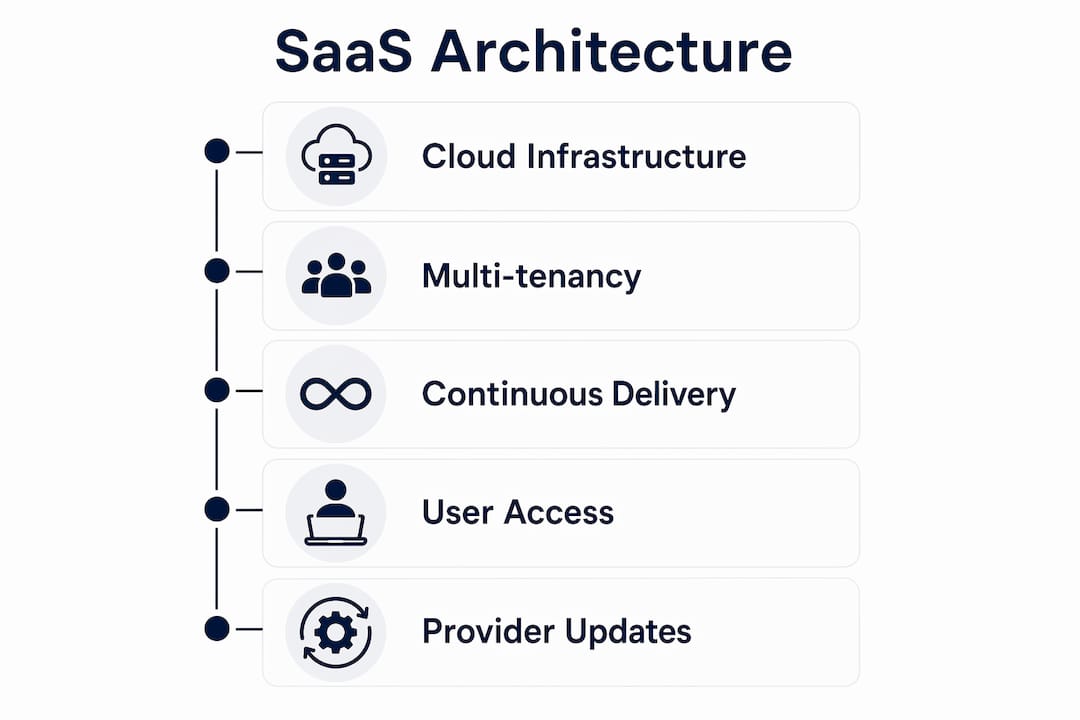
Multi-tenancy is the architectural cornerstone. A single shared codebase serves multiple customers simultaneously, with data isolation keeping each customer's information separate and secure. This shared model is what makes SaaS cost-effective at scale. The provider spreads infrastructure costs across thousands of customers instead of building dedicated environments for each one.
Continuous delivery is the second structural advantage. Providers push updates centrally, so every customer receives improvements at the same time without any action on their part. This is why SaaS providers respond faster to customer feedback than traditional software firms. A bug reported on Monday can be fixed and deployed by Wednesday, across every customer account simultaneously.
| Architecture Component | Role in SaaS |
|---|---|
| IaaS (e.g., cloud servers) | Provides raw compute, storage, and networking |
| PaaS (e.g., managed databases) | Supplies runtime environments and middleware |
| Multi-tenant application layer | Serves all customers from one shared codebase |
| Data isolation layer | Keeps each customer's data separate and secure |
| Continuous delivery pipeline | Deploys updates centrally without user action |
What operational requirements make SaaS products complex to build?
Building a SaaS product is not the same as building a web application. SaaS requires operational capabilities that go far beyond writing code, including onboarding flows, subscription billing systems, support tooling, monitoring, and release engineering. Founders who treat SaaS as a pure software project consistently underestimate what it takes to serve customers at scale.
The gap between a working prototype and a production-ready SaaS product is wide. A prototype serves one customer. A SaaS product must serve thousands simultaneously, handle payment failures gracefully, onboard new users without friction, and maintain uptime around the clock. Each of those requirements demands its own engineering investment.
The critical operational components every SaaS product needs include:
- Subscription billing system: Handles recurring payments, plan upgrades, downgrades, and failed charge recovery
- Onboarding flow: Guides new users to their first success moment quickly, reducing churn in the first 30 days
- Support tooling: Provides in-app help, ticketing, and knowledge bases so customers resolve issues without contacting your team
- Monitoring and alerting: Tracks uptime, error rates, and performance so your team catches problems before customers do
- Release engineering: Manages deployments, rollbacks, and feature flags so updates ship safely without downtime
- Multi-tenancy infrastructure: Isolates customer data while sharing compute resources efficiently
Pro Tip: Map your SaaS operational readiness before you launch. Most early-stage SaaS failures trace back to missing billing or onboarding infrastructure, not the core product feature set.
What are the key benefits of SaaS solutions for businesses?
SaaS reduces IT complexity by eliminating local installations, hardware dependencies, and manual maintenance cycles. That reduction translates directly into lower operational costs and faster deployment times. A business can activate a new SaaS tool for an entire team in hours, not weeks.
Scalability is the second major benefit. SaaS subscriptions typically offer tiered pricing, so you pay for the capacity you use and upgrade as you grow. A five-person startup and a 500-person company can use the same platform, just at different price points. That flexibility is structurally impossible with traditional perpetual licenses.
SaaS provides the highest cloud service level because vendors fully manage the application, removing maintenance and upgrade burdens from users entirely. The vendor's incentive is to keep the product running and improving, because their revenue depends on your continued subscription. That alignment of incentives benefits you directly.
The table below contrasts SaaS and traditional software across the dimensions that matter most to business owners:
| Dimension | SaaS | Traditional software |
|---|---|---|
| Installation | None required; browser-based access | Required on each device |
| Updates | Automatic, vendor-managed | Manual, user-managed |
| Cost model | Recurring subscription | Upfront license fee |
| Scalability | Adjust plan as needed | Requires new licenses |
| Availability | 24/7 with built-in monitoring | Depends on local setup |
| IT burden | Minimal; vendor handles infrastructure | High; internal team required |
How do different industries apply SaaS products effectively?
SaaS applications support businesses across every sector by providing flexible, browser-based access to specialized tools without the overhead of traditional software deployment. The range of SaaS categories covers nearly every business function.
The most widely adopted SaaS categories include:
- CRM platforms: Sales teams manage customer relationships, track pipelines, and automate follow-ups without installing anything locally
- ERP systems: Finance and operations teams run procurement, inventory, and accounting from a single cloud-based platform
- Collaboration tools: Remote and hybrid teams communicate, share files, and manage projects across time zones and devices
- HR and payroll platforms: People teams handle hiring, onboarding, benefits, and payroll through a single subscription
- Marketing automation: Growth teams run email campaigns, track attribution, and manage leads without dedicated data infrastructure
Small businesses benefit most from the low entry cost. A five-person team can access enterprise-grade CRM functionality for a monthly fee that would not have covered a single traditional software license a decade ago. That access levels the competitive field significantly.
Remote work has accelerated SaaS adoption across every industry. Because SaaS products run in a browser, a team member in Chicago and a contractor in Austin access the same application with the same data in real time. No VPN, no file syncing, no version conflicts. That cross-device, cross-location access is a structural feature of the SaaS model, not an add-on.
For individuals, SaaS tools like project management apps, design platforms, and writing assistants provide professional-grade capabilities on a personal budget. The SaaS tools available today cover everything from solo freelancers managing invoices to enterprise teams running global supply chains.
Key Takeaways
A SaaS product delivers software over the internet on a subscription basis, and its value comes from continuous updates, multi-tenancy, and the complete removal of local installation and maintenance burdens.
| Point | Details |
|---|---|
| Core SaaS definition | Software hosted by a provider, accessed via browser, billed on subscription. |
| Architecture foundation | Multi-tenancy and continuous delivery are what make SaaS cost-effective and fast to improve. |
| Operational complexity | SaaS requires billing, onboarding, monitoring, and support infrastructure beyond the core app. |
| Business benefits | SaaS eliminates IT overhead, scales with your team, and keeps software current automatically. |
| Industry applications | CRM, ERP, collaboration, HR, and marketing tools all run effectively as SaaS across every sector. |
Why most business owners misread the SaaS model
The most common mistake I see business owners make is treating a SaaS subscription like a software purchase. They evaluate the feature list, sign up, and then wonder why adoption stalls. The product is not the problem. The onboarding is.
SaaS vendors compete on retention, not just acquisition. The best ones invest as much in the first-user experience as they do in the core feature set. When you evaluate a SaaS product, the quality of the onboarding flow tells you more about the vendor's long-term reliability than any feature comparison chart.
The second mistake is underestimating what it takes to build a SaaS product. Founders often come to me with a working prototype and a launch date. What they are missing is the billing infrastructure, the monitoring stack, and the customer success process. Building SaaS at scale requires engineering, marketing, and customer success to operate in parallel, not in sequence.
My honest advice: if you are evaluating SaaS for your business, ask the vendor how they handle billing failures and what their uptime SLA looks like. If you are building a SaaS product, treat the operational layer as a first-class engineering problem from day one. The companies that get this right early grow faster and churn less.
— Gregory Cornelius
What SaaS LaunchPad does for product teams
Building a SaaS product that holds up under real customer load requires more than good code. It requires a disciplined approach across every layer of the product.

SaaS LaunchPad by Stratevia analyzes your application across twenty-one disciplines, the same way an elite product team would, and delivers a Product Excellence Blueprint along with a copy-paste-ready Master Transformation Prompt tailored to your platform. The 21-discipline framework covers the operational, architectural, and go-to-market layers that most SaaS products miss before they hit growth. If you are building or refining a SaaS product, this is where a structured review pays for itself.
FAQ
What is a SaaS product in simple terms?
A SaaS product is software you access through a web browser and pay for on a subscription basis. The provider hosts the application and manages all updates, so you never install or maintain anything locally.
How does SaaS differ from traditional software?
Traditional software requires local installation and manual updates, while SaaS runs in the cloud and updates automatically. You pay a recurring fee for access rather than a one-time license fee for ownership.
What are common examples of SaaS applications?
Common SaaS applications include CRM platforms, project management tools, HR and payroll systems, marketing automation platforms, and cloud-based accounting software. These tools cover nearly every core business function.
Is SaaS right for my business?
SaaS is the right fit for most businesses because it reduces IT overhead, scales with your team size, and keeps software current without internal maintenance. The subscription model also converts large upfront costs into predictable monthly expenses.
What should I check before adopting a SaaS product?
Evaluate the vendor's onboarding quality, uptime SLA, billing flexibility, and data security practices. A strong onboarding flow and transparent SLA are the clearest signals of a vendor that will support your business long term.