TL;DR:
- Bubble no-code is an AI-powered visual platform that enables building fully functional web and mobile apps without coding. It generates editable app logic, databases, and interfaces, allowing users to customize easily through a visual editor, making it suitable for hobbyists and first-time founders. However, it limits infrastructure control by lacking code export, requiring users to accept platform lock-in.
Bubble no-code is a visual, AI-powered platform that lets you build fully functional web and native mobile applications without writing a single line of code. Unlike drag-and-drop website builders, Bubble generates complete app logic, databases, and user interfaces that you can edit and maintain visually. It sits in a category called visual application development, and it has quietly become one of the most capable tools available to hobbyists and first-time founders. If you have an app idea and no programming background, Bubble is worth understanding in depth.
How does Bubble's visual AI app builder work?
Bubble generates fully visual apps where the UI, workflows, and database remain human-readable and editable, which sets it apart from every AI tool that spits out opaque code. When a traditional AI coding assistant writes code for you, you get a file you cannot easily read or change without programming knowledge. Bubble takes a different path entirely.

The AI agent inside Bubble reads your plain-language description and builds the app structure for you. It creates pages, connects database fields, sets up privacy rules, and maps out visual workflow logic as flowcharts you can read and modify. That means you can see exactly what your app does at every step, without decoding any syntax.
Here is what the AI generates in a single session:
- Pages and UI components laid out visually on a canvas
- Workflows shown as readable flowcharts that describe app logic in plain language
- Database schemas with fields, data types, and relationships
- Privacy rules controlling who can read or write each data type
Bubble has powered more than 7 million apps built by 6 million builders across over 220 countries, with most users generating a working app foundation in under 10 minutes. That speed matters because it lowers the cost of experimentation. You can test an idea the same afternoon you think of it.
Pro Tip: Treat the AI-generated app as a starting point, not a finished product. The real power comes from switching into the visual editor and customizing every detail to match your actual requirements.
The visual editor is where you take control. You can drag elements, adjust database fields, rewrite workflow steps, and change privacy settings without touching any code. That level of direct control is what separates Bubble from simpler no-code tools that lock you into fixed templates.
What security and enterprise features does Bubble provide?
Bubble includes production-grade security out of the box, which means you can deploy a real app to real users without setting up your own server infrastructure. This is a significant advantage for hobbyists who want to build something serious without a DevOps background.
As of 2026, Bubble offers SOC 2 Type II compliance, GDPR-ready data processing agreements, and AWS hosting with TLS and AES-256 encryption. SOC 2 Type II is an independent audit standard that verifies a platform's security controls are operating correctly over time. That certification matters if you plan to handle user data, process payments, or pitch your app to business clients.
The built-in security features include:
- SOC 2 Type II certification for verified security controls
- GDPR-ready agreements covering data processing for European users
- AWS hosting with TLS encryption for data in transit
- AES-256 encryption for data at rest
- Security dashboard that scans your app for common vulnerabilities
The security dashboard is a feature most hobbyists overlook. It actively scans your app and flags issues like exposed data types or misconfigured privacy rules before they become problems. That kind of automated review replaces what a security engineer would normally do during a code review.
Bubble's managed infrastructure handles scaling automatically. You do not need to configure load balancers or provision servers as your user count grows. The platform absorbs that complexity so you can focus on the product itself.
What is the typical experience of building an app on Bubble?
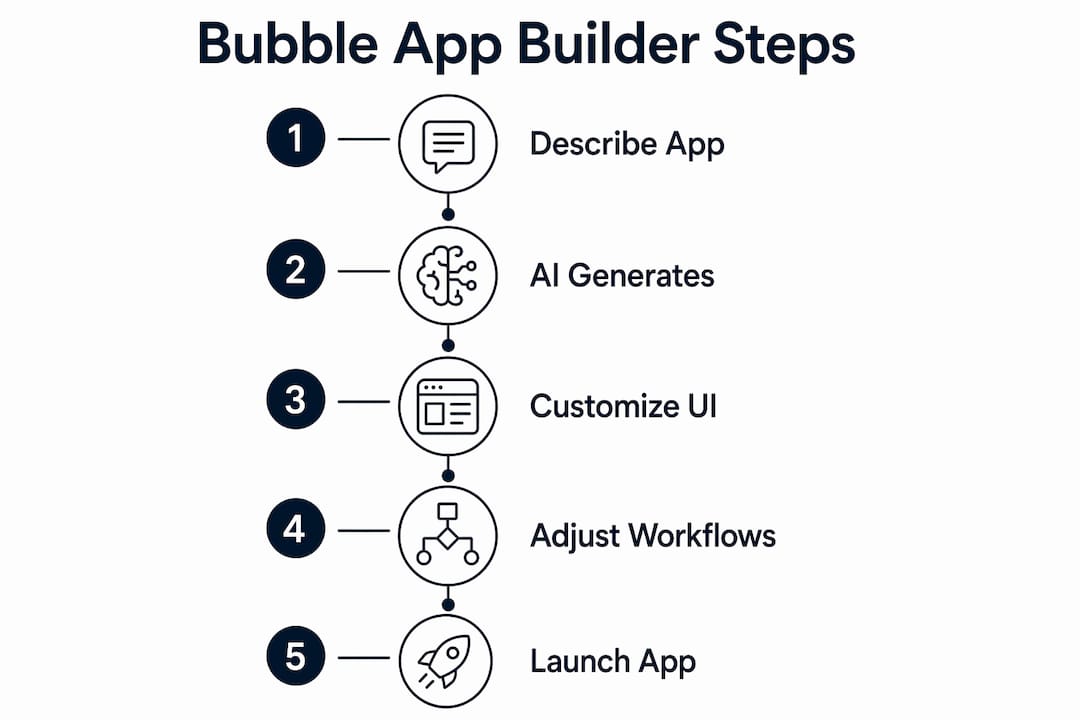
Building on Bubble follows a clear sequence that moves from description to working product faster than most people expect. The process is iterative, and understanding each phase helps you get better results.
- Write a plain-language description. Describe your app the way you would explain it to a friend. Include the core features, the type of users, and the main actions they will take.
- Let the AI generate the foundation. The AI agent creates pages, database schemas, and workflows based on your description. This takes a few minutes.
- Review the generated structure. Open the visual editor and examine what the AI built. Check the database fields, the workflow logic, and the page layouts.
- Refine through conversation. Return to the AI chat and ask for specific changes. "Add a search bar to the listings page" or "Create a workflow that sends an email when a user signs up" are the kinds of instructions that work well.
- Switch to the visual editor for precision. The AI agent and visual editor work side by side. Use the chat for speed and the editor for control.
- Test with real data. Bubble includes a preview mode where you can interact with your app exactly as a user would, using a live database.
- Deploy when ready. Publishing your app requires one click. Bubble handles the hosting, SSL certificates, and domain configuration.
Pro Tip: When the AI produces something unexpected, do not restart from scratch. Open the workflow editor and trace the logic step by step. You will learn the platform faster by fixing a mistake than by regenerating everything.
The back-and-forth between AI chat and visual editing is what makes Bubble feel different from both traditional coding and simpler no-code tools. You get the speed of AI generation and the precision of direct editing in the same workspace.
What kinds of apps do hobbyists actually build on Bubble?
The range of projects built on Bubble is wider than most people realize. Successful projects span from simple internal tools to SaaS platforms, marketplaces, social networks, and AI-powered chatbots, showing that the platform handles real complexity at scale.
Here are the most common project categories hobbyists build successfully:
- Marketplaces where buyers and sellers transact, with user profiles, listings, and payment flows
- Social networks with feeds, follows, messaging, and notification systems
- SaaS dashboards that display data, manage subscriptions, and handle user roles
- AI-powered chatbots integrated with external APIs like OpenAI
- Directory apps for listings, reviews, and search
- Internal tools for small teams managing data or workflows
| App type | Core Bubble features used |
|---|---|
| Marketplace | Database, payments, user roles, search |
| Social network | Real-time data, feeds, messaging, privacy rules |
| SaaS dashboard | Charts, API connections, subscription logic |
| AI chatbot | API workflows, external service integration |
| Directory | Search, filtering, user-submitted content |
Bubble also supports native mobile apps using React Native, with shared backend logic between web and mobile versions. The mobile features are still evolving, but the shared database and workflow layer means you build core logic once and apply it across platforms.
For hobbyists exploring no-code app builder options, Bubble sits at the more capable end of the spectrum. It handles complexity that simpler tools cannot, which makes it the right choice when your idea requires real database relationships or custom business logic.
What challenges should new Bubble users expect?
Bubble is not a point-and-click toy. The learning curve for advanced visual logic and database design is significant, comparable to understanding basic software architecture principles. That is not a reason to avoid it. It is a reason to set realistic expectations.
The main challenges new users face:
- Workflow logic requires you to think sequentially about what happens when a user takes an action
- Database design demands understanding of data types, relationships, and how records connect
- Privacy rules must be configured carefully or data can be exposed unintentionally
- Mobile-specific rebuilding is required for some UI components when moving from web to native mobile
- Platform lock-in is real. Bubble is a managed platform that controls the deployment environment, and code export is not available
The lock-in point deserves honest attention. Because Bubble manages your hosting and does not allow code export, you cannot migrate your app to a different server or framework without rebuilding it. For most hobbyists building a product to test an idea, that trade-off is worth it. For teams that need full infrastructure control, it is a genuine constraint.
The no-code industry trend is toward hybrid models where understanding database structure and logic flows remains necessary regardless of whether you write code. Bubble reflects that reality. The platform removes syntax, but it does not remove the need to think clearly about how your app works.
Pro Tip: Start with Bubble's official documentation and the Bubble Forum before watching third-party tutorials. The official resources reflect the current editor, while many tutorials are outdated and show an older interface.
Key Takeaways
Bubble no-code is the most capable visual app builder available to non-developers, combining AI-generated foundations with a fully editable visual editor, production-grade security, and support for real-world app complexity.
| Point | Details |
|---|---|
| AI generates a working foundation | Bubble's AI creates pages, workflows, databases, and privacy rules from a plain-language description in under 10 minutes. |
| Visual editing gives you full control | Every AI-generated element is editable in the visual editor without writing any code. |
| Enterprise security is built in | SOC 2 Type II compliance, AES-256 encryption, and GDPR-ready agreements come standard on all plans. |
| Real apps are possible | Marketplaces, SaaS dashboards, social networks, and AI chatbots all run successfully on Bubble at scale. |
| Lock-in is a real trade-off | Bubble manages hosting and does not allow code export, so infrastructure control is limited by design. |
Why Bubble is the right bet for serious hobbyists in 2026
I have watched a lot of no-code tools come and go, and most of them hit a ceiling fast. You build something that looks like an app, and then the moment you need a real database relationship or a conditional workflow, the tool falls apart. Bubble does not do that.
What genuinely surprised me about Bubble's AI approach is that it does not try to hide the complexity. It generates the logic visually and then hands you the controls. That is the right philosophy. You learn how your app actually works because you can see every workflow step and every database field. That transparency pays off enormously when something breaks or when you want to add a feature six months after launch.
The combination of AI speed and visual precision is what makes Bubble worth the learning investment. Yes, the workflow editor takes time to master. Yes, the database concepts feel unfamiliar at first. But those concepts are the same ones you would need to understand even if you hired a developer. Bubble just lets you engage with them directly, without a middleman.
My honest advice: do not treat Bubble as a shortcut around thinking. Treat it as a tool that removes the syntax barrier so you can focus on the actual product decisions. The hobbyists who get the most out of it are the ones who commit to understanding app logic, not just clicking through the AI prompts.
— Gregory Cornelius
When your Bubble app needs a product strategy to match
Building the app is one part of the equation. Knowing what to build, how to price it, and how to scale it is another.

SaaS LaunchPad analyzes your application across 21 product engineering disciplines, covering everything from database architecture and user experience to monetization and growth strategy. It delivers a Product Excellence Blueprint and a copy-paste-ready Master Transformation Prompt tailored to your specific platform. For hobbyists who have built something on Bubble and want to take it seriously, SaaS LaunchPad provides the structured product thinking that turns a working prototype into a product worth scaling. You can also explore the product stages framework to understand exactly where your app sits and what it needs next.
FAQ
What is Bubble no-code?
Bubble no-code is a visual app development platform that uses AI to generate fully functional web and mobile applications without requiring any programming. It produces editable UI, workflows, and databases that users control through a visual editor.
How long does it take to build an app on Bubble?
Bubble's AI generates a working app foundation in under 10 minutes from a plain-language description. Refining and customizing the app to production quality takes additional time depending on complexity.
Is Bubble secure enough for real users?
Bubble provides SOC 2 Type II compliance, GDPR-ready data processing agreements, and AWS hosting with AES-256 encryption, making it suitable for production apps that handle real user data.
What types of apps can hobbyists build on Bubble?
Hobbyists successfully build marketplaces, social networks, SaaS dashboards, AI-powered chatbots, and directory apps on Bubble, ranging from simple MVPs to apps serving large user bases.
What is the biggest downside of using Bubble?
Bubble is a managed platform that does not allow code export, which means you cannot migrate your app to a different infrastructure without rebuilding it. This trade-off is worth it for most hobbyists but is a real constraint for teams needing full server control.