SaaS performance testing is the practice of validating that a multi-tenant cloud application meets its SLOs for latency, stability, tenant fairness, and cost under production-like load. It is not a one-time load test before launch. It is a repeatable discipline that catches the failure modes unique to shared infrastructure, like one heavy tenant slowing down everyone else on the same database shard.
The goals are simple to state and hard to hit: stability under peak traffic, scalability that matches real usage curves, fairness across tenants, and cost that doesn't spiral as you scale. Slow performance has a direct revenue cost. Google found that 53% of mobile visitors abandon a site that takes longer than three seconds to load, and SaaS platforms lose trial signups and renewals the same way.
Three moves get you started this week:
- Set SLOs for p95 and p99 latency on your critical user flows, not just averages.
- Model your actual tenant mix, including your heaviest accounts, before writing a single test script.
- Add a performance gate to your CI/CD pipeline so regressions get caught before release, not after a customer complains.
TL;DR:
- Setting SLOs on the p95 and p99 latency percentiles for critical user flows helps capture tail latency issues that impact user experience.
- Modeling your actual tenant usage, especially your heaviest accounts, ensures test scenarios reflect real-world skew and workload distribution.
- Cross-tenant fairness tests are essential to detect how a heavy tenant can degrade service quality for others sharing infrastructure.
- Integrating lightweight load tests into CI and scheduling comprehensive tests nightly helps catch regressions before they reach customers.
- SaaS-specific tests should include rate limiting, tier enforcement, background job queues, and data sharding to ensure fair and stable multi-tenant performance.
Table of Contents
- Types of SaaS Performance Tests and When to Run Them
- What Makes SaaS Performance Testing Different From Traditional Load Testing
- Metrics and SLOs That Actually Reflect User Experience
- Designing Realistic Workloads and Tenant-Mix Modeling
- Tools and CI/CD Integration for Performance Testing
- Running the Test and Diagnosing What Breaks
- Turning Results Into Fixes: Prioritization and Optimization
- Your Pre-Test, In-Test, and Post-Test Checklist
- How SaaS Launchpad Fits Performance Testing Into a Full Product Audit
- What Most Teams Get Wrong About Performance Testing
- Get a Prioritized Performance Blueprint Instead of Guessing
- Key Takeaways
- Sources
- FAQ
Types of SaaS Performance Tests and When to Run Them
Each test type answers a different question about your system, and skipping one leaves a blind spot.
- Load testing applies expected, steady traffic to confirm your app holds its SLOs under normal peak conditions, like the daily 9 a.m. login rush.
- Stress testing pushes past expected load until something breaks, revealing your actual ceiling and how the system fails, gracefully or catastrophically.
- Spike testing simulates sudden traffic surges, such as a marketing campaign driving 10,000 signups in an hour, to check autoscaling response time.
- Soak (endurance) testing runs sustained load for hours or days to expose memory leaks, connection pool exhaustion, and slow-growing queue backlogs.
- Scalability testing measures how throughput and latency change as you add resources, confirming your horizontal scaling actually delivers proportional gains.
- Baseline and benchmark testing captures performance under known conditions so every later test has something concrete to compare against.
- Real-user simulation (RUS) replays realistic session patterns, including think time and mixed API calls, instead of hammering a single endpoint.
Run load and baseline tests in CI on every pull request against a scaled-down environment. Save stress, spike, and soak tests for nightly or pre-release pipelines, since they take longer and need dedicated infrastructure. Scalability testing belongs in a quarterly or pre-major-launch cadence, tied to capacity planning.
What Makes SaaS Performance Testing Different From Traditional Load Testing
Multi-tenancy changes everything about how you design tests. A single-tenant app either works or doesn't under load. A multi-tenant SaaS platform can look perfectly healthy in aggregate metrics while one tenant experiences unusable latency because another tenant just ran a massive batch export on the same shared database.
That's the "noisy neighbor" problem, and it demands its own test category: tenant fairness testing. You deliberately load one tenant heavily while measuring latency and error rates for quieter tenants sharing the same infrastructure. AWS's guidance on testing SaaS solutions recommends explicit cross-tenant impact tests, tenant consumption tests, and onboarding tests as standard practice, not optional extras.

Autoscaling introduces its own gap. The scaling policy might work fine on paper, but the window between the traffic spike and new instances coming online, especially with cold container starts or cold cache states, is exactly where users see timeouts. Test that window directly by measuring latency during the scale-up interval, not just after it stabilizes.
Real-time connections (WebSockets, SSE, long-polling dashboards) and background job queues fail differently than HTTP request/response cycles. A queue that backs up silently for twenty minutes won't show up in your request latency dashboard at all.
Other SaaS-specific test targets worth building into your suite:
- Rate-limit and throttling behavior when a tenant hits their API quota mid-test
- Tier boundary enforcement, confirming a free-tier account can't consume enterprise-tier resources
- Background job queue depth under concurrent tenant load
- Data sharding and partition behavior as tenant data volume grows unevenly
Security and performance overlap heavily here. Rate limiting exists partly to protect against noisy neighbors, and testing it thoroughly deserves the same attention you'd give to SaaS security practices more broadly.
Pro Tip: Run your noisy-neighbor test with the heavy tenant's load starting five minutes before your measurement window opens on quiet tenants. Starting them simultaneously hides the ramp-up effect that actually causes the worst customer complaints.
Metrics and SLOs That Actually Reflect User Experience
Averages lie. A mean latency of 200ms can hide a p99 of 4 seconds affecting one in every hundred requests, which is exactly the kind of intermittent failure that generates support tickets nobody can reproduce.
Use p95 and p99 latency for interactive flows like login, search, and checkout, since these are what your most engaged users actually feel. Use p50 for diagnostic work when you're comparing typical-case performance across code changes. Throughput (requests per second) and error rate need to be tracked together, because a system can maintain throughput by silently dropping or timing out the requests it can't handle.
Resource utilization (CPU, memory, database connections, queue depth) tells you why latency degrades, not just that it did. Cloud-specific testing guidance stresses tracking cost per transaction alongside these metrics, since autoscaling can hit an SLO by simply throwing more compute at the problem, which quietly wrecks your margins.
| Metric | Healthy Signal | Warning Signal |
|---|---|---|
| p95 latency (critical flow) | Under agreed SLO | Approaching SLO under normal load |
| p99 latency | Within 3x of p50 | Above 5x of p50, indicating tail issues |
| Error rate | Very low error rate | Above 1%, or rising during ramp |
| Queue depth | Returns to baseline after burst | Grows continuously, never drains |
| Per-tenant p95 variance | Within 20% across tenants | One tenant consistently 2x+ slower |
Per-tenant metrics matter as much as system-wide ones. If your aggregate p95 looks fine but one tenant's p95 is double everyone else's, you have a fairness problem your dashboards won't surface unless you're slicing by tenant ID.
Designing Realistic Workloads and Tenant-Mix Modeling
Generic load testing tools generate traffic. What makes a test useful is whether that traffic resembles your actual production patterns, and most teams get this wrong by treating every simulated user identically.
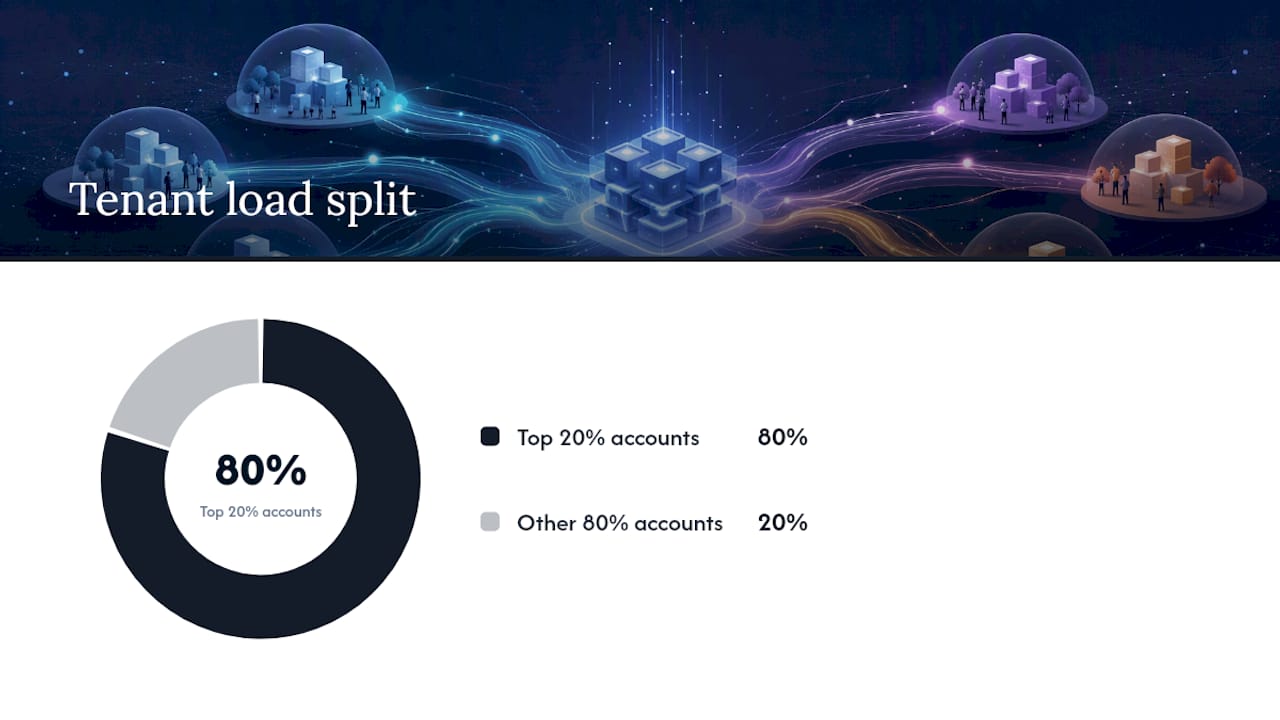
Real SaaS tenant bases follow a skewed distribution: your top 20% of accounts by usage often generate roughly 80% of your load, and that handful of power users hits different code paths than your median free-tier account. Build tenant tiers into your test plan explicitly, weighting virtual users so the mix matches your production analytics, not an even split across "small," "medium," and "large" accounts.
Representative journeys matter more than raw request volume. A test that hammers your login endpoint a million times tells you little if your real risk is a reporting dashboard that runs a slow aggregate query. Pull your actual top-ten user journeys from analytics and script those, with realistic data volumes attached to each tenant tier.
Test data and environment parity deserve equal attention:
- Seed test environments with data volumes that match production tenant sizes, not toy datasets
- Keep database indexes, cache warmup state, and infrastructure sizing consistent with production
- Refresh test data periodically so query plans don't drift from what users actually experience
Cloud environments also introduce measurement noise that a single test run can't average out.
Multi-tenant resource contention and VM scheduling introduce genuine randomness into cloud performance measurements, which means a single test run rarely tells you the full story. The PT4Cloud methodology addresses this with statistical stop conditions, achieving roughly 95% accuracy in performance-distribution estimates while cutting the number of required test runs by more than 60%. That's a meaningful cost reduction for teams running tests repeatedly in CI.
Applying similar statistical thinking to your own test suite means running enough iterations to get a confidence band, then stopping once results stabilize rather than burning compute budget on diminishing returns.
Tools and CI/CD Integration for Performance Testing
Tool choice depends on what layer you're testing and how much infrastructure you want to manage yourself.
Open-source protocol-level tools remain the backbone of most pipelines. k6 and Gatling both use code-based scripting, which makes tests reviewable and versionable like any other code, and both integrate cleanly into CI runners. JMeter has the largest plugin ecosystem and deepest enterprise history, though its GUI-first workflow fits less naturally into a code-first pipeline. Locust appeals to Python-heavy teams who want to write test logic in the same language as their application. For browser-level testing that captures real rendering and JavaScript execution time, Playwright fills the gap that protocol-level tools can't reach.
Managed services remove infrastructure overhead entirely. Azure App Testing runs JMeter, Locust, and Playwright scripts at scale, simulating large virtual user counts while correlating client-side and server-side metrics automatically, which speeds up diagnosis considerably.
Integration strategy matters as much as tool choice:
- Run lightweight load tests on every pull request against a scaled-down environment, gating merges on latency regressions
- Schedule full-scale load, stress, and soak tests nightly against a staging environment that mirrors production sizing
- Reserve spike and chaos-style tests for pre-release windows with dedicated infrastructure
- Watch for rate limits and quotas on your test-generation infrastructure, especially with geo-distributed load generators
Leading performance engineers now treat load tests as code, version-controlled alongside the application, so a regression is caught the same day it's introduced rather than weeks later.
Running the Test and Diagnosing What Breaks
A disciplined test run follows a pattern, not a single blast of traffic. Start with a baseline phase at low load to confirm the system is healthy, then ramp traffic gradually to your target level, sustain that load long enough to expose slow leaks, and finish with a spike phase to test recovery behavior.
- Capture APM traces, application logs, and infrastructure metrics (CPU, memory, connection pools) for the entire run, timestamped consistently.
- Correlate load-generator timestamps with your observability platform so a latency spike at minute 12 maps directly to the trace and log entries from that same minute.
- Slice every metric by tenant ID where possible, since aggregate charts hide the noisy-neighbor pattern almost every time.
- Work through a diagnostic checklist when latency degrades: check database query times and lock contention first, then cache hit rates, then queue depth, then rate-limiter or throttling logs.
- Package the run into an evidence pack: test script, configuration, raw metrics export, annotated dashboards, and a written summary of what failed and why.
That evidence pack matters more than most teams realize. It's the difference between a one-off finding and a reproducible regression test you can re-run after every fix, which is what actually prevents the same bug from resurfacing two releases later.
Turning Results Into Fixes: Prioritization and Optimization
Not every finding deserves the same urgency. Triage each issue on three axes: severity (how badly it breaks the user experience), scope (one tenant or all of them), and reproducibility (does it happen every run or intermittently). A severe, widespread, reproducible issue goes first. An intermittent, single-tenant issue goes on a watch list.
Common symptoms map to familiar remedies:
- High p99 latency on read-heavy endpoints usually points to missing caching or an unindexed query, not raw compute shortage.
- Growing queue depth under sustained load often means your worker pool is undersized relative to job arrival rate.
- Autoscaling that lags behind spikes usually needs a lower scale-out threshold or pre-warmed capacity for predictable traffic patterns.
- Per-tenant latency variance frequently traces back to a shared database connection pool with no per-tenant limits.
After a fix ships, retest with the same script that found the problem, then run a shorter soak test to confirm the fix holds under sustained conditions, and add the scenario to your CI performance gate as a permanent regression check. Weigh every fix against its cost impact too. Throwing more compute at a caching problem might hit your SLO on paper while quietly doubling your infrastructure bill.
Your Pre-Test, In-Test, and Post-Test Checklist
Before a single test runs, three gaps cause most bad results: undefined SLOs, an environment that doesn't match production, and monitoring that isn't actually capturing per-tenant data.
Before testing: confirm SLOs are documented, verify test environment parity with production sizing, load realistic test data volumes, and enable full observability instrumentation.
During testing: watch telemetry live rather than waiting for a post-run report, check per-tenant metrics continuously for fairness violations, and flag any scale-gap window where autoscaling lags behind demand.
After testing: compile the evidence pack, add the scenario to your CI regression gate, write a remediation plan with owners and deadlines, and schedule a re-run once fixes ship.
How SaaS Launchpad Fits Performance Testing Into a Full Product Audit
Performance is one discipline among many that determine whether a SaaS platform is ready for enterprise buyers, and testing it in isolation misses how it interacts with security, scalability, and workflow design. SaaS LaunchPad's 21-discipline audit examines performance analysis alongside scalability, security, and business logic verification, so a caching fix that improves latency doesn't accidentally create a security gap elsewhere.
The audit produces:
- A Product Excellence Blueprint that ranks performance findings against 20 other product disciplines by business impact
- A Master Transformation Prompt, copy-paste-ready for major no-code platforms that translates findings into implementation steps
- A prioritized improvement roadmap with phased execution guidance, so fixes ship in an order that actually reduces risk
Teams that want a reproducible evidence pack tied to enterprise-readiness scoring, not just a raw load test report, can see how the audit stages break down before committing.
What Most Teams Get Wrong About Performance Testing
The most common mistake I see is testing only averages and calling it done. A mean response time under SLO tells you almost nothing about the tenant whose p99 latency triples during your busiest hour, and that tenant is usually the one about to churn.
The second mistake is ignoring tenant skew entirely, running evenly distributed synthetic load against a system where real usage is wildly uneven. The third is skipping post-mortems after a test uncovers a problem, fixing the symptom, and never turning the scenario into a permanent CI regression check.
If you're starting from scratch, spend your first real effort on workload modeling and a CI performance gate before you touch exotic chaos scenarios. Get the basics reproducible first. If you're unsure whether your current testing covers the gaps that matter, a focused audit is a faster path to clarity than guessing.
— Gregory Cornelius
Get a Prioritized Performance Blueprint Instead of Guessing
Most teams patch performance problems one support ticket at a time, without ever seeing how latency issues connect to scalability limits or security gaps elsewhere in the platform. SaaS LaunchPad's audit gives you a single diagnostic pass across 21 disciplines, including performance analysis, so tenant-fairness gaps and autoscaling weak points show up alongside everything else that affects enterprise readiness.

You get a Product Excellence Blueprint that ranks your performance findings by business impact, plus a Master Transformation Prompt you can paste directly into your no-code platform to start implementing fixes. It's a practical shortcut for teams that want a prioritized plan instead of another spreadsheet of raw load test numbers. Check the pricing and credit packs to book an analysis and see where your platform's performance stands against enterprise buyer expectations.
Key Takeaways
Effective SaaS performance testing requires tenant-mix realism, latency percentile SLOs, and CI-integrated gates to catch regressions before customers do.
| Point | Details |
|---|---|
| Define SLOs on percentiles | Set p95 and p99 latency targets for critical flows, not averages, since tail latency drives support tickets. |
| Model your real tenant mix | Weight virtual users to match production usage skew, since a handful of accounts often drive most load. |
| Test for noisy neighbors | Run cross-tenant fairness tests to catch one heavy tenant degrading others sharing infrastructure. |
| Gate releases in CI | Add lightweight load tests to pull requests and full suites to nightly runs to catch regressions early. |
| Get an integrated readiness view | SaaS LaunchPad's 21-discipline audit places performance findings alongside security and scalability in one prioritized roadmap. |
Sources
- Google: 53% of mobile users abandon sites that take over 3 seconds to load
- Shift-left performance testing in CI/CD: a practical framework
- A statistics-based performance testing methodology for cloud applications (PT4Cloud)
FAQ
What Is SaaS Performance Testing?
It's the practice of validating that a multi-tenant cloud application meets latency, stability, tenant-fairness, and cost SLOs under production-like load, covering load, stress, spike, soak, and scalability scenarios.
What Are the Top Performance Testing Tools?
k6, Gatling, and JMeter are the most widely used, with k6 and Gatling favored for code-based CI integration and JMeter offering the deepest plugin ecosystem. Managed options like Azure App Testing add scale and observability correlation without infrastructure management.
Is SaaS Testing Being Replaced by AI?
AI tools are speeding up test script generation and anomaly detection in results, but they aren't replacing the need for realistic tenant-mix modeling, SLO definition, and human judgment in triaging failures.
Which Is Better: JMeter or a Code-First Tool Like k6 or Gatling?
JMeter's GUI-first workflow and mature plugin library suit teams with existing scripts and complex protocol needs, while k6 and Gatling fit better into CI pipelines because their tests are written and versioned as code.
How Do I Reduce the Cost of Running Performance Tests?
Apply statistical stop conditions, as PT4Cloud demonstrates, running enough iterations to reach a confidence band and stopping once results stabilize rather than running fixed, oversized test batches.