A design system audit produces three things: a component inventory, a scored map of where the product has drifted from the system, and a prioritized fix list you can start working the same week. Run one when you notice variant sprawl, rising rework, or a UI that looks inconsistent between teams. The output isn't a report that sits in a drive folder. It's a ranked list of fixes, sized by effort, that someone on your team can start today.
TL;DR:
- A design system audit focuses on shipped product screens to accurately identify drift and variant sprawl that often go unnoticed in component libraries.
- Running quarterly light checks helps detect early signs of drift, while full audits after major changes ensure overall system health.
- Prioritization should target high-traffic, high-variance components and accessibility issues first, with fixes measured by impact and effort.
- Automated tools like Figma plugins, token linters, and visual regression testers streamline inventory, scoring, and enforcement but require manual review for accuracy.
- External audits are valuable for multiple-product systems or when governance is inconsistent, providing a comprehensive, unbiased snapshot of systemic issues.
Table of Contents
- What Does a Design System Audit Cover?
- Why Run a Design System Audit Now?
- How to Run a Design System Audit in 5 Days
- How Do You Score Design System Drift?
- What Accessibility Checks Belong in a Design System Audit?
- Fixing Tokens, Documentation, and Governance for Good
- What Tools Help Automate a Design System Audit?
- What Should the Audit Deliverable Look Like?
- When Should You Bring in an External Design System Audit?
- Lessons From Auditing Design Systems Under Deadline
- Get a Faster, Deeper Read on Your Product Than a Manual Audit Delivers
- Sources
- FAQ
What Does a Design System Audit Cover?
A design system audit only tells the truth if you point it at the right target: the shipped product, not the component library. Libraries look clean because someone maintains them for show. Production screens tell you what designers and engineers actually did under deadline pressure, which is where drift lives.
There are four common audit types, and picking the wrong one wastes a sprint:
- Full system audit — every component, token, pattern, and doc page, usually run annually or after a major redesign.
- Component set audit — a narrower pass on one family (forms, navigation, data tables) when you suspect a specific problem area.
- Tokens-only audit — checks whether color, spacing, and type tokens are actually used, or whether hardcoded values have crept back in.
- Accessibility pass — a focused review against WCAG criteria, often run between full audits.
Before you start, define what "healthy" looks like in numbers, not adjectives. Three metrics do most of the work: variant sprawl (how many one-off versions of a button or card exist outside the documented set), adoption rate (the percentage of instances using the real component versus a rebuilt clone), and override rate (how often teams bypass tokens with custom CSS or hardcoded values). Without these numbers going in, you'll finish the audit with opinions instead of evidence, and opinions don't survive a budget conversation.
Why Run a Design System Audit Now?
The warning signs are usually visible before anyone calls them a crisis: three different button shadows across two products, a form component that engineering quietly forked six months ago, designers rebuilding a card from scratch because "the real one didn't fit." Each of these is small. Together, they compound into weeks of redundant work every quarter.
A significant share of design systems fail not because of bad components, but because of weak funding and governance. Systems run as a side project, staffed with "20% time" instead of dedicated headcount, are far more likely to collapse once the original champions move on or get pulled onto other priorities. An audit gives you the leverage to fix that: a scored, documented drift map is a much stronger budget argument than "the design system feels messy."
Cadence matters as much as depth. Run a light quarterly check, thirty minutes with the most-used screens, to catch drift early. Reserve the full audit for once a year or right after a major product change, a rebrand, a platform migration, a big feature launch. Waiting longer than a year almost guarantees you're auditing a system nobody fully trusts anymore.
How to Run a Design System Audit in 5 Days
You don't need a quarter to get real answers. A compact five-day workflow works well for systems with up to roughly 60 components, and scales down cleanly for smaller products. Here's the breakdown.
Before day one, get access sorted. You need edit or view access to Figma files and the live Storybook (if one exists), a shared spreadsheet or lightweight tool for tracking findings, and an automated accessibility scanner like axe-core installed or bookmarked. Missing access is the single most common reason audits stall on day two.
- Day 1: Inventory the product, not the library. Walk through your five or six highest-traffic user flows, screenshot every component instance you encounter, and log it against the documented system. Count variants that don't exist in the official set. This is where variant sprawl becomes visible instead of theoretical.
- Day 2: Score drift by category and severity. For every gap you found, tag it as token drift, variant drift, pattern drift, or documentation drift, then rate severity from cosmetic to broken. Don't rate everything "high." A button with a slightly off shadow is not the same emergency as a form input missing a focus state.
- Day 3: Run accessibility checks. Scan flagged components with an automated tool referencing WCAG, then manually tab through the same flows with a keyboard, checking focus order and visible focus states. Automated scanners alone will miss real problems.
- Day 4: Reconcile tokens and documentation. Compare token values in the library against what's actually rendered in production CSS or code. Note every documentation page that describes a component's old behavior instead of its current one.
- Day 5: Build the fix list. Turn every scored finding into a row with the affected component, the drift type, the recommended fix, and a rough effort estimate (small, medium, large).
Pro Tip: Prioritize by multiplying reach and risk, not by whichever fix feels fastest. A button used on 40 screens with a minor spacing issue usually outranks a rarely used modal with a broken layout, and any accessibility failure on a high-traffic component jumps to the top regardless of how "small" the fix looks.
The prioritization rule that holds up under scrutiny: fix high-variant-sprawl components and accessibility failures first, since both compound the fastest across a growing product. Everything else gets sequenced by effort against impact, not by who complains loudest in Slack.

How Do You Score Design System Drift?
Scoring only works if you separate the kinds of drift, because a token mismatch and a broken pattern need completely different fixes. The five-day checklist model splits drift into four categories: token drift (hardcoded values replacing variables), variant drift (unofficial versions of a component), pattern drift (workflows that no longer match documented interaction patterns), and documentation drift (docs describing behavior that no longer exists in production).
A simple 0 to 3 severity scale per category keeps scoring consistent across auditors: 0 for no drift, 1 for cosmetic, 2 for functional inconsistency, 3 for broken or inaccessible. Once every finding has a category and a severity score, you can roll results up into a maturity picture instead of a pile of individual complaints.
The Design System Audit Framework (DSAF) gives you a neutral, open rubric for this roll-up: a 25-item quick-start for a fast read, or the full 125-criterion model across 20 categories when you need a defensible, detailed score. It works like a maturity model. A low score means components exist but nobody consistently uses them. A middle score means adoption is real but governance and documentation lag behind. A high score means tokens, components, and docs stay synchronized because CI enforces it, not because someone remembers to check.
| Metric | What it measures | Healthy signal |
|---|---|---|
| Variant sprawl ratio | Unofficial variants versus documented variants | Trending toward zero |
| Adoption rate | Percentage of instances using the real component | High in core flows |
| Override rate | Frequency of hardcoded values bypassing tokens | Low and falling quarter over quarter |
| Median time to adopt a release | How long it takes new component versions to reach production | Days, not months |
Track these four metrics quarterly and you'll catch drift returning long before it becomes a full audit again.
What Accessibility Checks Belong in a Design System Audit?
Accessibility deserves its own pass inside the audit, not a footnote at the end. Start with an automated scanner like axe-core run against your flagged components, checking contrast ratios, missing labels, and ARIA attributes against WCAG criteria.
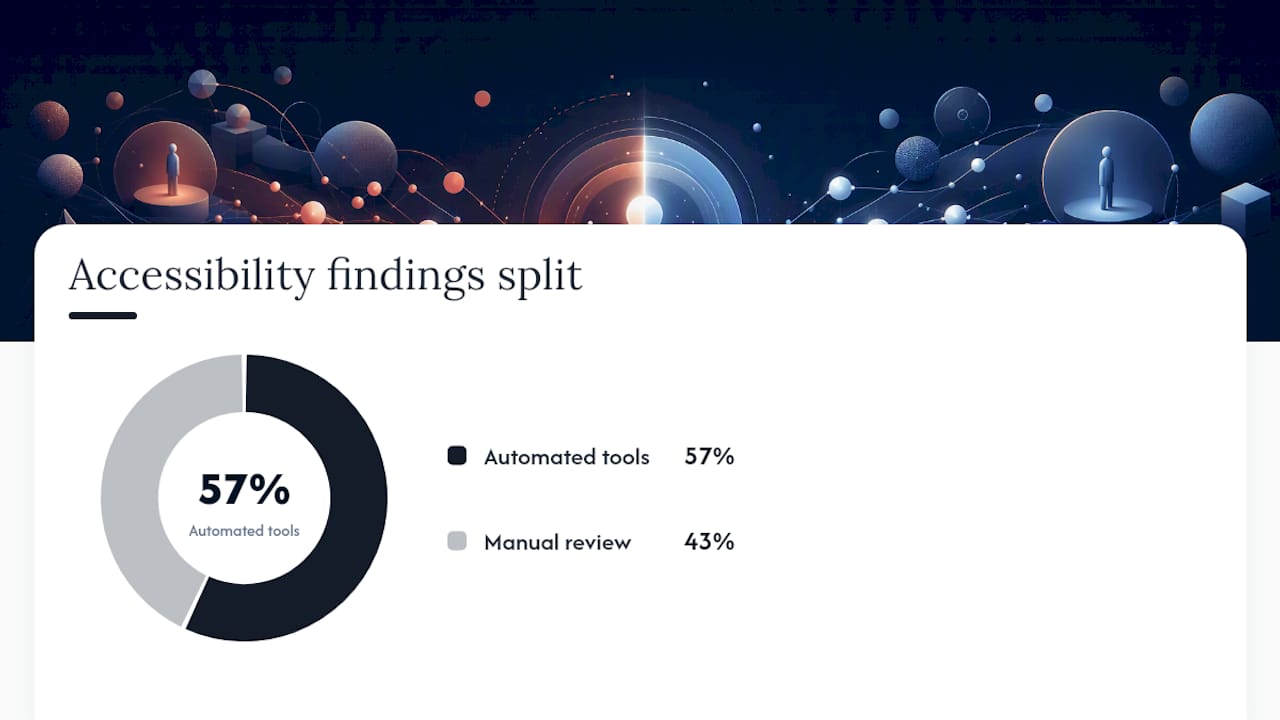
Automated tools catch roughly 57% of accessibility issues. The rest require a human: tabbing through a flow to check focus order, testing with a screen reader on a form, confirming that a modal traps focus correctly when it opens. Skip the manual pass and you'll ship an audit that reports "clean" on components that fail for real people using assistive technology.
When you fold accessibility findings into the fix list, sequence matters:
- Components used across many flows go first, since one fix propagates everywhere.
- Components already flagged for high variant sprawl go next, since inconsistency and inaccessibility tend to travel together.
- Cosmetic accessibility issues (contrast just below threshold) rank below functional failures (unreachable by keyboard, missing labels).
Treat any accessibility finding with the same urgency you'd give a broken checkout flow. It usually affects more real users than the visual bugs that get all the attention in design reviews.
Fixing Tokens, Documentation, and Governance for Good
Fixing what you found is only half the job. Without changes to the underlying process, drift comes back within two quarters.
- Trace token drift to its source. Pull a sample of production components and compare their actual CSS values against the documented tokens. Where they diverge, the pipeline connecting design tokens to code has usually broken, often because a developer hardcoded a value under deadline pressure and nobody caught it.
- Run a documentation usability test. Hand a developer who has never touched the system a task, like implementing a data table, using only the docs. Watch where they get stuck. Confusion at that stage means the documentation problem is real, not hypothetical.
- Decide your governance model. Design system governance generally lands in one of three shapes: centralized (one team owns everything), federated (a core team sets standards, product teams contribute components), or open contribution (anyone can propose changes through a defined path). Pick the one matching your org size, and write down the contribution flow so it isn't tribal knowledge.
- Enforce contracts through CI, not policy documents. The systems that hold up over time mix decentralized delivery with centralized enforcement: token values, accessibility baselines, and linting rules get checked automatically in the build pipeline, not just described in a wiki page nobody rereads.
Pro Tip: If your governance model exists only as a Notion page, it doesn't exist. Add a linting rule that fails a build when someone hard-codes a color instead of using a token, and you'll stop more drift in a month than a year of policy reminders.
What Tools Help Automate a Design System Audit?
You don't need custom tooling to get most of this done. Three categories cover almost everything.
- Figma-native scanning: The Design System Auditor plugin scans files directly and flags how closely artboards follow your documented components, which speeds up the inventory phase considerably.
- Open scoring rubrics: DSAF gives you a repeatable, machine-readable scoring model. Run the 25-item quick-start for a fast temperature check, or the full 125-criterion version when a stakeholder needs a defensible, detailed score.
- CI-level enforcement: Token linting catches hardcoded values before they merge. Visual regression tools like Chromatic or Percy catch unintended component changes across pull requests, turning "we'll catch it in review" into an automated gate instead of a hope.
None of these replace human judgment on severity and priority. They just remove the tedious counting work so your team spends time on decisions instead of data entry.
What Should the Audit Deliverable Look Like?
The deliverable is only useful if someone outside the audit team can pick it up and act on it without a translator.
- Each fix-list row needs four fields: the component name, the drift type (token, variant, pattern, or documentation), the recommended fix, and an effort estimate (small, medium, large).
- Walk stakeholders through the findings in a focused 90 minute session, not an email with a spreadsheet attached.
- Define what success looks like one week out: a handful of the highest-priority fixes merged, and the token pipeline issue from day four already ticketed.
- Set a follow-up cadence, ideally the light quarterly check described earlier, so the fix list doesn't quietly become the new baseline of acceptable drift.
When Should You Bring in an External Design System Audit?
An internal team can run the five-day playbook described above for most single-product systems. Where it gets harder is scale: multiple products, several design and engineering teams, and a governance model nobody fully agrees on. That's usually where a fresh set of eyes catches blind spots insiders have stopped seeing.
SaaS LaunchPad approaches this as one piece of a broader 21-discipline product analysis, covering UX and UI audit work alongside performance, security, and enterprise readiness scoring, and returns it as a Product Excellence Blueprint with a tailored Master Transformation Prompt your team can act on immediately. If your organization is past the point where a spreadsheet and a Slack channel can hold the governance conversation, an outside audit tends to move faster than trying to build consensus internally from scratch.
Lessons From Auditing Design Systems Under Deadline
The biggest mistake teams make isn't sloppy scoring. It's auditing the component library instead of the shipped product, then presenting a clean report that has nothing to do with what users actually see. The second biggest mistake is marking every finding "high priority," which guarantees nothing gets fixed because nothing stands out.
An outside perspective tends to catch what internal teams normalize, the workaround everyone quietly accepted eighteen months ago. In one review, a single token fix, correcting a hardcoded spacing value baked into a shared card component, resolved layout inconsistencies across eleven separate screens. That's the pattern worth remembering: small, well-targeted fixes beat sweeping rewrites almost every time.
— Gregory Cornelius
Get a Faster, Deeper Read on Your Product Than a Manual Audit Delivers
A five-day design system audit tells you where your UI has drifted. It doesn't tell you whether your onboarding flow is bleeding revenue, whether your security posture would survive enterprise procurement, or whether your feature set matches what competitors shipped last quarter. SaaS LaunchPad is built for that wider gap: a 21-discipline product analysis that covers design consistency alongside performance, conversion, scalability, and enterprise readiness in one pass.

You buy credits per analysis, no subscription, and credits never expire, so you can run one now and another after your next release without renegotiating anything. The output is a Product Excellence Blueprint plus a Master Transformation Prompt built for your platform, something your team, or a no-code builder, can act on the same day it lands. If your last design system review raised more questions than it answered, check current pricing and run a full analysis on your platform this week.
Sources
- A Design System Governance Process | Brad Frost
- Design System Audit Framework (DSAF) — GitHub
- How to run a design system audit in 5 days: a checklist
FAQ
What is a design system audit?
A design system audit is a structured review comparing what's documented in your design system against what's actually shipped in production, producing a component inventory, a scored drift map, and a prioritized fix list.
How long does a design system audit take?
For systems with up to roughly 60 components, a focused five-day workflow covering inventory, drift scoring, accessibility, and token reconciliation is usually enough to produce an actionable fix list.
What tools can automate parts of a design system audit?
The Design System Auditor plugin for Figma speeds up inventory work, DSAF provides an open scoring rubric, and CI tools like token linters and visual regression testing (Chromatic or Percy) enforce fixes after the audit.
Why do automated accessibility scans miss issues?
Automated scanners catch roughly 57% of accessibility issues; problems like keyboard focus order and screen reader behavior require a manual pass referencing WCAG criteria.
How often should you run a design system audit?
Run light checks quarterly to catch drift early, and reserve a full audit for once a year or immediately after a major redesign, rebrand, or platform migration.
When is an external design system audit worth it?
An external audit is worth it once a system spans multiple products or teams and governance blind spots outweigh what a five-day internal checklist can catch. SaaS LaunchPad's 21-discipline analysis covers that broader scope in a single pass.