No-code lets you build working software by configuring templates and drag-and-drop blocks, with zero programming. Low-code does the same thing but keeps a code escape hatch open for custom logic, integrations, and edge cases that visual tools can't handle. The quick rule: pick no-code when the app is simple, internal, and business-owned. Pick low-code when you need custom business logic, deep integrations, or a system that has to scale past a few hundred users.
Both approaches sit on a spectrum rather than in separate boxes, according to Microsoft's own framing of the two models. SaaS LaunchPad evaluates this exact tradeoff for founders across 21 product disciplines, and the pattern shows up constantly: teams pick a tool based on marketing rather than fit, then pay for it in a rebuild eighteen months later.
Here's the fast version of the decision:
- Choose no-code for internal trackers, simple client portals, marketing dashboards, and early MVPs where speed beats flexibility.
- Choose low-code when you need custom workflows, deep API integrations, role-based security, or an app that has to survive real user growth.
- Choose a hybrid platform if you're not sure yet. Most serious vendors now offer both experiences under one roof.
Key Takeaways
The right choice between no-code and low-code depends on custom logic needs, integration complexity, and long-term scale, not on which label sounds more modern.
| Point | Details |
|---|---|
| Match tool to job | Use no-code for simple, internal, business-owned apps; use low-code for custom logic and integrations. |
| Watch the scaling ceiling | No-code platforms often hit hidden costs and lock-in as usage grows, per no-code scalability analysis. |
| Separate the integration layer | Route data and connections through a dedicated layer instead of building logic into the UI tool. |
| Govern citizen development early | Assign an owner, write a one-page approval template, and review apps quarterly. |
| Validate fit before scaling | SaaS LaunchPad's 21-discipline Product Excellence Blueprint checks integration, security, and scalability before you commit further. |
Table of Contents
- No Code vs Low Code: What Each Term Actually Means
- No Code vs Low Code: Comparing the Dimensions That Actually Matter
- Which Use Cases Fit No-Code, and Which Need Low-Code
- Where No-Code Scalability Breaks Down
- Governance and Integration: The Short Checklist
- How SaaS LaunchPad Evaluates No-Code and Low-Code Fit
- An Editorial Take on Choosing Between the Two
- Get a Product Excellence Blueprint Before You Commit to a Platform
- Sources
- FAQ
No Code vs Low Code: What Each Term Actually Means
The terms get thrown around loosely, but the mechanics behind them are specific enough to matter once you're picking a real tool.
Low-code platforms give you a visual builder for most of the app, then let you drop into actual code when the visual layer can't do what you need. IBM describes it as tooling aimed at professional developers who want to skip boilerplate and spend their time on the logic that's actually hard: pricing rules, approval chains, data transformations.
No-code platforms remove the code option entirely. You configure forms, connect prebuilt blocks, and rely on the vendor's managed hosting and data layer for everything underneath. This is deliberate: no-code platforms are aimed squarely at business users who need software but have no interest in becoming developers.
Here's what actually happens once you use either one for more than a weekend project:
- Auto-generated code runs under the hood either way. Even "no-code" apps compile into real code somewhere. You just never see it or touch it.
- The visual builder is the real product in both cases. Drag-and-drop layout, prebuilt logic blocks, and connector libraries define what's possible far more than the label on the pricing page does.
- Modern platforms increasingly offer both experiences at once. A tool might let a marketing team build a landing page with zero code while giving an internal developer a scripting panel for the same project.
- The label mostly signals intended audience and extensibility ceiling, not a hard technical wall. A platform marketed as "no-code" today might quietly ship a low-code tier next year because vendors have noticed the same blurring you're noticing.
That last point is why the argument over which term is "correct" mostly misses the point. What matters is how far a specific platform will stretch before it breaks.
No Code vs Low Code: Comparing the Dimensions That Actually Matter
Skip the marketing copy and compare the two approaches on the axes that determine whether your app survives contact with real users.
Target user. No-code is built for business users, ops managers, marketers, HR staff, who've never written a function in their life. Low-code assumes at least some technical literacy, often a professional developer working faster, not a beginner working at all.

Coding requirement. No-code: none, by design. Low-code: minimal for common cases, real coding ability required for anything custom, per IBM's comparison.
Flexibility and extensibility. This is where the split gets real. No-code tools cap out at what the vendor's blocks support. Low-code tools let you write your way past that ceiling.
Speed to deliver. Both are fast compared to traditional development, that's the entire pitch of the category. No-code is usually faster for genuinely simple builds; low-code pulls ahead once custom logic enters the picture, because you're not fighting the tool to fake a feature it doesn't support.
Governance and IT involvement. No-code apps often get built with little or no IT oversight, which is exactly how "shadow IT" sprawl happens. Low-code tends to pull IT in earlier, if only because the code itself needs review.
Scalability and long-term costs. No-code platforms frequently hit walls around data volume, workflow complexity, or per-action pricing. Low-code, with its exit ramps into custom code, tends to absorb growth more gracefully.
Where no-code wins:
- Faster for non-technical teams to launch something real
- Lower upfront cost and no developer hiring required
- Business owners keep direct control over changes
Where no-code struggles:
- Hits a ceiling fast on custom logic and complex integrations
- Governance often gets skipped entirely, which creates risk later
Where low-code wins:
- Handles custom business rules and deep API work
- Scales further before you hit a real architectural wall
Where low-code struggles:
- Slower than no-code for genuinely simple projects
- Still requires someone with real coding skill on standby
Gartner has projected the worldwide low-code development technologies market to grow at double-digit rates year over year, a pace that tracks almost exactly with how many mid-size companies now report a formal citizen-development program instead of an informal one built on spreadsheets and goodwill.
Pro Tip: Don't shop for "no-code" or "low-code" as separate categories. Shop for a platform that offers a no-code floor for your business users and a low-code ceiling for your developers, so you never have to migrate off it just because your app grew up.
Which Use Cases Fit No-Code, and Which Need Low-Code
Match the tool to the job, not the other way around. Here's how that plays out across common project types.
- Internal tools and trackers (inventory logs, approval queues, event sign-ups): no-code wins almost every time. Nobody needs custom logic to track who signed up for the holiday party.
- Marketing dashboards and simple client portals: no-code again, especially when a marketing or ops team owns the build directly and just needs to see data, not manipulate it in complex ways.
- Early-stage MVPs: no-code lets you validate an idea in days instead of months, which is exactly the point of an MVP. Save the real engineering for after you know people want the thing.
- Customer portals with custom business logic (tiered permissions, usage-based billing, conditional workflows): low-code, because no-code's prebuilt blocks won't stretch to fit rules that specific.
- CRM integrations and enterprise workflow automation: low-code, since these typically touch multiple systems with authentication requirements no drag-and-drop connector fully covers.
Role by role, the pattern holds up: marketing and HR teams building something for internal use should default to no-code first and only escalate if they hit a wall. Ops and product teams building anything customer-facing or revenue-connected should start the conversation with low-code, because the cost of under-building is usually higher than the cost of over-building.
Before you commit, run this checklist:
- What's the real scope? A single-team tool or something company-wide?
- How many systems does this need to talk to?
- What's the security and compliance bar, especially if customer data is involved?
- What's the actual timeline, this week or this quarter?
- Who owns this app after launch, and do they have the skill to maintain it?
Where No-Code Scalability Breaks Down
The failure mode nobody puts in the sales deck: an app that worked perfectly at 50 users starts choking at 500, and by then it's woven into three departments' daily workflow.
Architectural rigidity is the real cost, not the sticker price. No-code platforms bundle your UI, your data, and your automation logic into one vendor's walled garden. That's convenient until you need to move, and then it's brutal. Migration off a no-code platform frequently means rebuilding the data model and every workflow from scratch, because there's no clean export path, according to analysis of no-code scalability limits.
Hidden costs show up as you scale, not before. Per-action pricing that looked negligible at launch turns into a real line item once your automation runs thousands of times a day. Connector limits cap how many external systems you can touch. Data export restrictions mean you don't always own your own data the way you assumed.
The most durable fix is architectural, not contractual: treat the no-code tool as a front end, and put integration and data logic in a dedicated layer instead of stuffing it into the UI tool itself, a pattern industry guides on scaling SaaS with no-code increasingly recommend.
- Vendor lock-in shows up hardest in data structure and workflow logic, not just pricing
- Per-action and per-workflow pricing models can cause costs to increase substantially at real volume
- Low-code reduces some of this risk since custom code can bridge gaps, but it still needs governance or it creates its own sprawl
- An integration layer built separately from the UI tool is usually the single highest-leverage decision you'll make early
Low-code doesn't eliminate these risks, it just gives you more rope to work around them. Skip the governance step and a low-code app can sprawl just as badly as a no-code one, just with more code debt attached.
Governance and Integration: The Short Checklist
Before any citizen developer touches a build button, get these basics settled. This is the part that separates a tool that scales gracefully from one that turns into a liability.
- Assign clear ownership. One named person approves new builds and owns the decision to retire old ones.
- Write a one-page governance template. Who can build what, what needs review, and what's off-limits for citizen developers, before anything ships.
- Build the integration layer separately. Route data and system connections through a dedicated iPaaS layer instead of hardcoding logic into the UI tool. This is the single most cited fix for the scaling problems above.
- Lock down security basics. Role-based access, single sign-on, and audit logs aren't optional once real customer or employee data touches the app.
- Assign a maintenance owner. Someone needs to monitor uptime, review changes, and catch the app before it becomes an orphaned tool nobody remembers building.
Pro Tip: Set a calendar reminder to review every citizen-built app quarterly. Orphaned apps, ones nobody owns anymore, are how "temporary" internal tools turn into unpatched security gaps three years later.
How SaaS LaunchPad Evaluates No-Code and Low-Code Fit
SaaS LaunchPad's Product Excellence Blueprint reviews a SaaS platform across 21 disciplines, from platform architecture to security to scalability, the same categories that determine whether a no-code or low-code choice holds up under real growth.
For a no-code vs low-code decision specifically, five disciplines carry the most weight: integration architecture, security posture, scalability limits, user experience design, and data ownership. Weakness in any one of those tends to be the actual reason a "quick build" turns into a costly rebuild.
Run this in an hour before you commit to a platform:
- Can you export your full data model in a usable format if you leave?
- Does the platform separate integration logic from the UI layer, or is everything bundled?
- Who outside your team can see or edit this app, and is that access logged?
An Editorial Take on Choosing Between the Two
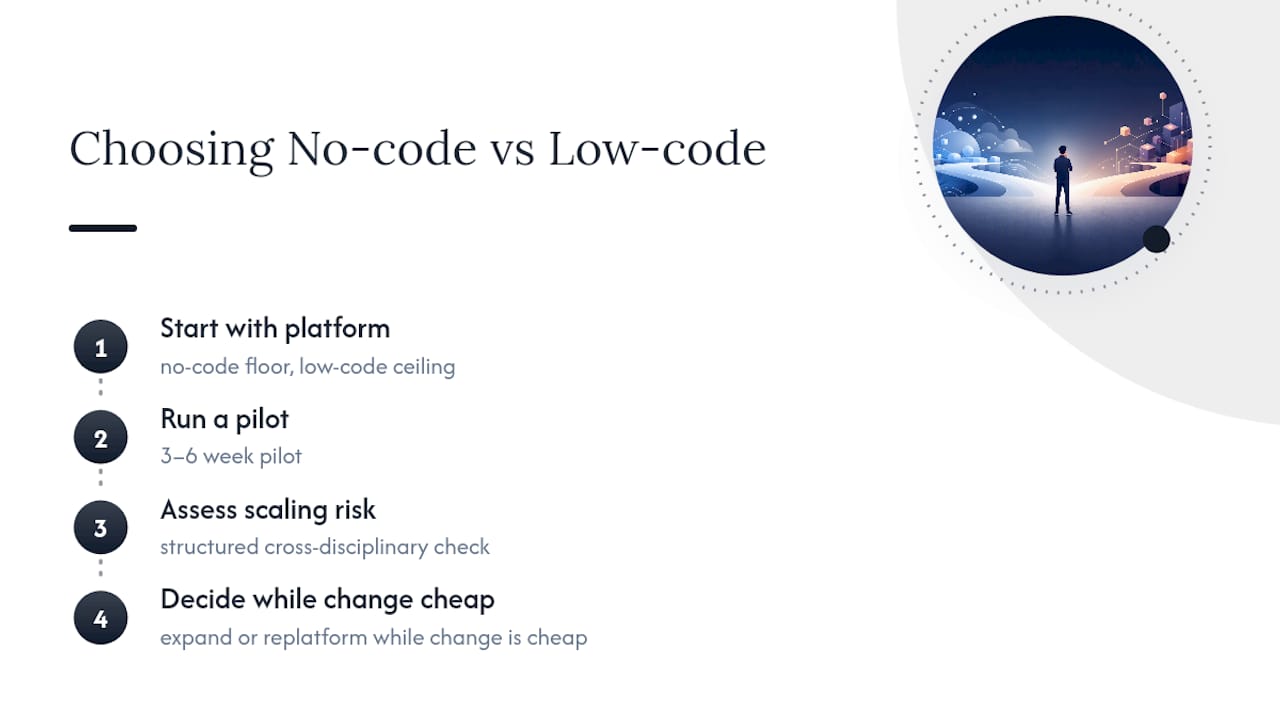
Most teams treat no-code and low-code as a permanent decision. It isn't. Treat it as a starting point instead, and prefer platforms that give you a no-code floor and a low-code ceiling, so growth doesn't force a rebuild.
Run a pilot for three to six weeks before committing further. Pair it with a structured check across the disciplines that actually predict scaling failure, then decide whether to expand or replatform while the cost of changing course is still low.
Get a Product Excellence Blueprint Before You Commit to a Platform
Choosing between no-code and low-code is really a bet on your app's next two years, not its next two months. SaaS LaunchPad's Product Excellence Blueprint runs your platform through a 21-discipline analysis covering integration architecture, security, scalability, and UX, the exact dimensions that decide whether your current platform choice holds up or needs a rebuild.

You get a prioritized roadmap and a copy-paste-ready Master Transformation Prompt built specifically for your platform, so you're not guessing which fixes matter first. If you're weighing a migration or trying to validate whether your no-code build can survive its next growth stage, request an analysis and get a clear answer instead of a hunch. Credits never expire, and packs come with volume discounts if you're evaluating more than one product.
Sources
- Low-Code vs. No-Code: What’s the difference? | IBM
- Scale SaaS Business with No-Code 2026 Guide
- Replatform, refactor, rearchitect — Azure Cloud Adoption Framework
FAQ
Is No-Code Actually Slower Than Low-Code for Complex Apps?
Yes, often. No-code tools can take longer than low-code once you're forcing prebuilt blocks to fake custom logic they weren't designed for.
Can I Switch From No-Code to Low-Code Later?
Sometimes, but it usually means a partial rebuild since no-code platforms often lack clean data export paths, which is why planning your migration path early matters more than it seems at launch.
Do I Need a Developer for Low-Code Platforms?
You need someone with real coding ability on call, even if most of the build stays visual, since low-code's whole value comes from that code escape hatch.
What's the Biggest Risk With No-Code at Scale?
Vendor lock-in and hidden per-action pricing, both of which tend to surface only after the app is deeply embedded in daily operations.
How Does SaaS LaunchPad Help With This Decision?
SaaS LaunchPad's 21-discipline Product Excellence Blueprint audits integration architecture, security, and scalability so you can validate a platform choice, or plan a migration, before hidden limits become expensive problems.