TL;DR:
- Bubble is the top no-code SaaS builder in 2026 for most founders, offering full-stack control. However, platform selection should consider data architecture, security, and exit plans to ensure long-term success. SaaS LaunchPad provides comprehensive analysis to optimize and future-proof no-code SaaS products.
What are the best no-code SaaS builders right now?
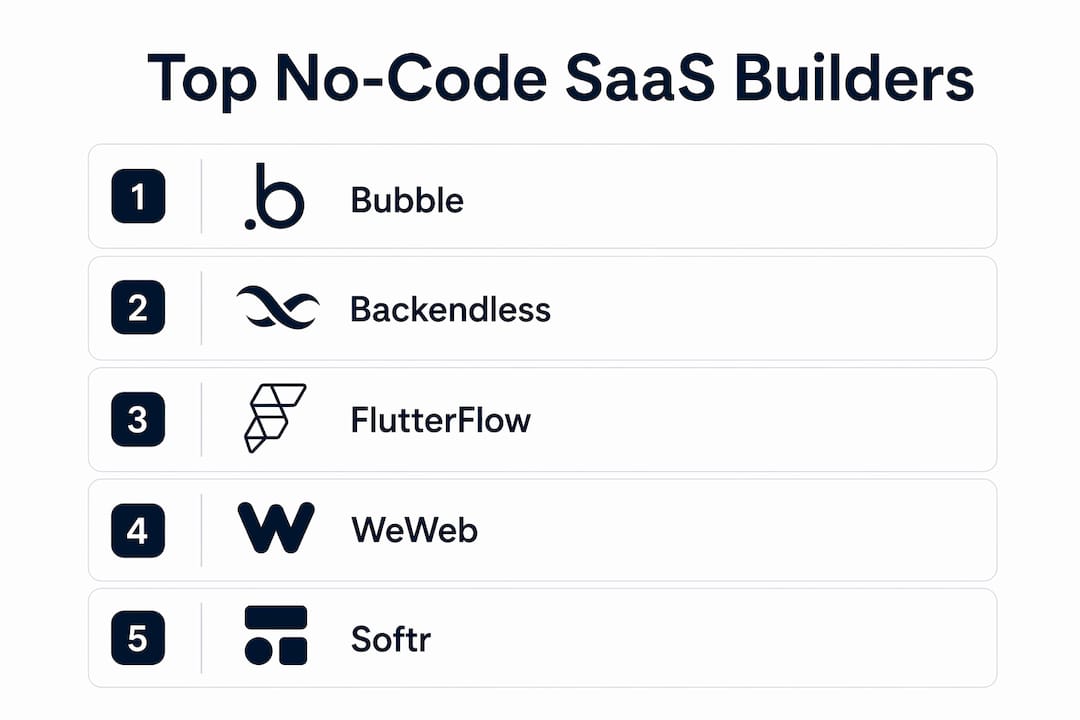
The best no-code SaaS builder for most founders in 2026 is Bubble, with Backendless and FlutterFlow close behind for teams that need deeper backend control or multi-platform reach. But the right pick depends heavily on your workflow, your data architecture, and whether you plan to sell the company someday.
This comparison covers 17 platforms, evaluated across features, pricing, scalability, integration depth, and platform ownership. The methodology was: each platform was assessed against five criteria weighted by founder impact: backend capability, UI flexibility, integration breadth, pricing transparency, and export or code-access options. Platforms that lock you into proprietary databases with no export path scored lower, regardless of how polished the interface looks.
Here is the full comparison at a glance.
| Platform | Best For | Key Features | Pros | Cons | Pricing | Export / Ownership |
|---|---|---|---|---|---|---|
| Bubble | Scalable subscription apps | Full-stack visual editor, native mobile, AI prompting | Most capable no-code platform; huge community | Steeper learning curve | Free tier; paid plans from $15/mo | No raw code export; hosted on Bubble |
| Zite | AI-powered business apps | AI app generation, built-in database, enterprise tools | Fast generation for business logic | Limited public documentation | Not publicly listed | — |
| FlutterFlow | Multi-platform SaaS | Firebase integration, Buildship workflows, mobile/web | Strong mobile output; exports Flutter code | Requires Firebase knowledge | Free tier; paid plans from $15/mo | Exports Flutter/Dart code |
| Glide | Mobile-first apps from spreadsheets | Google Sheets binding, fast prototyping | Fastest path from data to app | Limited for complex logic | Free tier; paid plans from $15/mo | No code export; Glide-hosted |
| Emergent | AI-powered SaaS apps | Advanced AI integration, automation | Strong AI feature depth | Newer platform; smaller community | Not publicly listed | — |
| Atoms | Versatile SaaS building | Growth tools, scalability focus, comprehensive toolset | Well-rounded for scaling | Less specialized than rivals | Not publicly listed | — |
| Adalo | Visual mobile apps | Drag-and-drop, mobile feature set | Easy mobile UI creation | Performance limits at scale | Free tier; paid plans from $15/mo | No code export |
| WeWeb | Responsive web SaaS | Flexible UI, powerful integrations, custom code support | Best frontend flexibility | Needs external backend (Supabase, Xano) | Free tier; paid plans from $15/mo | Exports HTML/CSS/JS |
| Softr | Complete beginners | Client portals, membership apps, Airtable/Google Sheets | Easiest onboarding | Limited for complex SaaS logic | Free tier; paid plans from $15/mo | No code export |
| Appy Pie | Quick prototypes | Drag-and-drop, broad integrations, app publishing | Wide integration library | UI quality lags behind rivals | Free tier; paid plans from $15/mo | No code export |
| Launchpad.io | Product agencies | Workspace management, client collaboration | Good for multi-project teams | Niche use case | Not publicly listed | — |
| Base44 | High-complexity apps | Modular architecture, extensibility focus | Handles complex data models | Smaller community | Not publicly listed | — |
| Figma Make | Design-first SaaS | Design-to-app workflow, prototyping | Best for designers | Limited backend capability | Not publicly listed | — |
| ToolJet | Open-source flexibility | Self-hosted, built-in integrations, visual dev | Full self-hosting option | Requires DevOps for self-host | Free (open source); cloud plans available | Full source code access |
| Backendless | Advanced backend control | API management, real-time database, backend logic | Deepest backend control in class | Complex for beginners | Free tier; paid from $15/mo | Exports backend code |
| Momen | AI feature integration | AI-centric workflows, automation | Fast AI feature deployment | Narrower scope | Not publicly listed | — |
| Firebase | Managed backend services | Realtime database, auth, scalable hosting | Google infrastructure; pairs with FlutterFlow | Not a full app builder alone | Free tier (Spark); Blaze pay-as-you-go | Google-managed; no proprietary lock-in |
A note on testing: Pricing figures reflect publicly listed plans as of mid-2026. Platforms without public pricing are noted as "not publicly listed" rather than estimated.
How do the leading platforms actually compare in depth?
Bubble: the full-stack workhorse
Bubble remains the most capable no-code platform for founders who want real product depth without writing code. Its visual programming language gives you genuine control over UI, data structure, and backend logic. The tradeoff is a learning curve that catches beginners off guard. One practical note: Bubble's built-in database works fine for early-stage products, but founders who rely on it exclusively often hit performance walls as their user base grows. The fix is integrating a dedicated backend like Supabase early, before the data layer becomes a bottleneck.

Backendless: when your backend is the product
Backendless earns its place for founders building B2B SaaS where the data model is complex and security requirements are real. It offers API management, real-time database, and backend logic that most visual builders simply do not match. The interface is less polished than Bubble, but for a founder who needs granular control over how data flows and who can access what, that tradeoff is worth it. Pricing starts at $15/mo, which makes it accessible for early-stage teams.
FlutterFlow + Firebase: the multi-platform stack
FlutterFlow paired with Firebase is the go-to combination for teams targeting both iOS and Android alongside web. FlutterFlow exports actual Flutter/Dart code, which matters enormously if you ever want a developer to extend the product or if a buyer wants to inspect the codebase during technical due diligence. Firebase handles authentication, real-time data, and hosting at Google scale. The stack requires more setup than a single-platform tool, but the output is closer to a traditionally coded app than almost anything else in this category.

WeWeb: frontend freedom with a backend caveat
WeWeb gives designers and product-minded founders the most flexible UI layer in the no-code space. You can export clean HTML, CSS, and JavaScript, and the integration options are genuinely broad. The catch: WeWeb is a frontend tool. You need an external backend, typically Supabase or Xano, to handle your data and authentication. That adds complexity and cost, but for teams that care deeply about how their product looks and behaves, WeWeb is hard to beat on the frontend side.
Softr, Glide, and Appy Pie: the beginner tier
These three serve different beginner needs. Softr is the cleanest path to a client portal or membership product, especially if your data lives in Airtable or Google Sheets. Glide takes spreadsheet data and turns it into a mobile app faster than any other tool here. Appy Pie covers the broadest range of integrations but lags on UI quality. None of them are the right choice if you are building something with complex logic or enterprise security requirements.
Momen, Emergent, and Zite: the AI-native builders
These platforms generate app structures from plain-language descriptions, which sounds appealing until you hit a layout or logic edge case the AI did not anticipate. AI app builders generally lack robust visual editors, which creates real problems when you need to fine-tune behavior beyond what the AI produced. Momen stands out for adding AI features directly into your product, not just building the product with AI. Emergent and Zite are worth watching but have smaller communities and less public documentation than the established players.
ToolJet: the open-source option
ToolJet is the only platform here that gives you full source code access out of the box. For teams with a developer on staff who want to self-host and avoid vendor dependency entirely, it is a strong choice. For solo founders with no DevOps experience, the self-hosting requirement is a real barrier.
Adalo, Base44, Figma Make, Atoms, and Launchpad.io
Adalo works well for mobile-first products with straightforward logic, though it hits performance limits faster than Bubble at scale. Base44 targets high-complexity apps with a modular architecture that handles intricate data models better than most. Figma Make is purpose-built for designers who want to go from prototype to live product without switching tools. Atoms positions itself as a versatile, growth-focused builder. Launchpad.io is aimed at product agencies managing multiple client projects rather than solo founders building a single product.
How do you choose the best no-code SaaS builder for your needs?
The single biggest mistake founders make is picking a platform based on the demo video rather than their actual data model. Here is a practical framework for making the right call.
Criteria to weight before you commit:
- Workflow scope: Can you describe your core user flow in three sentences? If not, no platform will save you. Solve one problem first, then add features. Founders who skip this step risk feature bloat and increased failure risk.
- Data architecture: Does the platform let you connect an external database, or does it force you into a proprietary one? Built-in databases cause what experienced founders call "database debt," where performance and maintainability degrade as the product grows. Model your schema in Airtable or Supabase before you build a single screen.
- Security and compliance: B2B SaaS products almost always need Role-Based Access Control (RBAC) and row-level permissions to meet SOC 2 or HIPAA standards. Check whether the platform supports granular security before you build, not after your first enterprise prospect asks for a security review. This is a common oversight among first-time no-code builders.
- Integration depth: Does the platform connect natively to Stripe, Twilio, and OpenAI, or do you need a middleware layer like Zapier? Native API integrations reduce complexity and failure points.
- Export and ownership: If you plan to raise funding or sell the company, buyers will want to inspect the codebase. Platforms that expose production-grade React or Node code, like FlutterFlow and ToolJet, make that process far easier. Proprietary platforms complicate technical validation for buyers.
- Pricing at scale: Free tiers are useful for prototyping, but check what the platform costs at 1,000 active users. Some platforms with low entry prices become expensive quickly as you scale.
Common red flags:
- No external database support
- No RBAC or row-level security
- No code export or API access
- Community forums with unanswered questions older than six months
- Pricing that jumps sharply between tiers with no intermediate option
Pro Tip: Define your one core problem in writing before you open any platform. A sentence like "users need to submit expense reports and managers need to approve them" is enough to evaluate whether a platform's data model and workflow logic can actually support your product. Platforms look identical in demos; they diverge fast when you try to build something specific.
What makes no-code SaaS platforms worth using in 2026?
No-code SaaS platforms let founders build and ship subscription software products without writing code. The category has matured well past simple website builders. Today's leading platforms include authentication, payments, hosting, role management, and API integrations as standard features, covering the full product lifecycle without external engineering.
The core benefits:
- Speed: A focused MVP can go from idea to live product in days rather than months.
- Cost: No engineering salary or agency contract required for the initial build.
- Iteration: Changing a workflow or UI element takes minutes, not a sprint cycle.
- Accessibility: Founders with domain expertise but no technical background can build products that actually solve the problems they understand best.
The main types of no-code SaaS builders:
- Full-stack visual builders (Bubble, Base44): Handle frontend and backend in one environment.
- Frontend-focused builders (WeWeb, Figma Make): Require an external backend but offer superior UI control.
- Mobile-first builders (FlutterFlow, Adalo, Glide): Prioritize iOS and Android output.
- AI-native builders (Emergent, Zite, Momen): Generate app structures from natural language descriptions.
- Backend-as-a-service (Backendless, Firebase): Provide the data and logic layer that frontend builders connect to.
- Beginner-friendly portals (Softr, Appy Pie): Trade depth for simplicity, best for MVPs and internal tools.
The no-code category is also shifting toward what practitioners call "vibe coding," where founders describe business logic in plain language and the platform generates the structure. The limitation, as noted earlier, is that AI-generated layouts often need manual adjustment that only platforms with strong visual editors can accommodate.
What do experts say about scaling and exit strategy in no-code SaaS?
The two issues that trip up the most no-code founders at growth stage are data architecture and platform lock-in. Neither shows up in the demo.
On data architecture: most entrepreneurs underestimate the importance of defining a normalized, external database schema before building any UI. The pattern that works is to model your data in a dedicated tool like Supabase or Airtable first, validate the relationships, and then connect your no-code frontend to that external source. Founders who skip this step and rely exclusively on their platform's built-in database often find themselves rebuilding the data layer six months later when query performance degrades.
On platform lock-in and exit strategy: platform choice affects technical due diligence in ways most founders do not consider until they are in an acquisition conversation. Buyers and investors want to inspect code. Platforms that expose production-grade React or Node source code, like FlutterFlow and ToolJet, make that inspection straightforward. Platforms with fully proprietary runtimes require buyers to take the vendor relationship on faith, which often reduces valuation or kills deals entirely.
Pro Tip: If there is any chance you will sell the company in the next five years, choose a platform that either exports production-grade code or has a clear migration path to a standard stack. That decision costs nothing today and can be worth a great deal later.
Security is the third issue that surfaces late. Granular RBAC and row-level permissions are not optional for B2B SaaS products targeting enterprise clients. A SaaS audit checklist for enterprise prospects will include questions about authentication standards, data isolation, and access control that many no-code platforms cannot answer satisfactorily without significant additional configuration.
For founders who want to pressure-test their platform choice against all of these dimensions before committing, a structured product analysis that covers scalability, security, and workflow scope can surface problems before they become expensive. That is exactly what production-ready analysis tools are designed to catch.
What SaaS LaunchPad offers that the compared platforms don't
The platforms above are all builders. SaaS LaunchPad is something different: a 21-stage product analysis engine that evaluates what you have already built, or what you are about to build, across disciplines like UX audit, security review, revenue optimization, scalability assessment, and competitive intelligence.

If you have picked a no-code platform and started building, SaaS LaunchPad by Stratevia analyzes your product the way a full product team would, then delivers a Product Excellence Blueprint and a copy-paste-ready Master Transformation Prompt tailored to your specific platform. No subscription required. You purchase credits, run the analysis, and get a prioritized improvement roadmap you can act on immediately. For founders who want to move from "it works" to "it's enterprise-ready," that gap is exactly what SaaS LaunchPad is built to close.
FAQ
What is the best no-code SaaS builder for beginners?
Softr is the most accessible starting point for complete beginners, particularly for client portals and membership products. For slightly more complex needs, Bubble's free tier offers a guided path with a large community.
Which no-code platforms export production-grade code?
FlutterFlow exports Flutter/Dart code, ToolJet provides full source code access, and WeWeb exports HTML, CSS, and JavaScript. These are the strongest options if technical due diligence or future developer handoff matters to you.
How important is RBAC for a no-code SaaS product?
For any B2B SaaS product targeting business clients, Role-Based Access Control is a baseline requirement. Platforms like Bubble and Backendless support granular row-level security natively; others require workarounds that may not satisfy enterprise security audits.
Can you build a scalable SaaS product without coding in 2026?
Yes, but scalability depends on your data architecture choices, not just the platform. Connecting an external database like Supabase early, rather than relying on a platform's built-in database, is the single most important technical decision for long-term performance.
What is the difference between no-code and low-code SaaS builders?
No-code platforms require zero programming knowledge and rely entirely on visual interfaces. Low-code platforms like ToolJet allow optional custom code for advanced logic while keeping the core workflow visual. The line between them is blurring in 2026 as more platforms add both AI generation and manual code escape hatches.
Key Takeaways
The best no-code SaaS builder is Bubble for most founders, but exit strategy, data architecture, and security requirements should drive the final choice.
| Point | Details |
|---|---|
| Platform choice affects exit value | Platforms that export production-grade code simplify technical due diligence during acquisitions. |
| Data architecture matters more than UI | Connecting an external database early prevents performance degradation as your user base grows. |
| RBAC is a B2B baseline | Granular role-based access control is required for enterprise compliance; check for it before building. |
| Scope one problem first | Defining a single core workflow before building reduces feature bloat and failure risk significantly. |
| SaaS LaunchPad fills the analysis gap | After choosing a platform, SaaS LaunchPad's 21-stage product analysis identifies scalability, security, and revenue gaps before they become costly. |