If enterprise prospects are already asking about SSO and SOC 2, the answer is yes, invest now. Prioritize identity (SSO/SCIM), SOC 2 evidence, audit logging with RBAC, and a basic SLA/DR story, in that order. Quick wins like SAML support ship in days to weeks; certifications and disaster recovery testing take months, so start the long-lead items immediately even while you chase faster fixes.
TL;DR:
- Supporting enterprise deals with SSO support, SOC 2 evidence, audit logging, and disaster recovery testing should be initiated immediately, with faster fixes prioritized for short-term wins.
- Essential features like SAML/OIDC, SCIM provisioning, and role-based access control are the most common requirements, with audit logs lasting at least 90 days and tenant isolation defaulting to row-level unless specified.
- SOC 2 Type I can be achieved within a few months as an interim, while Type II typically takes six to nine months, so vendors should prepare and collect evidence proactively.
- Infrastructure choices, SLA commitments, and observability tools should be aligned with realistic targets, tested thoroughly, and transparently communicated through status pages and clear documentation.
- An enterprise readiness scorecard covering twelve key areas helps benchmark progress, and a detailed 90-day plan promotes measurable improvements to accelerate enterprise sales.
Table of Contents
- When Should You Prioritize Enterprise SaaS Readiness?
- What Technical Features Do Enterprises Require First?
- How Long Does SOC 2 Certification Actually Take?
- Which Deployment Model and SLA Tier Do You Need?
- What Integrations and Observability Tools Do Enterprises Expect?
- How Do You Package and Sell to Enterprise Buyers?
- Should You Build or Buy Your Enterprise Features?
- What Does a Complete Enterprise Readiness Checklist Look Like?
- What Should Your First 90 Days Look Like?
- Author perspective: trade-offs and realistic expectations
- Turn Your Roadmap Into an Enterprise-Ready Blueprint
- Primary Sources and Further Reading
- Sources
- FAQ
When Should You Prioritize Enterprise SaaS Readiness?
The clearest signal is inbound demand: enterprise sales inquiries, requests from bigger logos, or deals stalling above a certain ARR or ACV threshold. Watch technical triggers too. Support tickets about custom authentication, requests for niche integrations, and security questionnaires landing in your inbox all mean procurement teams are already vetting you.
Not every fix deserves equal urgency. Some unblock a deal this quarter; others need multiple quarters of engineering time before they pay off.
- Unblocks now: SAML/OIDC login, basic audit logging, a public security page.
- Needs a quarter: SCIM provisioning, formal RBAC, SOC 2 Type I.
- Needs multiple quarters: SOC 2 Type II, dedicated tenancy options, tested disaster recovery.
Once you've mapped these, get product, engineering, and sales aligned on a shared priority list. Sales should know which asks are "yes, two weeks" versus "yes, but not this deal." That single conversation prevents more lost deals than any feature you'll build this year.
What Technical Features Do Enterprises Require First?
Four capabilities show up in nearly every enterprise security questionnaire, and they follow a natural build order.
Single sign-on comes first. Support SAML 2.0 and OIDC, since most enterprise identity providers (Okta, Azure AD, Ping) will request one or the other in a fairly standard format. Building against a free test IdP before your first real customer request saves weeks of back-and-forth.
SCIM 2.0 provisioning follows close behind. The most common mistake teams make is treating deprovisioning as an afterthought. If an employee leaves and your system uses soft deletes instead of a hard state change, that account can linger with active access. Enterprises test for this specifically during security review.
Role-based access control needs at least three tiers, admin, member, and viewer, plus a tenant isolation model. Row-level isolation in a shared database is the fastest to ship; schema-per-tenant and fully isolated hosting cost more but satisfy stricter buyers.
Audit logs should capture logins, permission changes, and data exports, with retention long enough to survive a compliance review and enough tamper evidence that a log can't be quietly edited.
- Publish sample SAML/SCIM configs and a sandbox IdP so integration teams can self-serve.
- Log every permission change, not just logins.
- Default to row-level tenant isolation unless a customer contractually requires more.
Pro Tip: Ship a self-service SSO setup page before your first enterprise contract closes. Practitioner data from Descope shows developer experience around identity is often the deciding factor in whether integrations create support tickets or close themselves.
How Long Does SOC 2 Certification Actually Take?
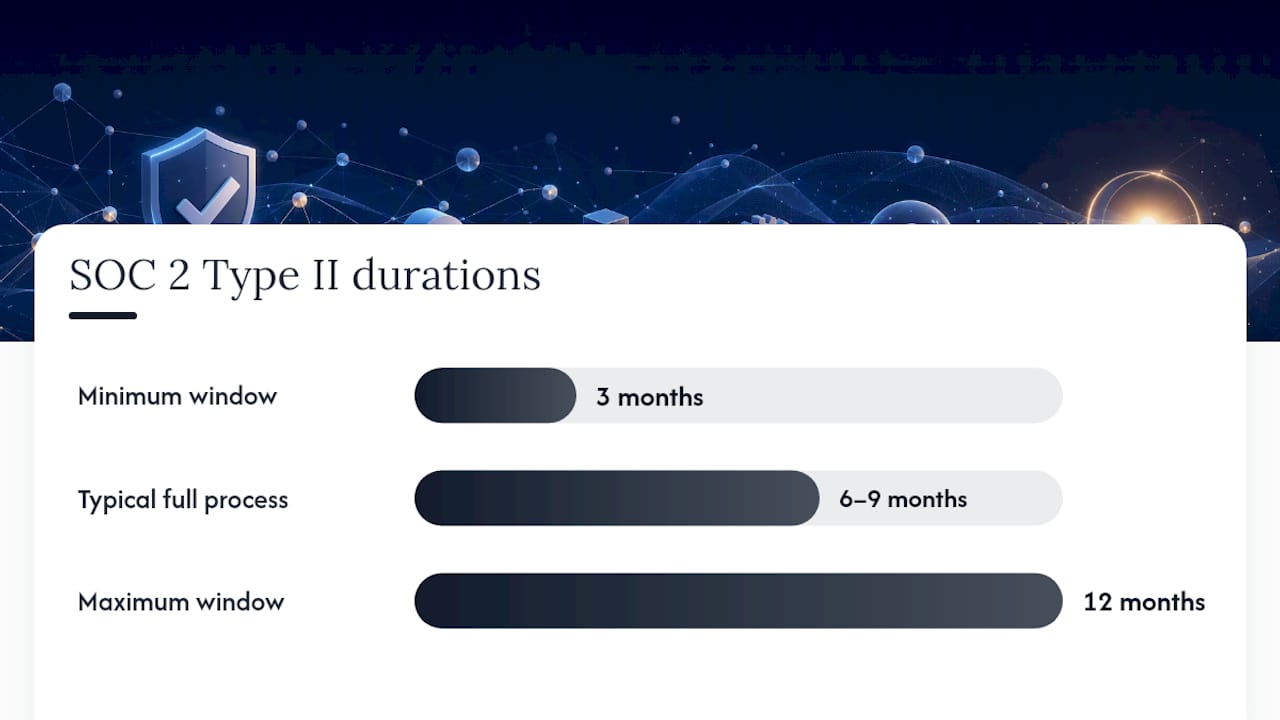
SOC 2 Type I confirms your controls exist on a given date. SOC 2 Type II confirms those controls actually worked over a window of time, typically three to twelve months, and most vendors report the full Type II process takes six to nine months from kickoff to report. If a deal can't wait that long, a Type I report or a documented self-attestation buys you credibility in the interim.
ISO 27001 matters more for enterprise buyers outside the US or in regulated industries. If your customers touch health data or payment cards, add HIPAA or PCI DSS considerations to your roadmap early, since retrofitting them later is expensive.
Beyond certifications, procurement teams want paperwork ready before they ask for it.
- Keep a signed Data Processing Agreement (DPA) and Master Service Agreement (MSA) template on file.
- Publish a public trust page linking your SOC 2 status, uptime history, and security contact.
- Centralize evidence collection (screenshots, access logs, policy documents) in one repository instead of scrambling per deal.
Practitioner playbooks consistently recommend embedding these evidence habits into normal sprint planning rather than treating audits as a separate fire drill, which is the difference between compliance as a bottleneck and compliance as a repeatable process.
Which Deployment Model and SLA Tier Do You Need?
Your infrastructure choices decide how much friction shows up during security review. Multi-tenant with row-level isolation is cheapest to run and fine for most mid-market buyers. Schema-per-tenant adds isolation at moderate cost. Dedicated VPC hosting satisfies the most conservative buyers, usually regulated industries, but multiplies your operational overhead.
SLA commitments follow the same logic: promising more than your infrastructure can deliver backfires the first time you miss it.
- Decide your real SLA tier, with uptime targets typically requiring only very limited annual downtime, and build monitoring and redundancy to match.
- Set concrete recovery time objective (RTO) and recovery point objective (RPO) targets, then actually test the failover, not just document it.
- Add load testing under enterprise-scale traffic before you promise that tier in a contract.
- Use canary deploys and zero-downtime upgrades so version updates don't create their own outages.
- Stand up a public status page; enterprises expect transparency during incidents, not silence.
Microsoft's Azure readiness assessment framework is a useful reference here, since it walks through landing zone architecture decisions that map directly onto these tenancy and reliability trade-offs.
Pro Tip: Don't advertise 99.99% uptime until you've tested a real failover. A missed SLA in your first enterprise quarter costs you more trust than a modest, honestly kept promise.
What Integrations and Observability Tools Do Enterprises Expect?
Enterprise buyers assume your API is stable enough to build on. That means clear versioning, documented rate limits, and webhooks that don't silently drop events. Security teams will also ask whether your logs stream into their existing tools.
- Support log export to common SIEM platforms, Datadog, and Splunk, with clearly documented fields and retention windows.
- Publish a deprecation policy so breaking changes come with advance notice, not surprise emails.
- Build a runbook and escalation matrix your support team can hand to a customer's IT staff during an incident.
- Involve a sales engineer or technical account manager early in enterprise onboarding, since self-serve docs rarely cover every edge case a large IT team will hit.
Treating these as documented, self-service features rather than one-off favors is what keeps your engineering team from becoming a support queue.
How Do You Package and Sell to Enterprise Buyers?
Technical readiness closes doors if your commercial packaging doesn't exist yet. An enterprise tier with a "contact sales" flow, rather than a public price list, sets buyer expectations correctly and gives your team room to negotiate terms like custom SLAs.
Proof-of-concept trials fail most often because nobody defined what success looks like. Set explicit success criteria, a measurement plan, and a fixed end date before the POC starts, not after week six when it's still "ongoing."
- Draft standard MSA, DPA, and order-form templates so legal doesn't rebuild them for every deal.
- Package your SOC 2 report, SLA terms, and a one-page executive summary procurement can forward internally without follow-up questions.
- Define onboarding milestones and a time-to-value commitment, since enterprise buyers want to know when they'll see results, not just when the contract is signed.
WorkOS's guide to becoming enterprise-ready emphasizes exactly this combination of technical and commercial readiness, arguing that a solid security posture without procurement-ready paperwork still stalls deals.
Should You Build or Buy Your Enterprise Features?
Run every enterprise requirement through three questions: does it strengthen your core product, what's the ongoing engineering cost to maintain it, and how much lock-in does a vendor introduce if you outsource it?
Identity layers, compliance evidence automation, and log streaming pipelines are the categories most teams outsource first, since they're commodity infrastructure rather than differentiators. Building your own SAML implementation rarely wins you a deal; having one that works reliably does.
- Check a vendor's own security posture and audit artifacts before trusting them with your customer data.
- Confirm API quality and SLA terms, since a flaky identity vendor becomes your outage.
- Ask about the exit path. If you decide to migrate off in eighteen months, how painful is that?
Pro Tip: Treat "minimum viable fix" as your default mode for build-vs-buy decisions. A documented MVF approach for SSO and audit logs unblocks procurement fast, without forcing you to rebuild your roadmap around enterprise features six months early.
What Does a Complete Enterprise Readiness Checklist Look Like?
A practical checklist beats a vague strategy document. Score yourself on twelve items, each with a defined minimum viable fix, then total the results into a single readiness figure.
- Identity (SSO): minimum fix is SAML or OIDC login working against one test IdP.
- Provisioning (SCIM): minimum fix is automated user creation and hard deprovisioning.
- RBAC: minimum fix is three roles (admin, member, viewer).
- Tenant isolation: minimum fix is enforced row-level isolation.
- Audit logs: minimum fix is logging logins, permission changes, and exports with 90-day retention.
- SOC 2 readiness: minimum fix is a documented Type I in progress.
- SLA: minimum fix is a published uptime commitment matching your real infrastructure.
- Disaster recovery: minimum fix is a written, tested RTO/RPO runbook.
- Data residency: minimum fix is documented region hosting, even if it's a single region.
- APIs: minimum fix is versioned endpoints with rate limit documentation.
- POC structure: minimum fix is a written success-criteria template.
- Legal templates: minimum fix is a signed DPA and MSA on file.
PwC's readiness scoring approach treats organizations scoring in the mid-50s as needing rapid foundation work, a useful benchmark if you're building your own 0-to-100 model. Weight each item, sum them, and treat your lowest-scoring pillar as your biggest deal risk, since pillarized scoring frameworks consistently show that one weak area drags down the whole program regardless of how strong the others are.
| Score band | What it means | Recommended action |
|---|---|---|
| 0 to 50 | Not enterprise ready | Focus entirely on quick wins: SSO, basic audit logs |
| 51 to 69 | Mid-market ready | Start SOC 2 Type I and formal RBAC |
| 70 to 100 | Enterprise ready | Maintain evidence automation and pursue Type II |
For a deeper breakdown of what enterprise auditors actually check line by line, SaaS LaunchPad's audit checklist guide walks through each category in more detail.
What Should Your First 90 Days Look Like?
A runnable plan beats a wish list. Assign a product manager to own the whole timeline, a security lead to drive evidence collection, engineering to build the fixes, a sales engineer to translate deals into requirements, and legal to prep contract templates.
- Weeks 1 to 2: run the readiness assessment, score every pillar, and flag your top three blockers.
- Weeks 3 to 6: ship quick wins, SSO, basic audit logging, a published security page.
- Weeks 7 to 10: automate evidence collection and kick off SOC 2 Type I.
- Weeks 11 to 12: build POC templates and pressure-test your first enterprise trial.
- Ongoing: run internal QA, schedule a penetration test, and report score changes to executives monthly.
Presenting measurable score movement, not just a list of finished tickets, is what actually shortens procurement conversations with skeptical buyers.
Author perspective: trade-offs and realistic expectations
The mistake I see most often is overbuilding: teams spend a quarter on perfect RBAC while skipping the audit trail that would have actually closed the deal. Readiness isn't a project, it's a discipline you bake into every sprint.
— Gregory Cornelius
Turn Your Roadmap Into an Enterprise-Ready Blueprint
Most teams treat enterprise readiness as a checklist to shuffle through manually, spending weeks pulling together security docs, RBAC plans, and SLA language from scratch. SaaS LaunchPad replaces that guesswork with a 21-discipline audit that scores your actual product against enterprise buyer expectations and hands back a prioritized roadmap instead of a generic template.

The audit produces a Product Excellence Blueprint covering identity, compliance, tenancy, and reliability gaps specific to your codebase, plus a Master Transformation Prompt built for the no-code or dev platform you already use. Product managers and founders use it to walk into enterprise sales conversations with a real engineering backlog instead of a vague promise, which tends to shorten sales cycles and give engineering a defensible priority order.
Purchase audit credits and run your first analysis against the 21-discipline framework to get a scored blueprint before your next enterprise deal reaches security review.
Primary Sources and Further Reading
- PwC AI readiness assessment: scoring frameworks for readiness maturity benchmarks.
- Microsoft Azure readiness assessment: cloud landing zone guidance for infrastructure decisions.
- WorkOS enterprise-ready guide: practitioner timing and feature priorities.
- EY Digital Readiness Assessment: cross-functional digital maturity benchmarking.
- SaaS LaunchPad's audit checklist: internal templates for audit prep.
Sources
- Microsoft Learn — Azure readiness assessment
- WorkOS — The guide to becoming enterprise-ready for SaaS product managers
FAQ
What Is Enterprise Readiness?
Enterprise readiness is the combination of security, compliance, reliability, and commercial packaging a SaaS product needs to pass procurement review at large organizations. It typically covers identity management, audit logging, certifications like SOC 2, and contract-ready legal documents.
What Is Considered Enterprise SaaS Software?
Enterprise SaaS software serves large organizations with complex requirements around security, role-based permissions, dedicated support, and formal SLAs, distinguishing it from self-serve tools built for individuals or small teams. It usually includes SSO, audit trails, and negotiated contracts rather than click-to-buy pricing.
Is SaaS Still Profitable in 2026?
SaaS remains a profitable model in 2026, particularly for products that successfully move upmarket into enterprise accounts, since larger contracts carry higher average deal values and lower churn than self-serve tiers. Profitability increasingly depends on readiness work like compliance and identity support that unlocks those larger deals.
What Is Enterprise SaaS Software Used For?
Enterprise SaaS software handles core business functions, from CRM to financial systems, at organizational scale, with the access controls, audit trails, and reliability guarantees that large companies require for regulatory and operational reasons. Tools like SaaS LaunchPad's audit process help product teams identify exactly which of those requirements their platform is still missing.