An error budget policy sets pre-agreed rules for how much unreliability a service is allowed before feature work slows down. The single most useful move right now is to adopt banded thresholds tied to automated CI/CD or feature-flag gates, reviewed weekly, rather than negotiating release decisions incident by incident. A copy-ready template follows below.
TL;DR:
- Implement a banded threshold system tied to automated CI/CD or feature-flag gates that review error budgets weekly to prevent unplanned release delays.
- Use a rolling 28 or 30-day window to calculate error budgets, tracking burn rates to identify when to slow or halt releases before exhausting the budget.
- Classify change risk upfront into four bands—healthy, watch, at risk, exhausted—and automate deployment restrictions accordingly to enforce policies efficiently.
- Automate SLI validation and gate enforcement with real-time dashboards that show burn rate and budget consumption for immediate incident response.
- Assign clear ownership for policy review: weekly for trends, monthly for analysis, and quarterly for policy updates to adapt to evolving telemetry and incident patterns.
Table of Contents
- What Is an Error Budget Policy, and How Does It Relate to SLI and SLO?
- How Do You Calculate an Error Budget?
- Example Error Budget Policy Template You Can Copy and Adapt
- How Do Budget Bands Map to Release Gates and Risk Classes?
- How Do You Automate Enforcement With CI/CD and Feature Flags?
- Who Owns the Policy, and How Often Should It Be Reviewed?
- How Does a Product Audit Help Operationalize an Error Budget Policy?
- The Real-World Trade-offs Nobody Puts in the Slide Deck
- Turn Your Policy Draft Into a Production-Ready System
- Where to Go Deeper on Error Budget Policy
- Sources
- FAQ
What Is an Error Budget Policy, and How Does It Relate to SLI and SLO?
An error budget is the flip side of your service level objective. The SLI (service level indicator) is the actual measurement, request success rate, latency under a threshold, that feeds the SLO calculation.
Here's how the three pieces fit together:
- SLI: the raw metric (e.g., percentage of HTTP requests returning under 500ms)
- SLO: the target for that metric (e.g., 99.9% of requests succeed)
- Error budget: the allowed failure margin, expressed in minutes or failed requests
- SLA: the customer-facing contract, usually looser than your internal SLO, with financial penalties attached
Most teams use a rolling 28 or 30-day window rather than a calendar month, since it avoids the reset-day cliff and stays comparable to how SLI and SLO differ from SLA commitments in the contract you signed. Breaching your internal SLO stings; breaching the SLA costs money.
How Do You Calculate an Error Budget?
Formula: Error budget = (1 − SLO) × total time (or total requests) in the window.
Pro Tip: *Track burn rate, not just remaining budget.
Two worked examples:
- Availability minutes: A 99.95% SLO over a 28-day window (40,320 minutes) leaves you 20 minutes of allowed downtime, the exact figure GitLab uses in its own engineering handbook.
- Failed requests: A 99.9% SLO against 10 million monthly requests allows 10,000 failures. If you've logged 4,000 so far, you've burned 40% of the budget with remaining runway to plan around.
Burn rate is consumed budget divided by elapsed time in the window. A burn rate consistently above 1.0 means you'll exhaust the budget before the window resets, which is your cue to slow down releases before the math forces your hand.
Example Error Budget Policy Template You Can Copy and Adapt
Below is a skeleton policy structure adapted from patterns used by Google SRE and GitLab. Fill in the brackets for your own service.
1. Scope and measurement
- Service: [service name], SLI source: [monitoring tool/dashboard]
- SLO: [99.9%] measured over a rolling [28 day] window
- Exclusions: scheduled maintenance windows are [counted / not counted] against the budget, a decision every team needs to make explicitly since treatment of maintenance time changes your effective budget size
2. Budget bands and actions A four-band model, drawn from common SLO policy examples for SaaS teams. It maps cleanly to approval workflows with bands indicating decreasing remaining budget: healthy, watch, at risk, and exhausted, each triggering progressively stricter release controls
3. Outage and postmortem rules
- Any single incident consuming more than 20% of the budget triggers a mandatory postmortem and a P0 action item
- Repeated incidents in the same subsystem escalate to architecture review
4. Escalation and exceptions
- Exceptions (security patches, compliance deadlines) require sign-off from the service owner and SRE lead
- Unresolved disputes escalate to the CTO or VP Engineering
How Do Budget Bands Map to Release Gates and Risk Classes?
Bands only work if they're wired into your pipeline instead of living in a slide deck. Classify every change as low, medium, or high risk before it reaches CI, then let the current band decide what's allowed.
| Band | Low-risk change | Medium-risk change | High-risk change |
|---|---|---|---|
| Healthy | Auto-merge | Standard review | Standard review |
| Watch | Auto-merge | Peer review + tests | Lead approval |
| At risk | Peer review | Lead approval | Blocked |
| Exhausted | Lead approval | Blocked | Blocked |
Classifying changes up front means the pipeline can allow or block a deployment without a human negotiating it in real time, a practice that encodes risk classes directly into pipeline steps. Any exception still needs a documented rollback plan and a named approver, logged automatically so nobody has to reconstruct who signed off after the fact.
How Do You Automate Enforcement With CI/CD and Feature Flags?
Automation is what separates a policy people follow from one that gets ignored after the second sprint. Wire your SLI computation into the deployment pipeline so a gate can query current budget status before a merge completes.
Three implementation steps matter most:
- Validate SLIs first: confirm your monitoring tool isn't miscategorizing retries, health checks, or bot traffic as real requests, since miscategorized signals inflate or hide true budget consumption
- Gate with override logging: block merges automatically at the "at risk" and "exhausted" bands, but let a lead override with a logged reason, since teams that automate enforcement through CI/CD and feature flags see far more consistent compliance than teams relying on manual sign-off
- Roll back through flags, not redeploys: tie feature flags to the same budget signal so a bad release can be killed in seconds instead of waiting on a full pipeline run
Your dashboard should show real-time burn rate, which feature or service is consuming the most budget, and a direct link to the relevant runbook. If an on-call engineer has to hunt for context during an incident, the dashboard has already failed its job. Teams building this out often start with the groundwork covered in SaaS performance testing, since clean SLI measurement has to exist before any gate can trust the number it's reading.
Who Owns the Policy, and How Often Should It Be Reviewed?
Ownership needs a name attached, not a team. The SRE lead typically owns the mechanics (thresholds, automation, dashboards), the service owner owns the SLO target itself, and the product manager weighs in when band status starts colliding with roadmap commitments.
- Weekly: check current band status and burn rate trend, flag anything approaching "at risk"
- Monthly: review the trend line across the full window, not just the current snapshot
- Quarterly: audit the policy itself, are thresholds still realistic, are exceptions being logged, is anyone actually reading the dashboard
A useful quarterly checklist borrows from practices that validate SLIs, review recent incidents for budget impact, and verify exceptions before rewriting policy language to match how the team actually operates. Update the policy when you see sustained burn that outlasts a single incident, a major architecture change, or a shift in how telemetry gets collected. A policy that never changes usually means nobody's reading the data closely enough to notice it's stale.
How Does a Product Audit Help Operationalize an Error Budget Policy?
Writing the policy is the easy part. Wiring it into real dashboards, real CI gates, and real telemetry, without breaking existing pipelines, is where most teams stall for months.
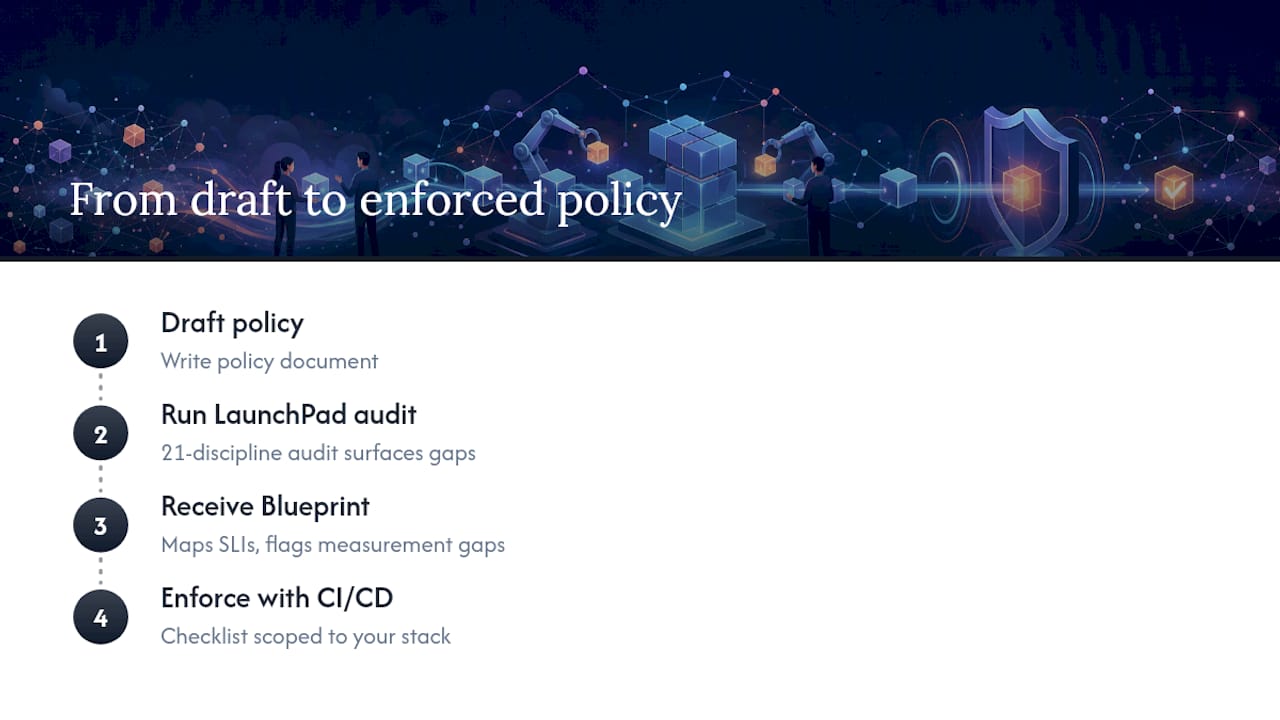
A 21-discipline product audit from SaaS LaunchPad maps directly onto this gap. The resulting Product Excellence Blueprint runs SLI sanity checks against your existing monitoring stack, maps dashboard gaps against the bands you've defined, and produces a CI gate checklist scoped to your actual pipeline instead of a generic template. That shortens the distance between "we wrote a policy doc" and "the policy actually blocks a bad release." Teams already comfortable iterating internally may not need it. Teams preparing for enterprise buyers who'll ask for SLO evidence during due diligence usually can't afford the months it takes to get there alone.
The Real-World Trade-offs Nobody Puts in the Slide Deck
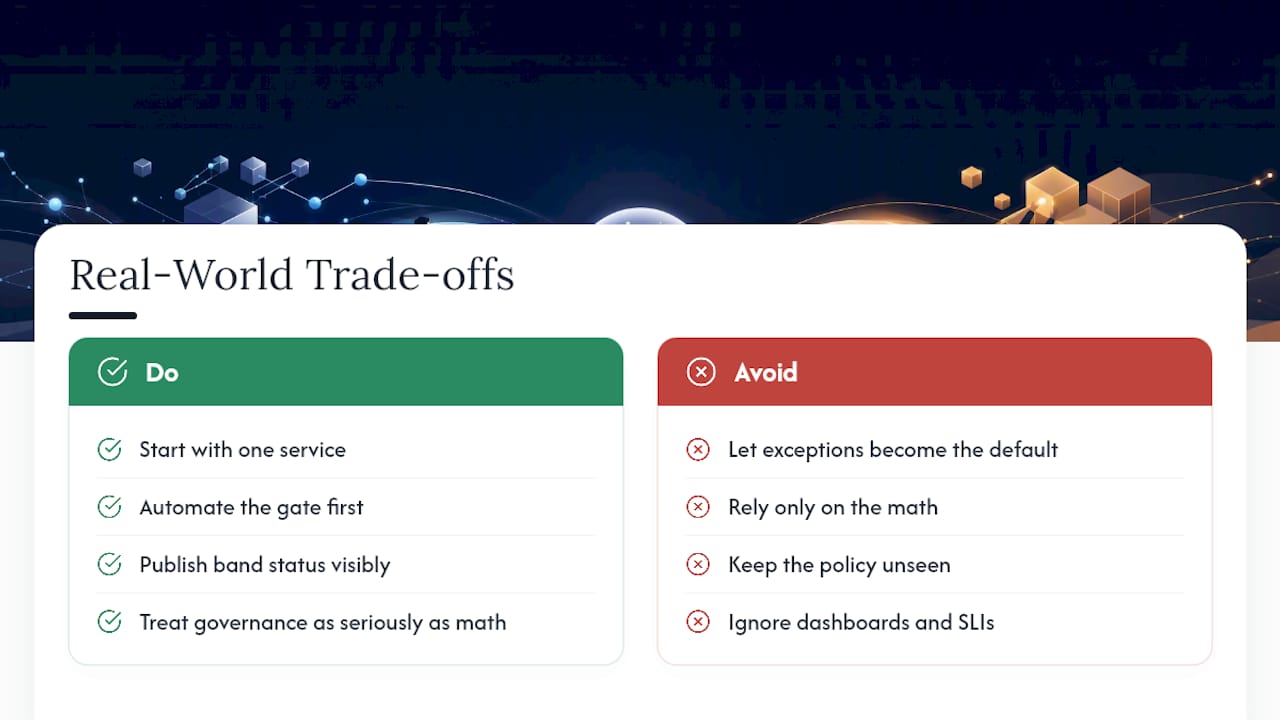
A well-written error budget policy kills most of the "should we ship this?" arguments, because the band answers it before anyone has to have an opinion. What it doesn't kill is politics around exceptions. Someone will always push to override the freeze for "just this one release," and the policy is only as strong as the discipline behind saying no.
The most common failure isn't the math. It's a bad SLI nobody validated, a dashboard nobody checks, or an exception process so loose it becomes the default path. Start with one service, automate the gate before you write a longer document, and publish the band status somewhere visible. A policy nobody sees might as well not exist. Teams that treat the governance side of reliability work as seriously as the math tend to keep the policy alive past the second quarter, which is where most of these efforts quietly die.
— Gregory Cornelius
Turn Your Policy Draft Into a Production-Ready System
Writing a policy document is a weekend project. Getting it enforced against real telemetry, with CI gates that don't break your deploy pipeline and dashboards your on-call team actually trusts, is where most internal efforts stall for a quarter or more. SaaS LaunchPad closes that gap directly: instead of guessing at which gates to wire up, you get a Product Excellence Blueprint that maps your existing SLIs, flags measurement gaps, and hands you a CI/CD gate checklist scoped to your actual stack.

This fits SaaS teams prepping for enterprise buyers who'll ask for reliability evidence during procurement, or teams that already have an SLO on paper but no working enforcement behind it. The 21-discipline audit covers far more than error budgets alone, security, scalability, and performance analysis are part of the same pass, so the policy work lands inside a broader enterprise readiness score instead of sitting in isolation.
Ready to see where your policy gaps actually are? Start with the SaaS LaunchPad audit and get a blueprint scoped to your platform.
Where to Go Deeper on Error Budget Policy
Google's SRE workbook remains the canonical reference for error budget policy, including the exact postmortem and escalation language most teams adapt. GitLab's engineering handbook publishes its own error budget calculations in full, useful as a second real-world comparison. For CI/CD and feature-flag integration patterns, review your pipeline vendor's gating documentation alongside the band and risk-class examples referenced throughout this piece.
Sources
- Error Budget Policy for Service Reliability (Google SRE workbook)
- Engineering Error Budgets | The GitLab Handbook
- SLO error budget policy examples for SaaS engineering teams
- SRE error budgets and maintenance windows (Google Cloud blog)
- SRE fundamentals: SLI vs SLO vs SLA (Google Cloud blog)
FAQ
What Is the Concept of an Error Budget?
An error budget is the amount of unreliability a service is allowed within a given window before it breaks its service level objective, calculated as (1 − SLO) multiplied by total time or requests in that window.
What Is an Error Budget in SRE?
In site reliability engineering, the error budget functions as a governance tool: it turns the reliability versus feature-velocity trade-off into a pre-agreed number instead of a case-by-case argument between product and engineering.
What Is Error Budget Burn Rate?
Burn rate is how fast you're consuming your error budget relative to elapsed time in the window; a burn rate above 1.0 means you're on pace to exhaust the budget before the window resets.
How Do You Decide Which Band Thresholds to Use?
Most teams start with the four-band model, healthy, watch, at risk, exhausted, and adjust the percentage cutoffs based on how much release risk the business can tolerate; a SaaS LaunchPad audit can help calibrate these against your actual incident history.