A product metrics dashboard exists to trigger a decision, not to display every number that your analytics tool can produce. The minimal structure that works: one North Star metric, three to five input metrics that drive it, and one or two guardrails that catch collateral damage. Everything past that is noise dressed up as diligence. Later sections give you copy-ready templates and the exact steps to build this in a weekend.
TL;DR:
- Building a decision-focused dashboard requires only a North Star metric, three to five input metrics, and one or two guardrails, avoiding metric overload.
- External tools or templates should ensure data consistency, with clear ownership, validation against cohorts, and automated data pipelines to prevent inaccuracies.
- Dashboards must be tailored to specific audiences, with layout and content matching their decision scope, such as executive, health, or experiment dashboards.
- Regular audits, feedback, and iteration are essential to prevent stagnation, with metrics only kept if they trigger actual decisions or actions.
- Protect privacy by applying role-based access, anonymizing data, and separating raw data from aggregated views, especially under regional regulations.
Table of Contents
- What Is a Product Metrics Dashboard, and Why Build for the Decision?
- How Do You Build a Metric Hierarchy: North Star, AARRR, HEART?
- Which Product Metrics Should You Actually Track?
- Which Dashboard Template Fits Your Team?
- How Should You Design a Dashboard That Actually Triggers Action?
- What Chart Types and Tools Actually Fit Product Metrics?
- How Does an Audit Turn Dashboard Signals Into a Roadmap?
- What Are the Best Practices for Collecting and Integrating Dashboard Data?
- What Are the Most Common Dashboard Mistakes That Mislead Teams?
- How Should You Iterate on Your Dashboard Over Time?
- How Do You Protect Security and Privacy on Dashboard Data?
- How Have Real Teams Used Dashboards to Change Outcomes?
- Author Perspective: A Practical Checklist for Your First Dashboard
- How SaaS LaunchPad Turns Dashboard Signals Into a Roadmap
- Useful Templates and Guides to Copy or Study
- Sources
- FAQ
What Is a Product Metrics Dashboard, and Why Build for the Decision?
A product metrics dashboard is a shared surface where product, engineering, and leadership look at the same numbers and decide what to do next. That's the whole point. Not "stay informed." Decide.
The gap between an informational dashboard and a decision dashboard is real and it's the reason most dashboards get ignored after week three. An informational dashboard reports 40 metrics because someone in a meeting once asked for each one. A decision dashboard shows the handful of numbers that map to a specific action, owned by a specific person, on a specific schedule.
Three failure modes explain almost every dead dashboard:
- Metric overload: when everything is tracked, nothing gets acted on, because no single number carries enough weight to force a call.
- Unclear owners: a metric drops and three people assume someone else is watching it.
- Missing cadence: the dashboard gets built, reviewed twice, and then quietly abandoned because no meeting was ever attached to it.
Airtable's research on product management practice found that only 26% of teams report high visibility into launch ROI, and just 31% feel confident they're building the right things. Dashboards built to inform rather than decide are a major reason why.
How Do You Build a Metric Hierarchy: North Star, AARRR, HEART?
Pick a North Star Metric first, because it disciplines every other choice you make afterward. A good North Star reflects genuine customer value, is a repeatable action rather than a one-time event, and correlates with retention and revenue over time. "Weekly active teams that complete a core workflow" beats "signups" every time, because signups measure interest, not value delivered.
Frameworks like AARRR (Acquisition, Activation, Retention, Referral, Revenue) and HEART (Happiness, Engagement, Adoption, Retention, Task success) exist to organize the metrics underneath your North Star, not to replace it. Use AARRR when you're mapping a funnel. Use HEART when you're evaluating a specific feature or experience. Neither works as a standalone dashboard; both feed the hierarchy.
That hierarchy is often called a metric tree: North Star at the top, input metrics branching below it, and each input metric tied to specific experiments or backlog items that could move it. IdeaPlan's framework guide recommends exactly this shape, one North Star plus three to five input metrics, because it forces you to draw a line from daily engineering work to the outcome that actually matters.
Building your metric tree follows a simple sequence:
- Pick candidate metrics for each stage of your funnel or experience, brainstorming broadly before narrowing.
- Validate against cohorts. Check whether a metric actually predicts retention or revenue for real user segments, not just in aggregate.
- Assign owners. Every input metric needs one named person accountable for moving it, and every guardrail needs someone watching for damage.
Cap yourself at three to five input metrics per focus area. IdeaPlan's own guidance backs this limit, noting that teams tracking a tight set of 3 to 5 metrics with clear guardrails make faster, better decisions than teams juggling a dozen. If you want a deeper walkthrough on choosing and stress-testing a North Star before you commit to it organizationally, this guide on validating a North Star metric is worth reading before you lock yours in.
Pro Tip: Write down, before you launch the dashboard, exactly what action each metric will trigger if it drops 10%. If you can't name the action, the metric doesn't belong on the dashboard yet.
Which Product Metrics Should You Actually Track?
Every product metrics dashboard needs a working vocabulary across six categories. Here's the practical catalog, with formulas you can drop straight into a spreadsheet or BI tool.
- Acquisition: Customer Acquisition Cost (total spend ÷ new customers), new signups per period, and top channels by conversion rate. Use CAC alongside lifetime value, never alone, or you'll optimize for cheap signups that churn fast.
- Activation: activation rate (users completing a defined "aha" action ÷ total signups) and time to value (median time from signup to that same action). A SaaS onboarding flow that gets users to value in under ten minutes tends to retain far better than one that takes days, which is why a solid onboarding checklist belongs right next to your activation metric.
- Engagement: DAU/MAU ratio (stickiness) and core action per active user per period, tracked against your defined North Star action.
- Retention: day-7 and day-30 retention, monthly churn rate, and cohort retention curves that show whether newer cohorts retain better than older ones.
- Revenue: Monthly Recurring Revenue, Average Revenue Per User, Net Revenue Retention, and the split between expansion MRR and churned MRR.
- System/health: error rate, uptime percentage, and API latency, which function as guardrails rather than growth metrics.
Airtable's KPI research lists 25 metrics worth considering across these categories, though most teams should treat that as a menu, not a checklist. Databox takes the opposite approach, distilling product management down to seven high-priority metrics most teams should track before adding anything else. Start narrow. Add only when a metric earns its place by changing a decision.
Which Dashboard Template Fits Your Team?
Different audiences need different dashboards, and trying to serve everyone with one screen is how you end up back at metric overload. Match the format to who's reading it and what they're deciding.
- Executive dashboard: the North Star at the top, plus four business metrics underneath (typically MRR, NRR, retention, and a growth metric). Executives don't need input metrics; they need the trend line and whether it's trending toward or away from plan.
- Product health dashboard: North Star, input metrics, RAG status (red, amber, green) per metric, and a written commentary field. PMRead's free product health dashboard template builds around exactly this structure, and the mandatory commentary field is the smartest part of it. Numbers without a sentence explaining them get skimmed and ignored.
- Experiment dashboard: a running list of active experiments, the metric each one targets, current lift or drop, and whether the result has reached statistical significance yet.
For layout inspiration rather than a rigid template, Reforge's dashboard example library shows how experienced product teams structure dashboards differently depending on company stage and decision cadence. To prototype fast, Notion's copyable Product Metrics Dashboard template lets you test a layout and ownership flow before you commit engineering time to wiring up a real data pipeline.
How Should You Design a Dashboard That Actually Triggers Action?
Layout should follow the decision flow, not the data model. Put the headline North Star metric top left, where eyes land first. Input metrics come next, grouped by funnel stage. Guardrails sit to the side, visually distinct so a red guardrail doesn't get lost among green inputs. Trend lines matter more than point-in-time snapshots for almost every metric here. Close with an action log: what changed last review, and what got decided.
RAG status only works if red, amber, and green are defined in advance, tied to specific thresholds, and mapped to a specific response. Red on activation rate might mean "PM convenes the growth pod within 48 hours." Amber on churn might mean "watch for two more weeks before acting." Undefined RAG status just becomes decoration.
Cadence should match how fast a metric actually moves:
- Daily for operational metrics like error rate and uptime, reviewed by engineering leads.
- Weekly for input metrics like activation rate and DAU/MAU, reviewed by the product team.
- Monthly for retention and revenue metrics, which move slowly and get noisy if you overreact to weekly wobbles.
- Quarterly for strategic reviews where the North Star itself and the metric tree underneath it get re-examined.
Design guidance on dashboard structure consistently recommends separating fast-moving operational metrics from slow-moving strategic ones in different tabs entirely, because mixing them creates false urgency. A latency spike and a quarterly retention dip do not deserve the same tone of alarm.
The commentary field is what separates a dashboard from a spreadsheet. Write one sentence diagnosing why a metric moved, and one sentence naming the recommended action. "Activation dropped 4 points after the onboarding redesign shipped; rolling back the new tooltip flow this week" does more work than any chart.
Pro Tip: If a metric hasn't triggered a single action in three review cycles, either redefine its threshold or remove it from the dashboard entirely. A metric with no teeth is just wallpaper.
What Chart Types and Tools Actually Fit Product Metrics?
Match the chart to the question, not the other way around. Funnels answer "where do users drop off?" Retention curves answer "do users stick around, and does that improve over time?" Cohort heatmaps answer "which signup month behaves differently, and why?" Bar charts answer simple period comparisons. Stacked area charts answer composition questions, like how much of MRR is expansion versus new business.
Cohort segmentation and clean event instrumentation are what make any of this trustworthy. A retention curve built on inconsistent event tracking will lie to you convincingly. Cohort retention analysis done properly requires deciding, before you build the dashboard, exactly what event counts as "active" and locking that definition so it doesn't drift month to month.
When evaluating a tool, whether you're building in-house or buying, run it against a short checklist:
- Data lineage: can you trace a number back to the raw event that produced it?
- Queryability: can a non-analyst product manager slice by cohort without filing a ticket?
- Sharing: can you drop a live view into a Slack channel or exec deck without a screenshot?
- Alerting: does it notify the right owner when a guardrail crosses threshold?
- Cost at scale: does pricing stay sane as event volume grows tenfold?
Build only when your needs are genuinely custom; buy or prototype with a template when you're still validating what "genuinely custom" even means for your product.
How Does an Audit Turn Dashboard Signals Into a Roadmap?
A dashboard tells you something moved. It rarely tells you why, or what to do about it, with enough confidence to greenlight engineering work. That's the gap between watching a metric and acting on it.
A 21-discipline audit exists to close that gap. It examines the areas a dashboard flags but can't diagnose on its own, workflow friction, UX gaps, security posture, conversion blockers, and business logic errors, then ties findings back to the metric that surfaced the problem in the first place. The output is a Product Excellence Blueprint: a prioritized roadmap that ranks fixes by impact and effort, plus a Master Transformation Prompt built for whichever platform the product runs on.
Pairing a measured deviation with a structured audit that identifies root cause, cost, and fix turns a red guardrail on a dashboard into a time-boxed engineering plan instead of a debate in a Slack thread.
Think of the dashboard as the smoke alarm and the audit as the inspector who tells you which wire is actually faulty.
What Are the Best Practices for Collecting and Integrating Dashboard Data?
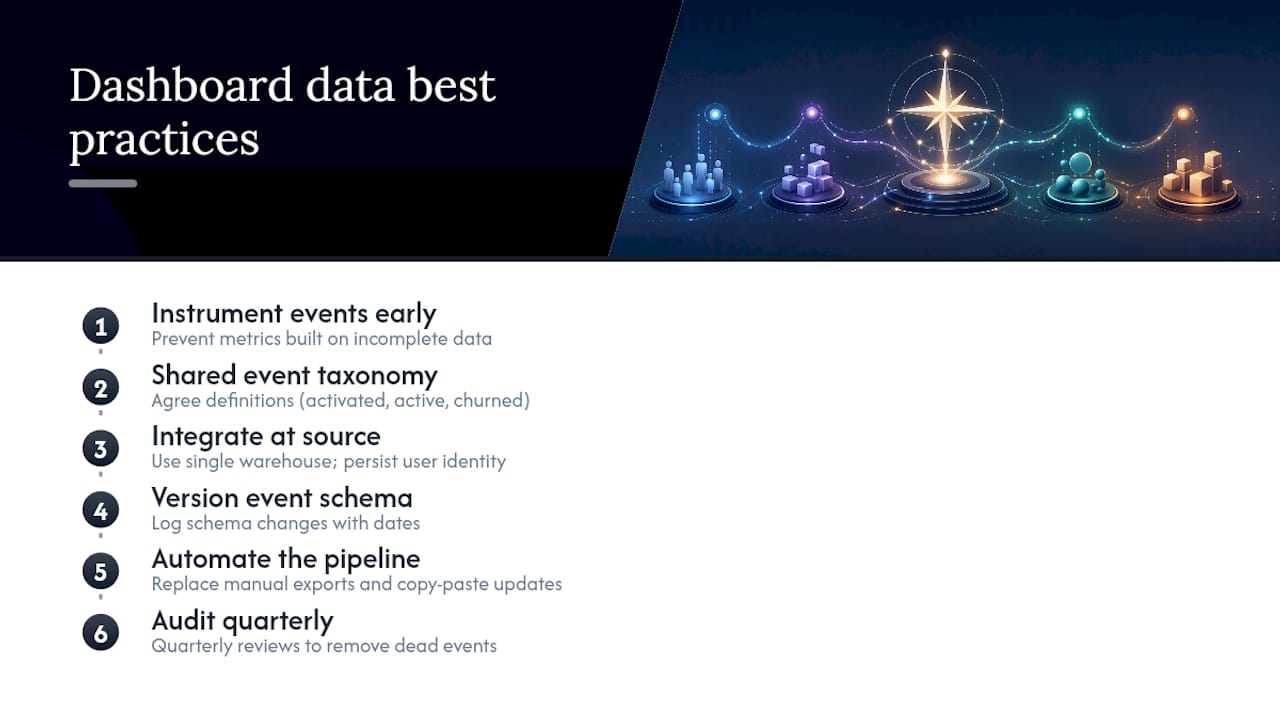
Instrument events before you design a single chart. The most common dashboard failure isn't a bad visualization, it's a metric built on inconsistent or incomplete event data collected after the fact.
Start with a shared event taxonomy. Every team touching the product, engineering, growth, support, needs to agree on what "activated," "active," and "churned" mean before anyone writes a query. Without that agreement, marketing's activation number and product's activation number will quietly diverge, and nobody will notice until a board meeting turns awkward.
Integrate at the source, not the dashboard. Pulling from a single warehouse (rather than stitching together five tool exports by hand) keeps definitions consistent and cuts the manual reconciliation that eats a data analyst's week. Contentsquare's guidance on building actionable dashboards emphasizes visualizing full multi-session user journeys rather than single-session snapshots, which requires event data that persists a user identity across sessions and devices from day one.
A few habits that prevent months of cleanup later:
Version your event schema the way you version your codebase. When you rename an event or change what triggers it, log the change with a date, so a retention curve doesn't mysteriously "improve" because you started counting differently, not because users actually stuck around longer.
Automate the pipeline from event to dashboard wherever possible. Manual CSV exports and copy-paste updates introduce errors and guarantee someone eventually forgets to refresh the numbers before a leadership review.
Audit your instrumentation quarterly. Products change fast, and events that made sense a year ago sometimes track a feature that no longer exists, quietly polluting your dashboard with dead weight.
What Are the Most Common Dashboard Mistakes That Mislead Teams?
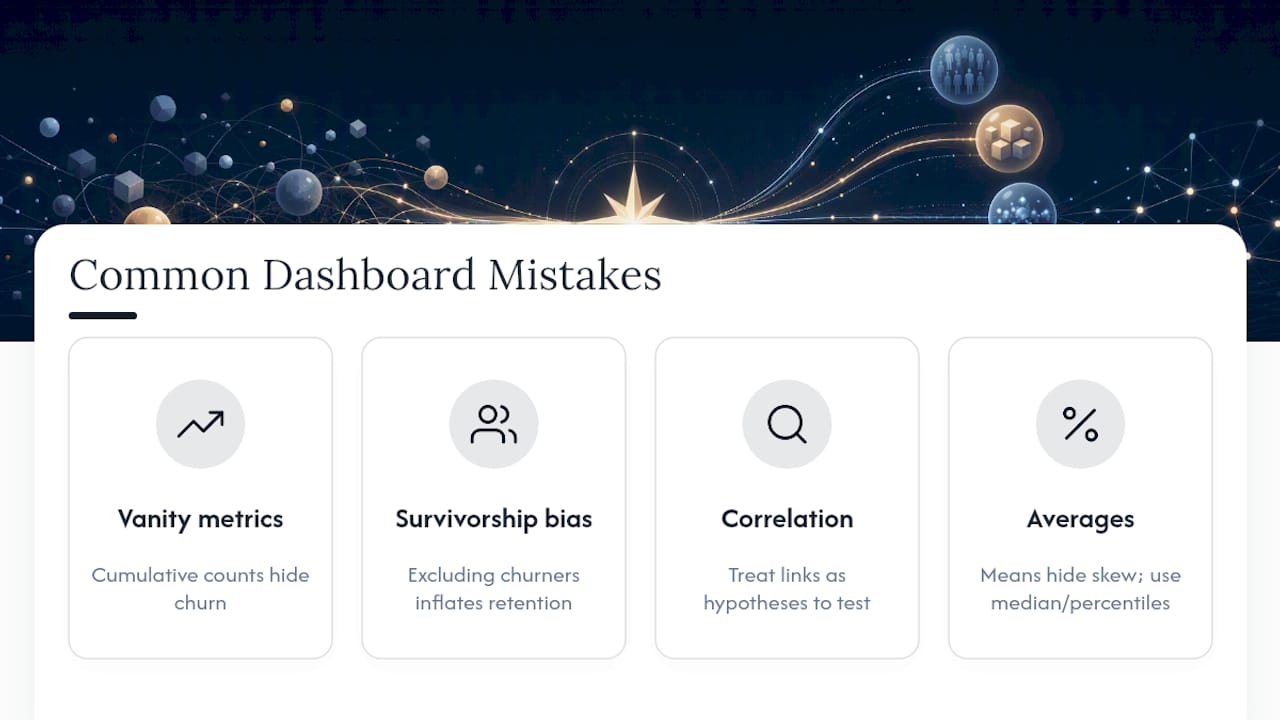
Vanity metrics are the biggest trap, and they're seductive because they almost always go up. Total signups, total downloads, and cumulative users climb by definition, since they never subtract churn. A dashboard led by cumulative metrics can look like relentless success while the underlying product is actually losing users faster than it gains them.
Survivorship bias quietly distorts retention numbers too. If you calculate "average session length" only across users still active today, you've excluded everyone who churned, which flatters the number and hides the real churn story. Cohort-based retention curves fix this, because they track a fixed group of users from day one regardless of what happens to them later.
Correlation gets mistaken for causation constantly in product analytics. Power users use a feature more and also retain better, but that doesn't prove the feature causes retention. It might just mean engaged users try everything. Treat a correlation as a hypothesis worth testing, not a conclusion worth acting on.
Averages hide the real story in skewed distributions. A SaaS product where a handful of enterprise accounts drive massive usage will show an "average" engagement number that no typical user actually experiences. Medians and percentile breakdowns tell the truth that averages paper over.
Finally, watch for metrics that reward the wrong behavior. A support team measured purely on ticket-closure speed will close tickets faster, sometimes by closing them before the problem is actually solved. Pair any efficiency metric with a quality guardrail, or you'll optimize your way into worse outcomes while the dashboard shows green across the board.
How Should You Iterate on Your Dashboard Over Time?
Treat your first dashboard as a draft, not a launch. The metrics that seemed critical in week one often turn out irrelevant by month three, once you've watched them fail to trigger a single real decision.
Run a short retrospective after each review cycle. Ask which metrics actually changed someone's mind, and which ones nobody looked at twice. Cut the second group without sentiment. A metric that sat unused for a full quarter isn't earning its spot just because it took effort to build.
Treat new metrics as small experiments rather than permanent additions. Add a candidate metric for a defined trial period, watch whether it correlates with outcomes you already trust, and only promote it to the permanent dashboard once it's proven useful across a few review cycles.
Solicit feedback directly from the people using the dashboard, not just the people who requested it. Engineering leads often want more granular system metrics than a PM would ever add voluntarily; sales leadership often wants revenue cuts that product teams overlook. A quick round of "what's missing, what's noise" every quarter keeps the dashboard aligned with who's actually reading it.
Version your dashboard the same way you'd version a product feature. Keep a short changelog of what got added, removed, or redefined, and why, so six months from now nobody has to reverse-engineer why the retention definition suddenly shifted.
How Do You Protect Security and Privacy on Dashboard Data?
Dashboards concentrate sensitive data in one visible place, which makes them a genuine privacy risk if access controls are an afterthought. Revenue figures, individual user behavior, and system health data all sit on the same screen, and not everyone in the company needs to see all of it.
Apply role-based access rather than one shared link for the whole organization. Engineering needs system health and error rates. Finance needs revenue metrics. Few people need both, and fewer still need raw user-level event data alongside aggregate business metrics.
Aggregate and anonymize wherever the decision doesn't require individual-level detail. A retention cohort dashboard needs cohort sizes and percentages, not a list of which specific customers churned, unless a named account manager genuinely needs that list for outreach.
Separate your dashboarding layer from your raw event warehouse. The dashboard tool should query pre-aggregated views, not raw personally identifiable data, which limits blast radius if a dashboard link ever gets shared more widely than intended.
Regional privacy rules, including GDPR for European users and CCPA for California residents, apply to product analytics data the same way they apply to any other user data. If your dashboard displays anything traceable to an individual, confirm your data retention and access policies actually match what those regulations require for your user base, not just what's convenient for your BI tool.
How Have Real Teams Used Dashboards to Change Outcomes?
The clearest wins come from teams that used a single dashboard to catch a problem their gut had already missed. A property technology SaaS team tracking cohort retention discovered that a specific onboarding step correlated with a sharp drop in week-two engagement, a signal an aggregate retention number would have buried entirely. Acting on that cohort-level detail, rather than the company-wide average, is what turned a vague "retention feels soft" complaint into a specific, fixable onboarding fix.
Dashboards also change outcomes by making a slow decline visible before it becomes a crisis. A team watching DAU/MAU stickiness week over week can catch a slow engagement erosion months before it shows up in a quarterly revenue report, when the fix is still cheap and the cause is still fresh in everyone's memory.
The pattern across teams that get real value from a product metrics dashboard is consistent: the dashboard didn't just report a number, it forced someone to ask "why did this move, and what are we doing about it" in a recurring meeting that actually existed on a calendar. Teams that skip the meeting and just glance at the dashboard occasionally rarely get the same payoff, because a chart nobody discusses is functionally the same as no chart at all.
Author Perspective: A Practical Checklist for Your First Dashboard
Here's the honest version of what works. In the first 30 days, pick one North Star and instrument the events behind it, nothing else. By day 60, build a single one-page health dashboard, resist every request to add a sixth metric. By day 90, run weekly reviews and kill anything that hasn't triggered a decision yet.
The three anti-patterns that sink most first attempts: building for every stakeholder at once, adding metrics because they're easy to pull rather than because they matter, and skipping the commentary field. Iterate in small experiments. Your second dashboard will be better than your first, and that's the point.
— Gregory Cornelius
How SaaS LaunchPad Turns Dashboard Signals Into a Roadmap
A dashboard tells you a guardrail went red. It won't tell you whether the fix is a two-day patch or a two-month rebuild, and guessing wrong there costs more than the dashboard ever saved you.

SaaS LaunchPad's 21-discipline audit picks up exactly where your dashboard leaves off. Instead of a team spending weeks debating what a metric drop actually means, the audit examines the platform across workflow, UX, security, conversion, and business logic, then delivers a Product Excellence Blueprint that ranks fixes by real impact. You get a prioritized roadmap and a Master Transformation Prompt built for your specific no-code or dev platform, ready to hand to engineering the same week. If your dashboard just flagged a problem you can't fully diagnose in-house, run a full audit through SaaS LaunchPad and get a concrete, sequenced plan instead of another meeting about what the numbers might mean. You can also explore the 21-discipline breakdown to see exactly what gets audited before you commit.
Useful Templates and Guides to Copy or Study
You don't need to build a dashboard from a blank canvas. Three resources cover most of what a product team needs to get started fast:
- Notion's Product Metrics Dashboard template gives you a copyable layout for testing structure and ownership flows before wiring up real data, available through the Notion Marketplace.
- PMRead's product health dashboard offers a free single-page snapshot with built-in RAG status and a commentary field, available here.
- Reforge's dashboard example library shows heavier internal dashboards used by real product teams at different company stages, browsable at Reforge.
Start with Notion or PMRead to prototype fast, then study Reforge's examples once your dashboard needs to scale past a single team.
Sources
- 25 key product management metrics & KPIs for 2026 | Airtable
- Product Metrics & KPIs Guide: Frameworks (2026)
- Free Product Health Dashboard for Product Managers | PMRead
- Metrics Dashboard Templates and Examples
FAQ
What Are Product Metrics?
Product metrics are quantifiable measures of how people use and get value from a product, spanning acquisition, activation, engagement, retention, and revenue. They differ from generic business metrics because they focus specifically on product usage and value delivery, not just top-line sales.
What Are Metrics in a Dashboard?
Metrics in a dashboard are the specific numbers selected to appear on that visual surface, usually a North Star metric, a small set of input metrics that drive it, and one or two guardrails that flag unintended damage. The best dashboards limit themselves to metrics that can actually trigger a predefined action.
What Is a Good Dashboard for Monitoring Production?
A good production monitoring dashboard tracks system health metrics like uptime, error rate, and API latency as guardrails, reviewed daily by engineering rather than weekly by product. It should sit separately from strategic dashboards so operational alerts don't get lost among slower-moving business metrics.
Can You Provide Examples of Metrics Dashboards?
Yes: an executive dashboard shows the North Star plus four business metrics like MRR and NRR; a product health dashboard shows the North Star, inputs, RAG status, and commentary, as PMRead's free template demonstrates; and an experiment dashboard tracks active tests against their target metrics and statistical significance. Teams looking to skip the build phase can also start from SaaS LaunchPad's audit output, which maps dashboard signals directly to a prioritized fix list.